How can I typset a library catalogue of the following type in Typst?

Hello everyone


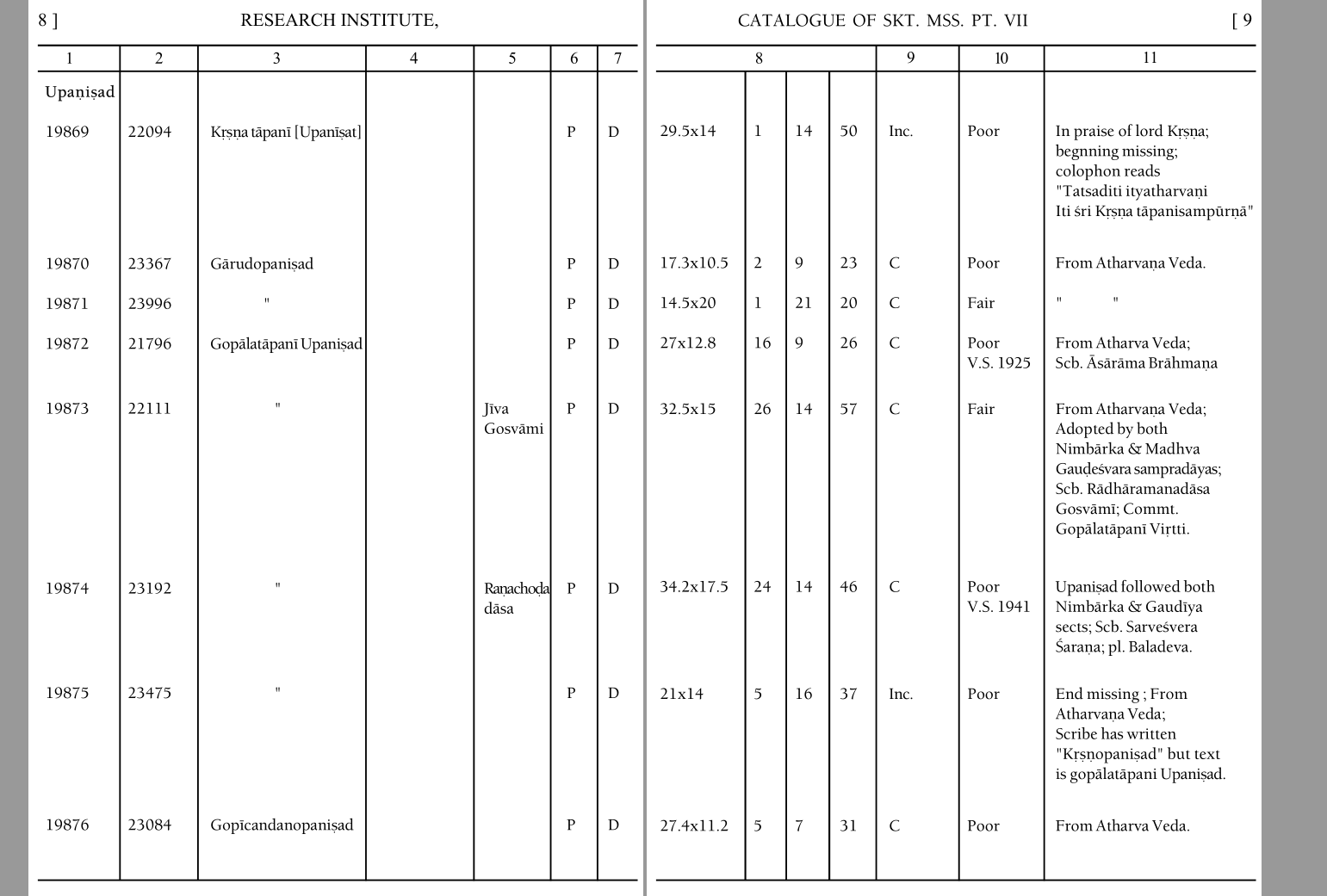
I am working on publishing a library catalogue which has a wide table laid out on two facing pages as in an open book. (please see the image). My data is available as a table. My question is how can I lay out the table across two pages in Typst? Is this even possible?

Thanks in advance

Well, the easiest way would be to just change the paper size to the landscape double sheet, because there is no multipage wide table layout feature.

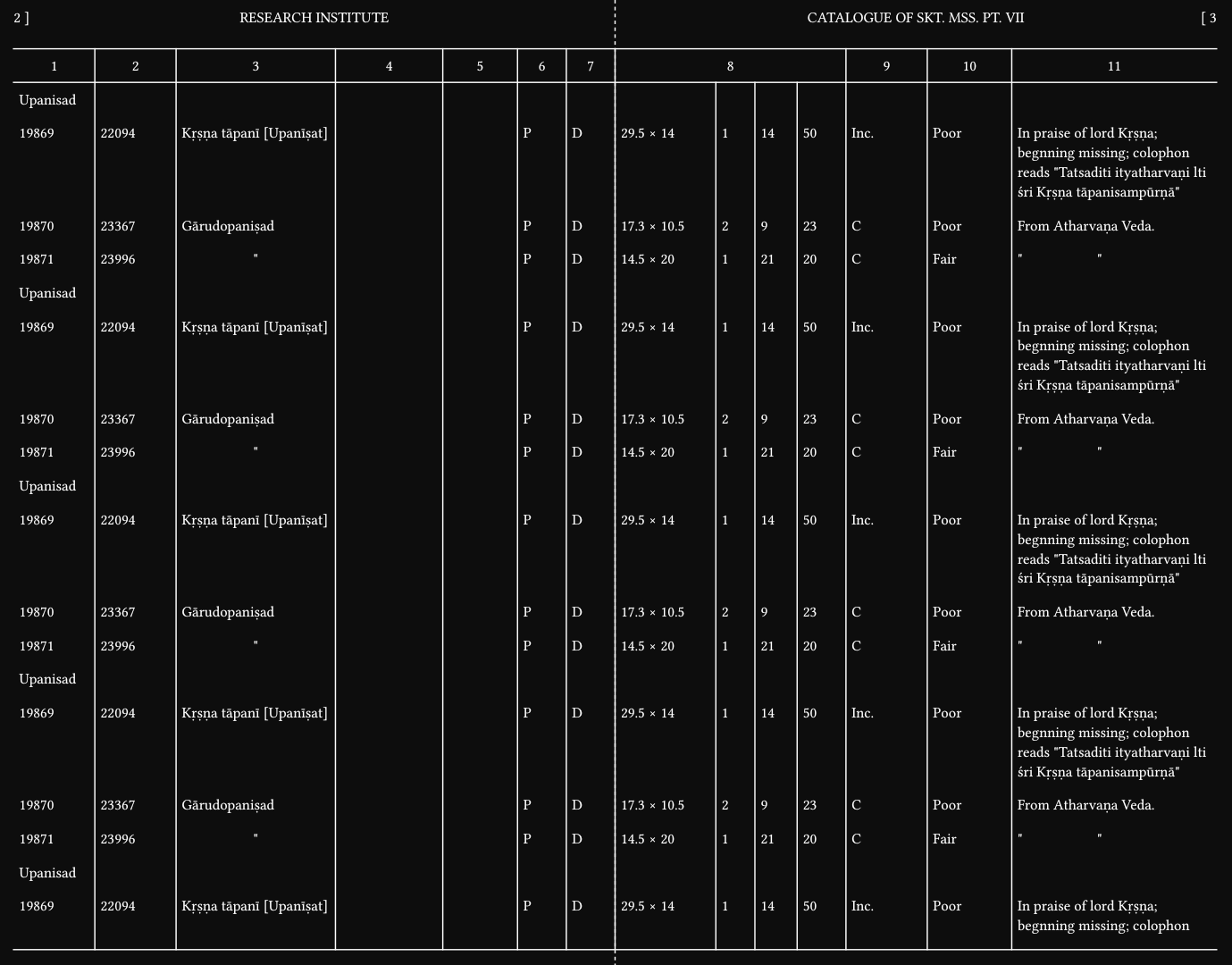
#set page(
  paper: "a3",
  height: 380mm,
  flipped: true,
  margin: (top: 15mm, rest: 5mm),
  background: {
    align(center, line(angle: 90deg, length: 100%, stroke: (dash: "dashed")))
  },
  header: context {
    set align(horizon)
    let page = here().page() * 2
    let next-page = page + 1
    grid(
      columns: (1fr, 1fr),
      align: center,
      {
        upper[research institute]
        place(top + left)[#page \]]
        // place(top + left, box(width: 1em, align(right)[#page]) + "]")
      },
      {
        upper[catalogue of skt. mss. pt. #numbering("I", 7)]
        place(top + right)[\[ #next-page]
        // place(top + right, "[" + box(width: 1em, align(left)[#next-page]))
      },
    )
    // grid(
    //   columns: (1cm, 1fr, 1fr, 1cm),
    //   align: (auto, center, center, auto),
    //   stroke: 1pt,
    //   [#page \]],
    //   upper[research institute],
    //   upper[catalogue of skt. mss. pt. #numbering("I", 7)],
    //   [\[ #next-page],
    // )
  },
)
#set text(13pt)
#set smartquote(enabled: false)

#let data = (
  (
    [Upanisad],
    ..([],) * 13,
  ),
  (
    [19869],
    [22094],
    [Kṛṣṇa tāpanī [Upanīṣat]],
    [],
    [],
    [P],
    [D],
    // [29.5x14],
    [29.5 #sym.times 14],
    // $29.5 times 14$,
    [1],
    [14],
    [50],
    [Inc.],
    [Poor],
    [In praise of lord Kṛṣṇa; begnning missing; colophon reads "Tatsaditi
      ityatharvaṇi lti śri Kṛṣṇa tāpanisampūrṇā"],
  ),
  (
    [19870],
    [23367],
    [Gārudopaniṣad],
    [],
    [],
    [P],
    [D],
    [17.3 #sym.times 10.5],
    [2],
    [9],
    [23],
    [C],
    [Poor],
    [From Atharvaṇa Veda.],
  ),
  (
    [19871],
    [23996],
    align(center)["],
    [],
    [],
    [P],
    [D],
    [14.5 #sym.times 20],
    [1],
    [21],
    [20],
    [C],
    [Fair],
    ["#h(5em)"],
  ),
)

#let colspan-start = 8
#let colspan = 4
#let header = (
  range(1, colspan-start),
  table.cell(colspan: colspan)[#colspan-start],
  range(colspan-start + 1, data.first().len() + 1 - colspan + 1),
)

// columns: (1fr,) * data.first().len(),
// columns: (4.5em, 4em, 11em, 5em, 4em, 2em, 2em, ..(1fr,) * 7),
// columns: (22mm, 19mm, 54mm, 24mm, 19mm, 9mm, 9mm, ..(1fr,) * 7),
// columns: (28mm, 25mm, 60mm, 30mm, 25mm, 15mm, 15mm, ..(1fr,) * 7),
// @typstyle off
#let columns = (
  25mm, 25mm,
  380mm / 2 - (25, 25, 33, 23, 15, 15).sum() * 1mm - 5mm,
  33mm, 23mm, 15mm, 15mm,
  31mm, 12mm, 13mm, 15mm, 25mm, 26mm, 1fr,
)
#table(
  columns: columns,
  inset: (x: 5pt, y: 0.8em),
  align: (_, y) => if y == 0 { center } else { auto },
  stroke: (x, y) => if y == 0 {
    if x == 0 { (y: 1pt) } else { (right: none, rest: 1pt) }
  } else {
    if x == 0 { (:) } else { (right: none, left: 1pt) }
  },
  table.header(..header.flatten().map(n => [#n])),
  ..data.flatten() * 15 * 3,
  table.hline(stroke: 1pt),
)
What you could do is take that A3 PDF, and render its pages into a second A4 PDF by creating one image() per page. The intermediate PDF can’t be avoided, I think, but otherwise this can be largely automated.

(But I hope that eventually, Typst can support such advanced page layout/ordering features directly – it comes up from time to time, e.g. for facing-pages layouts or folded booklets.)

You could use a custom function that takes your data as normal and inserts two tables. Each of these tables would consume half of the data and fill an entire page with a pagebreak between them. The data would be split in half per line. For instance the first half of each line ending up on the left half of the page. Fixed row heights would make vertical alignment beteeen the tables much easier.

I think this would have the correct look, but it would have these large deficiencies:

  1. It’s two tables and would show up as such in an outline of tables
  2. I have no ideas about turning this into a figure
  3. Likewise, I don’t know how you would refer to this from within your document
  4. It would not scale easily with data that takes up more than one set of facing pages. I can imagine that it’s possible though, using context to determine how many rows would fit on each page

I kinda just assumed that the table would take up more than one page. if it fits on one page, I would just produce the same table twice and place (or similar) it on the facing pages, once cropping out the right part, and once the left part.

1 Like

Will rotating the table (+90deg) and then laying it on an A4 in landscape not work? Could I not then use a pdf editor to just rotate the pages by (-90)?

Or can rotated tables not cross page boundaries?

Typst lays out content on a canvas that is as wide as the page, and is broken vertically into multiple pages. “facing” pages are not a thing as far as Typst’s layout is concerned.

You can of course insert a single landscape page to have a landscape table, even A3 if you want; that’s Andrew’s suggestion: “the easiest way would be to just change the paper size to the landscape double sheet”. You wouldn’t be easily able to print that on two A4 pages (I assume – I’m not that familiar with what transformations printers can do). That’s why I suggested taking that A3 page and post-processing it into two A4 pages. Rotating the table so that it fills a portrait A4 page is also no problem.

Maybe you could clarify a few things:

  • do you need a page that spans facing pages? I.e. should the PDF you get contain two pages that each contain half the table?
  • do you need a table that is as big as two pages, e.g. a single A3 page if your original page is A4?
  • or do you just need any kind of landscape table, on a single regular sized page of any orientation?
  • does your table have more rows than fit on a single (double) page, or does the whole table fit on a single (double) page?
1 Like

Thank you for all the help…

Yes, it should look as the image shows.

I need a table that is as big as two pages.

It has many more rows, close to 3000 actually.