Hello,
In Google Docs and Word you can spread a single paragraph over multiple lines by hitting shift+enter. This creates a hard linebreak (as opposed to soft linebreak when your text abuts the margins), but not a carriage return. I don’t know how to manually create a single paragraph that goes over multiple lines.
So for example, the follow code would have a massive space between the phone and email lines (since the \ is adding a carriage return. Is there any non-complicated way of adding a simple line break?
= Annoyed Celestial
Phone: (888) 888-8888 \
Email: annoyedcelestial@example.com
Any help would be appreciated!
This is the result of your code:
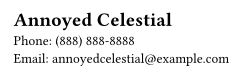
Is this the same spacing you are seeing? If not maybe another part of your document is increasing the line spacing?
If not and you want them tighter you could add a negative vertical space.
= Annoyed Celestial
Phone: (888) 888-8888\
#v(-1em)
Email: annoyedcelestial\@example.com

Hello @AnnoyedCelestial,
TL;DR
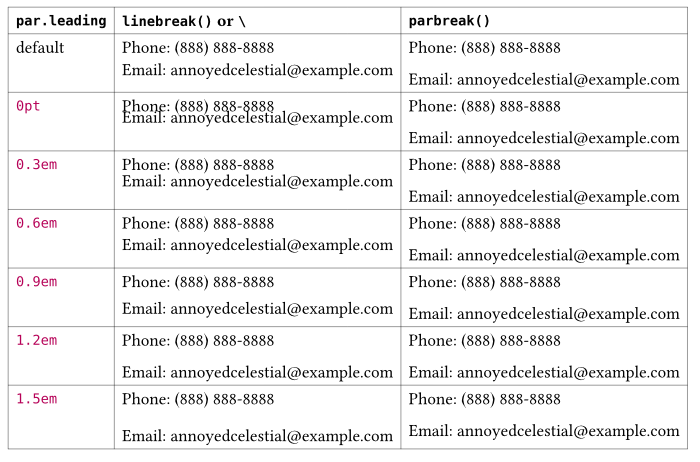
I believe this is the behavior you are looking for. You can adjust the paragraph leading to reduce the spacing between lines created with linebreak() or \.
#set par(leading: 0.5em) // Adjust to your liking; default is font-dependent

// This shows a linebreak
= Annoyed Celestial
Phone: (888) 888-8888 \ // or linebreak()
Email: annoyedcelestial\@example.com

// This shows a parbreak
= Annoyed Celestial
Phone: (888) 888-8888

Email: annoyedcelestial\@example.com
Parbreak and linebreak
Typst provides separate controls for line breaks and paragraph spacing.
In markup mode, a backslash \ or #linebreak() inserts a line break, which is the same as the Shift+Enter in many editors.
The documentation on this is quite explanatory:
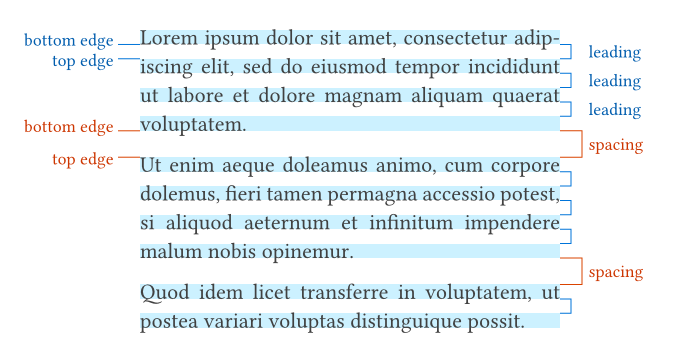
leading
The spacing between lines.
Leading defines the spacing between the bottom edge of one line and the top edge of the following line. By default, these two properties are up to the font, but they can also be configured manually with a text set rule.
spacing
The spacing between paragraphs …
Linebreak and leading
Here is a comparison using different leading values (note the spacing was left untouched so the right column is always the same):
Code
#set page(width: auto, height: auto)

#let _line1 = none //[= Annoyed Celestial]
#let _line2 = [Phone: (888) 888-8888]
#let _line3 = [Email: annoyedcelestial\@example.com]

#let lb = _line1 + _line2 + linebreak() + _line3
#let pb = _line1 + _line2 + parbreak() + _line3

#let _leading = range(6).map(x => x * 0.3em)
#let rows = ([default], lb, pb)

#for l in _leading {
  rows.push([#l])
  rows.push(par(leading: l, lb))
  rows.push(pb)
}

#table(
  columns: 3,
  stroke: 0.25pt,
  table.header(
    [*`par.leading`*],
    [*`` `linebreak()` or `\` ``*],
    [* `parbreak()`*]
    ),
  ..rows,
)
Hope this helps clarify the distinction between line breaks and paragraph breaks in Typst.
EDIT: Minor code adjustment.
4 Likes
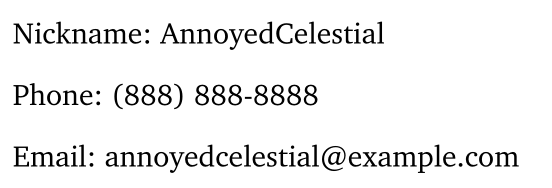
That’s not what I see. The space on my document is a larger (this is probably because I’m not using indents and am instead adding extra space between paragraphs to separate them via #set par(). So basically, what I’m seeing is
While this may not seem like excess space, compared to the rest of the document it’s excessive and disrupts the “grouping” I’m trying to get where all my contact info is part of the same paragraph (just separated by lines). I put all the code on my document below
#set page(
  paper: "us-letter",
  margin: (x:45mm, y:auto)
)
#set par(
  leading: 1.4em,
  spacing: 0.7em
)
#set text(
  font:"charter",
  size: 12pt
)
#set document(
  title: "Resume",
  author: "AnnoyedCelestial"
)
#show selector.or(list.item, enum.item): block
#show list.item: set par(leading: 0.7em)
#show heading: set block(below:0.8em, above: 1em)
Anyways, the issue is kinda mute because I realized that by adding a blank line between (without #v(-1em)) appears to create the correct spacing.
With leading being the space between lines and spacing the space between paragraphs I think you mixed up the two because your leading is greater than spacing.
This is also why adding blank line solves your issue: It create a new paragraph and thus uses the smaller spacing.
1 Like