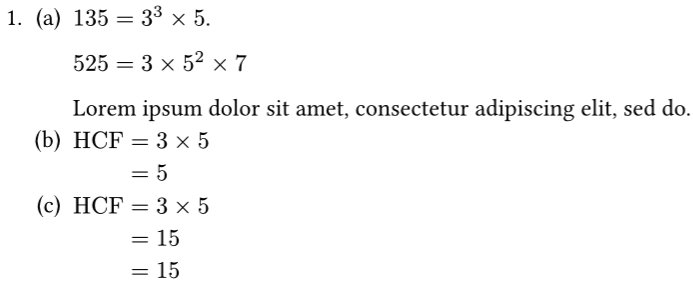
I want to bring the math equation down to the numbering list (as shown in picture). Have tried around to tinker with the "" and “&” , on top of looking for similar topics within this forum under “how to fix math align problem”. Can’t seem to see what I’ve been looking for thus far.
In Typst’s paragraph model, there is no capability to set or obtain the line height (?). For example, it is difficult to increase the line height for some lines and decrease it for others within the same paragraph text; (However, the line spacing of paragraphs can be uniformly set (using par.spacing), but also not for some lines). This makes it very challenging to center specific character individually on a line while keeping others unchanged. This is a manifestation of that issue here. For your situation, a temporary and imperfect solution is
#[
  #show enum: it => {
    show math.equation.where(block:true): set align(left)
    it
  }
  #import "@preview/numbly:0.1.0": numbly
  #set enum(
  full: true,
  numbering: numbly("{1:1}.", "({2:a})"),
  )
  + + $135 = 3^3 times 5$.

      $525 = 3 times 5^2 times 7$

      #lorem(10)
    + $ "HCF" &= 3 times 5 \ &= 5 $ // use block-eq instead of inline-eq
    + $ "HCF" &= 3 times 5 \ &= 15 \ &= 15 $
]