I have a .md file that I read and render using cmarker. I would like the tables to fill the width of the column (since I use a 2-column page layout, not to be confused with the table’s columns).
There are a some issues however. First and foremost is the fact that I can’t (or don’t know how to) access the internals of the table due to it being imported by cmarker. Second issue is that The content and column count of the tables vary greatly, some of them have two columns with roughly equal text in each row on both columns, some have 4 columns with one or two word in the first 3 and a paragraph in the fourth and anything in-between.
The default auto configuration works great with the tables that have long content, but it falls short with tables with less text in each cell. I have tried setting the table width to 100% but it just stretches the fill without changing the columns of the table.
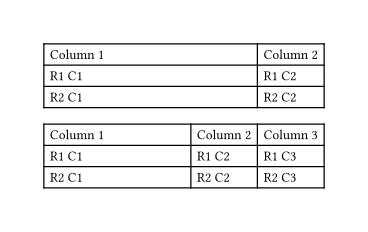
Having all columns set to auto will make them only as wide as they need to be. This code will take all tables and change the first column to be 1fr and the rest auto. This will mean the first column takes as much space possible while still allowing the others the space they need.
#show table: it => {
  if it.has("label") and it.label == <already-processed> { return it }

  let num-col = it.fields().at("columns").len()
  let num-col-auto = num-col - 1

  [#table(
    columns: (1fr, ) + ((auto, ) * num-col-auto),
    ..it.children
  )#label("already-processed")]
}
Caution: This is very hacky and ignores any other details from the table. There are improvements that pass all parameters from the original table.
This will also affect any other tables in your document. To avoid that, you’ll have to keep this show rule in a scope with the rendered markdown (this is achieved here by using a function).
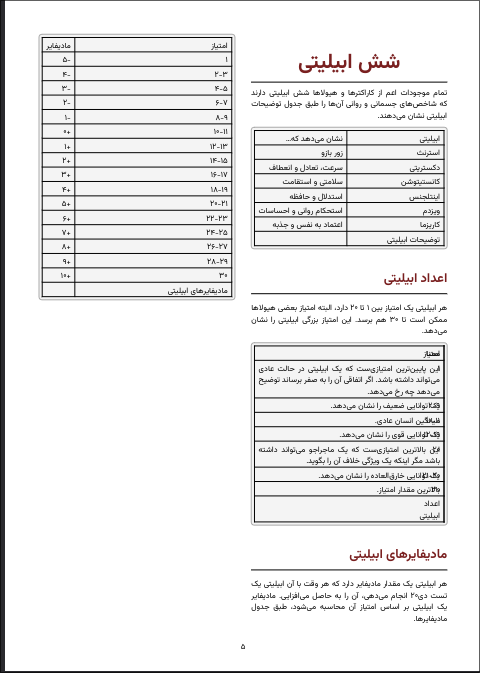
Thanks for the reply, but as you can see in the screenshot below, the table that worked previously now has a column that takes the entire space because it has a large text and another column with a width of 0, which is not desirable.
I don’t know a good way to solve that, but one way is to switch to all columns as 1fr.
The biggest downside of doing this is that columns with narrow content will get the same width as columns with wide content.
Full Code
#set page("a6")
#set page(height: auto)

#let md-table2 = ```| Column 1 | Column 2 |
| -------- | -------- |
| Some longer text that takes up a lot more space | Some more long text that takes up a lot of space and causes errors in column 1 |
| R2 C1 | R2 C2 |```.text

#let md-table3 = ```| Column 1 | Column 2 | Column 3 |
| -------- | -------- | -------- |
| Some longer text that takes up a lot more space | R1 C2 | R1 C3 |
| R2 C1 | R2 C2 | R2 C3 |```.text

#import "@preview/cmarker:0.1.8"
#let render-fixed-tables(md-text) = {
  show table: it => {
    if it.has("label") and it.label == <already-processed> { return it }

    let num-col = it.fields().at("columns").len()

    [#table(
      columns: (1fr, ) * num-col,
      ..it.children
    )#label("already-processed")]
  }
  cmarker.render(md-text)
}

#render-fixed-tables(md-table2)
#render-fixed-tables(md-table3)
That downside is the exact issue I’m trying to avoid. As it seems currently there is no good way to do this, so I think I should open a feature request.
Do you have any control over the source markdown files? cmarker has a raw-typst parameter that would allow you to put Typst code into your markdown document so the column configuration can be declared before each table in the markdown document.
Do you know anything about the tables before you add them to your Typst document?
The render-fixed-tables() function could be modified to take a column argument so you could choose, for each table, how the columns are configured.
I don’t really know the inner workings of typst, but I guess the simplest way to automatically detect this is the same way auto detects the optimal width, but instead of the shortest possible width the full width of the page should be divided between columns with the same ratio. I don’t know if that makes sense but I find it feasible.
I do have access to the markdown file but considering the large number of tables it’s not feasible to go through each one manually and add a raw-typst.
And about the third question, again it’s the same problem. There’s many tables with many variations to accurately detect anything useful or manually tag each one.
One way to look at it is that I need a way to apply the 1fr method to the tables with a small text, not enough to fill the page, and leave the tables with enough content to fill the page to auto.
I also didn’t look too deeply into how to integrate the solutions (or into how the solutions work exactly ).
I think this simple logic will give decent results:
Check if (given no space restrictions) the table would take up the full width allowed (whatever 100% is in absolute terms)
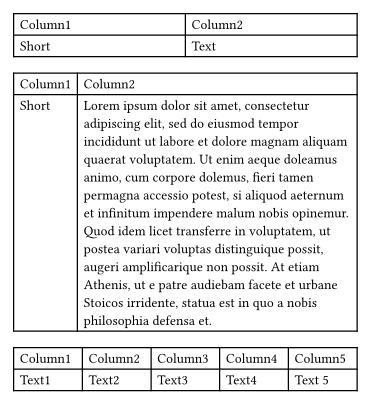
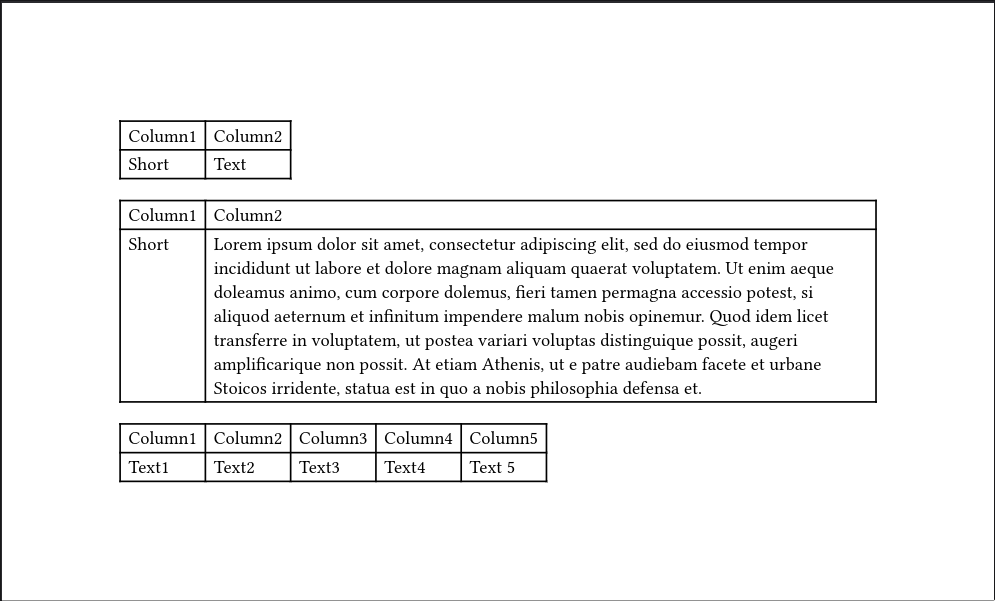
If not, then all columns are set to 1fr (this would look like table-with-short-text and table-with-many-columns example of the final example given above)
If so, then all columns are set to auto (this would look like the table-with-long-text example of the default cmarker behavior)
I’ll try to find time in the next few days to take the suggestions of the thread I linked and code up an example.
How does this work for your situation? It follows the logic I described in my last post.
Full Code
#set page("a6")
#set page(margin: 1em)
#set page(height: auto)

#let table-with-short-text = "
  | Column1 | Column2 |
  | ------- | ------- |
  | Short   | Text    |
"

#let table-with-long-text = "
  | Column1 | Column2 |
  | ------- | ------- |
  | Short   |" + lorem(80) + " |
"

#let table-with-many-columns = "
  | Column1 | Column2 | Column3 | Column4 | Column5 |
  | ------- | ------- | ------- | ------- | ------- |
  | Text1   | Text2   | Text3   | Text4   | Text 5  |
"

#import "@preview/cmarker:0.1.8"

#show table: it => {
  //Avoid recursion which would occur since there is a call to #table later
  if it.has("label") and it.label == <already-processed> { return it }

  //Choose column type based on whether the table fills the width already
  let already-fills-width = measure(it).width >= page.width
  let col-type = if already-fills-width {(auto, )} else {(1fr, )}

  //Get how many columns there are in this table
  let num-col = it.fields().at("columns").len()

  //Extract the children (cells) and keep all the rest of the table arguments
  let (children, ..rest) = it.fields()

  [#table(
    ..children,
    ..rest,
    columns: col-type * num-col,
  )#label("already-processed")]
}
#cmarker.render(table-with-short-text)
#cmarker.render(table-with-long-text)
#cmarker.render(table-with-many-columns)
This is an elegant but fragile solution. I found two issues:
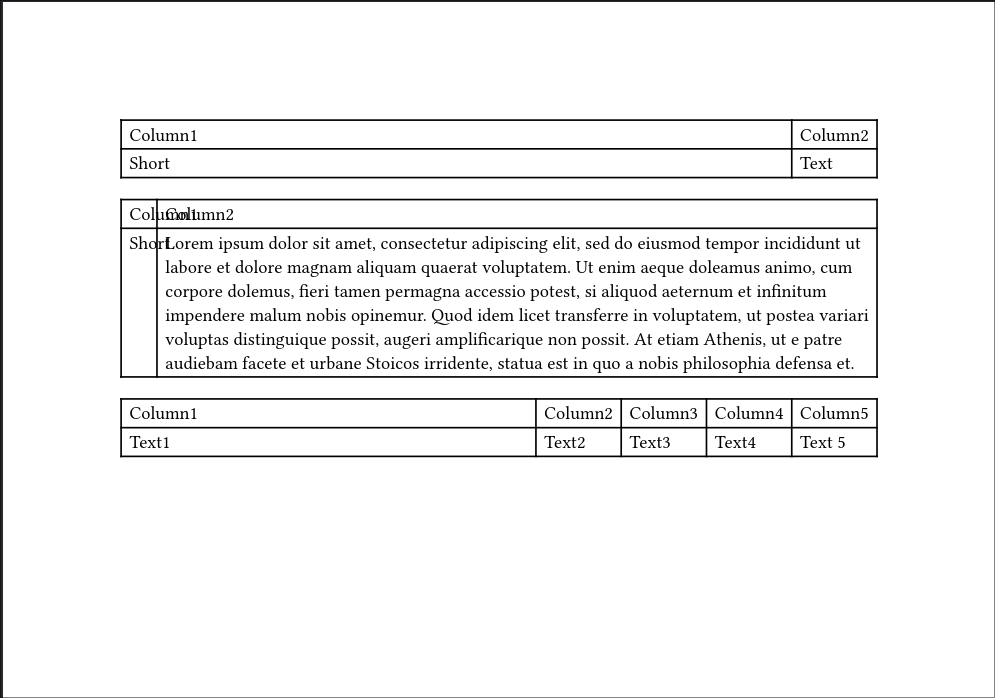
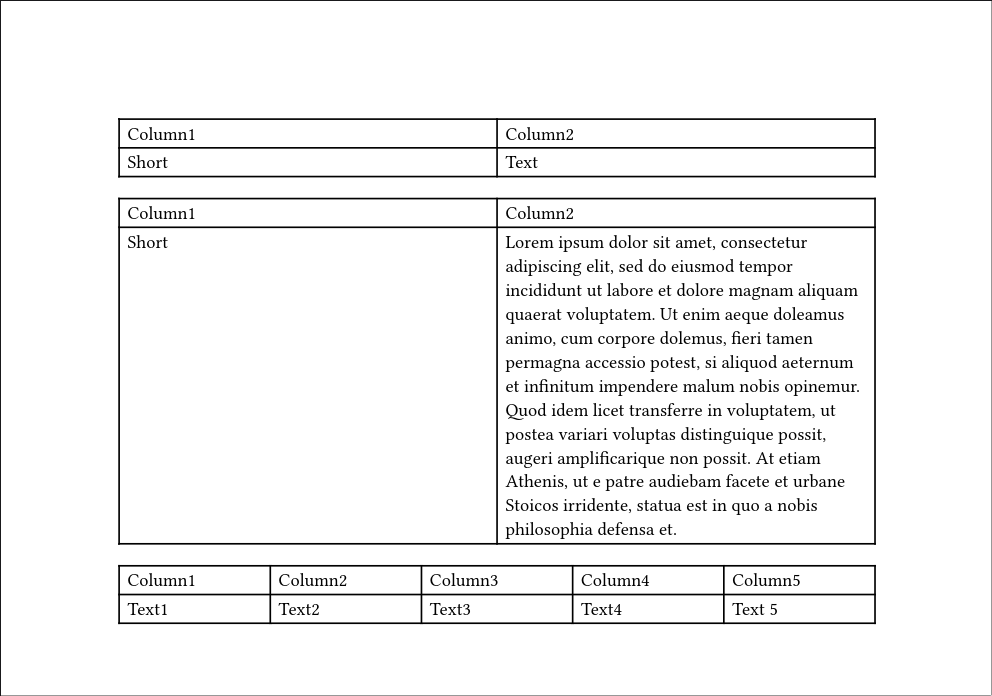
Tables that have barely enough text to fill the width of the page fall in a gray zone of some sorts, I’m not sure about the internals exactly but take a look at this:
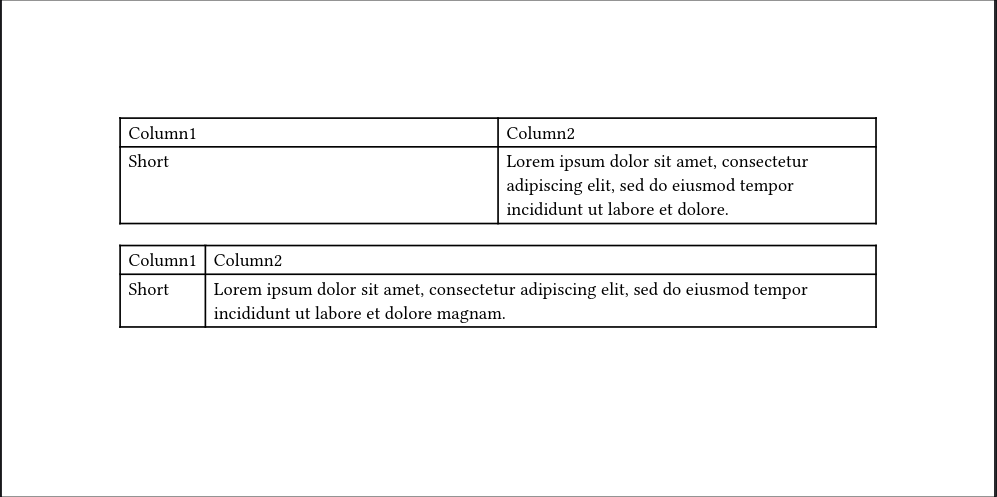
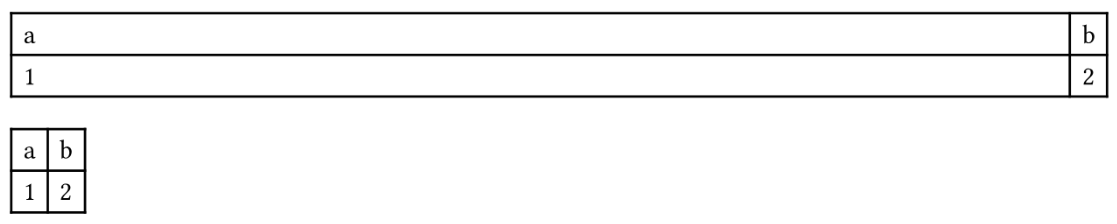
This somehow falls in the not wide enough category and is assigned 1fr for the column sizes, I have no idea why. Even with the column size being auto it stills wraps around, but with 1fr column size, the empty space in Column1 is too glaring to ignore (first image is just the default and second image is with your solution applied):
Another issue, which probably is an extension of the first one (therefor I couldn’t find an example that showcases it without showcasing the previous one) but I’m going to mention it anyways, is the fact that this measures the page width, but in a multicolumn context that isn’t really desirable.
EDIT: Here is a more extreme example I found for the first issue. This is using the default page settings; I think as soon as you change anything it’ll change (also funny thing I noticed, the 18th word of lorem impsum that caused the table to go long is magnam, which in Latin means large):
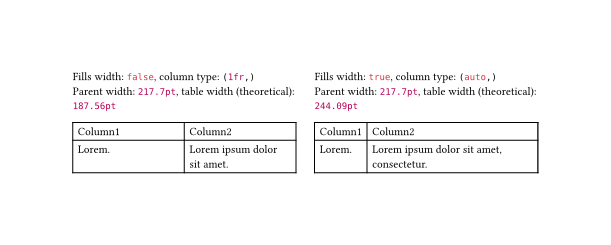
This version measures the parent container using layout() so it takes into account the columns. There’s also a line that gives some debugging info (shown in screenshot) that can be uncommented.
Full Code
#set page("a4")
#set page(height: auto)
#set page(columns: 2)

#let table-with-short-text = "
  | Column1 | Column2 |
  | ------- | ------- |
  | " + lorem(1) + "   | " + lorem(5) +"    |
"

#let table-with-short-text2 = "
  | Column1 | Column2 |
  | ------- | ------- |
  | " + lorem(1) + "   | " + lorem(6) +"    |
"

#import "@preview/cmarker:0.1.8"

#show table: it => context layout(parent-size => {
  //Avoid recursion which would occur since there is a call to #table later
  if it.has("label") and it.label == <already-processed> { return it }

  //Choose column type based on whether the table fills the width already
  let table-width = measure(it).width
  let already-fills-width = table-width >= parent-size.width
  let col-type = if already-fills-width {(auto, )} else {(1fr, )}

  //Get how many columns there are in this table
  let num-col = it.fields().at("columns").len()

  //Extract the children (cells) and keep all the rest of the table arguments
  let (children, ..rest) = it.fields()
  //[Fills width: #already-fills-width, column type: #col-type\ Parent width: #parent-size.width, table width (theoretical): #table-width]
  [#table(
    ..children,
    ..rest,
    columns: col-type * num-col,
  )#label("already-processed")]
})
#cmarker.render(table-with-short-text)
#colbreak()
#cmarker.render(table-with-short-text2)
This is essentially perfect, thank you so much. That parent-size.width * 0.95 trick really did the job. There may be one or two tables that technically don’t fill the entire width but the difference is minuscule.

 ).
).