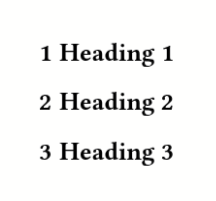
How do I reset the heading counter?

Hi,
I’m trying to reset the heading counter after some certain headings so that I would hae two headings with the same number. I tried the following:

#show: set heading(numbering: "1.1")
= Heading 1
= Heading 2
#counter(heading.where(level: 1)).update(n => n - 1)
= Heading 3

I would expect Heading 3 to be numbered 2 again but it still has number 3.


How can I do this?
Thanks for any help!

The counter for heading.where(level: 1) is not the one you want, you need counter(heading) instead and it will work.

A single counter contains multiple levels of numbers, so there is just a single counter for all headings. You can check the docs for counter.update on how you would use it when using multiple heading levels—for the shown code, your current approach simply works.

Thanks for the answer, your hint that the counter is an array helped a lot! I came up with the following which works for me (the above doesn’t):

#counter(heading).update((first, second) => (first - 1, second))

I need to include all levels of headings that have occured before modifying the counter (in my case til second level). I tried to generalize this via

#counter(heading).update((first, ..n) => (first - 1, ..n))

but I get an error for the second ..n telling me that I can’t spread arguments. What is an elegant way to do this?

for the second approach, you need to use ..n.pos(). n is an arguments value (which can contain positional and named arguments) but you need an array (with the positional arguments in it), thus pos().