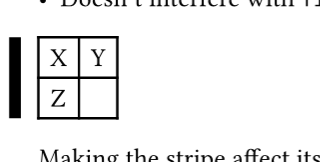
I’d like to draw a vertical “accent line” or stripe down the entire left of the table. Options I’ve considered are vline, a “fake” first column, or a rect / box.
Here’s the vline attempt, but the issue is that when the line is >1pt, such as 5pt below, it extends above the table. It also eats into the table content. I can’t “shift” it left.
As you have mentioned, there are numerous ways of making this, and I wouldn’t be surprised to see follow-ups. I see you already come up with your own function for this, but you weren’t explicit on whether this would be a one-off so I only used a show rule.
The approach here:
Alters all tables
Is applicable to elements other than table
Prevents the stripe from affecting its surroundings
Making the stripe affect its surroundings, like for reasons such as not being ignored in centring the table, is possible by changing outset to inset. Though really that change only counts in the inset amount, not also the actual stripe thickness which you would have to add manually. It’s a similar situation with stripe’s height which doesn’t change with the line thickness of the table.