How do I test whether the current line is the first or last line in the page?

I’d like to create a Typst function for typesetting a scene break/thematic break/transition (not sure what the best term is) as in most printed novels[1], i.e.:

  • By default, the break is displayed as a blank line between paragraphs
  • …unless that line is the first or last line on the page (or in the column, for multicolumn environments, I suppose), in which case the line contains some decorative element (usually three spaced asterisks).
  • Either way, the paragraph immediately after the break is not indented.

I know how to define a function for producing a decorative line with no indentation afterwards, but I’m unsure how to determine whether that line will be placed at the first or last line of the page and “blanking” it if it isn’t. The closest thing I can find to a “current line on page” function is here().position(), which returns a dictionary containing the current y-coordinate. If I then had the current line height (not sure how to get that) and the current page’s top & bottom margins (I assume they’re stored in page().margin, but I can’t figure out how to query them at the moment), I assume I could make this work. Am I on the right track? Is there a better way?


  1. Note that the following description assumes the use of “book paragraphs” where every paragraph is typically indented and there is typically no gap between consecutive paragraphs. “Web paragraphs” (where paragraphs are not indented and there is a blank line between every pair of consecutive paragraphs) are out of scope for this. ↩︎
There is no text line element, so you can’t do this. You can probably find if the beginning/end of a paragraph is at the top/bottom of a page. You might be able to customize the whole paragraph conditionally, but idk how you’d restrict styling to a single line. Also, “current line” doesn’t specify which line we’re talking about.

For margins, you can use #import "@preview/scaffolder:0.2.1": get-page-margins.

Hello @jwodder,

What you are describing is a dinkus by the way.

The dinkus. You know, the three asterisks beloved of a certain kind of fiction writer to split the chapter into some kind of sub-chapter.

If I was you, I would rephrase my question as you are potentially going down the path describing an XY Problem.

Something may already exist on Typst Universe.

1 Like

I was skeptical at first that this name had any traction, but Wikipedia has an article on it, so it seems that is the right name!

I’ve searched there for “dinkus”, “transition”, and “scene break” and found nothing.

Correct. But there are packages designed for movie scripts, plays, etc. I haven’t searched through. Other keywords could be fleuron, asterism or asterisk. Note that the search function on Typst Universe is not optimal IMO.

I maintain that your question will not track much more help as @Andrew has answered it already… however, you may get more help with a question title like the first sentence of your post:

(How do I) create a Typst function for typesetting a scene break…

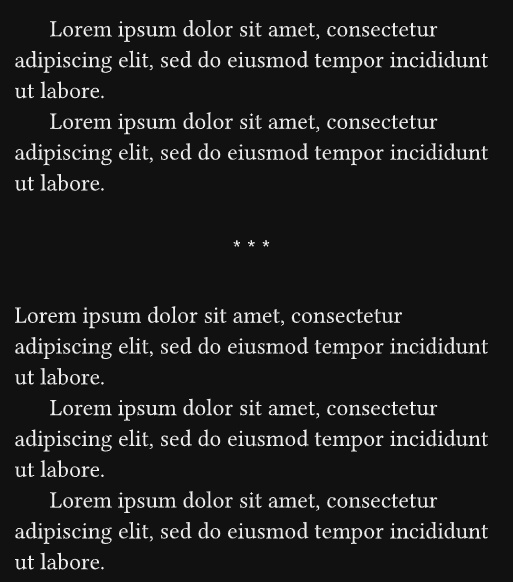
Am I correct that you want something like this?

If so, you can have a look at this basic code snippet, it may or may not be what you are looking for but it seems pretty close. The key may not be what the title of your post asks for, as the solution may well be a sticky block. Hence the reference to the XY Problem.

#let default-dinkus = "* * *" // "•  •  •" // "❧" // "⁂"
#let dinkus(style: default-dinkus) = align(center, style)

#let scene-break(body) = block(
  width: 100%,
  breakable: true,
  sticky: true,
  {
    v(indent)
    dinkus()
    v(indent)

    // First paragraph after dinkus
    set par(first-line-indent: 0em)
    body
  },
)
Full code
//#set block(stroke: red + 0.5pt) // Debug
#set page(paper: "a6")
#let l = 15 // Lorem lines

#let indent = 1.5em
#let spacing = 0.65em
//#let leading = 0.65em // This is the default

#let default-dinkus = "* * *" // "•  •  •" // "❧" // "⁂"
#let dinkus(style: default-dinkus) = align(center, style)

#set par(
  justify: true,
  first-line-indent: (
    amount: indent,
    all: true, // Toggle first paragraph indent
  ),
  spacing: spacing, // Same as leading
  //leading: leading,
)

#let scene-break(body) = block(
  width: 100%,
  breakable: true,
  sticky: true,
  {
    v(indent)
    dinkus()
    v(indent)

    // First paragraph after dinkus
    set par(first-line-indent: 0em)
    body
  },
)

#lorem(l)

#lorem(l)

#scene-break(lorem(l))

#lorem(l)

#lorem(l)

#scene-break(lorem(l))

#lorem(l)

#lorem(l)

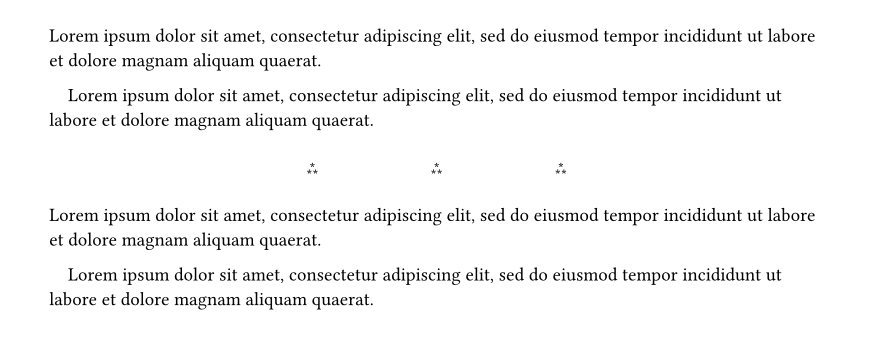
No need to include the body of the next ¶ in the function if the break is set in a block.

#set par(first-line-indent: 1em)

#let thoughtbreak = {
  block(
    height: 2em,
    width: 100%,
  )[
    #align(
      center + horizon
    )[⁂#h(6em)⁂#h(6em)⁂]
  ]
}

#lorem(20)

#lorem(20)

#thoughtbreak

#lorem(20)

#lorem(20)