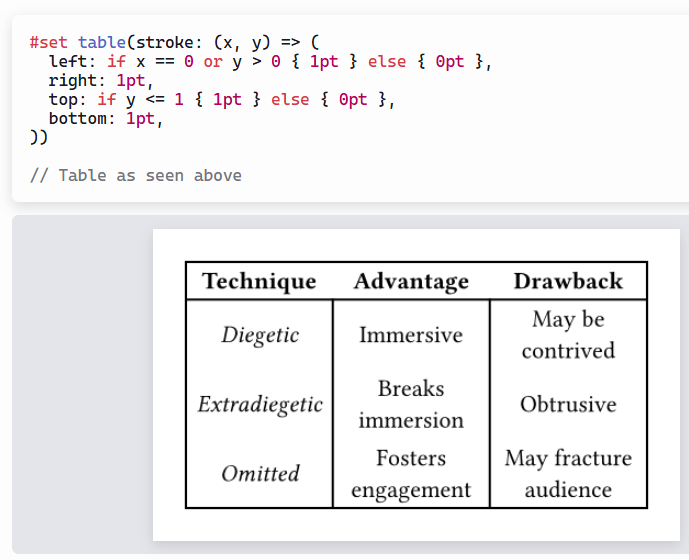
How do previous stroke commands override subsequent stroke commands?

I’ve adapted this code from the guide on tables, and I’m confused how it works.

#table(
  columns: 3,
  stroke: (x, _) => (
    left: if x == 0 {1pt} else {0pt},
    right: 1pt,
  ),
  [1],[2],[3],
)

image

I don’t understand how the else clause from the left stroke command can change how the right stroke command behaves. Shouldn’t right: 1pt always put a stroke on the right of every cell regardless of what was written before it?

Also, if {0pt} is the default stroke on all sides when using functions (as shown with top and bottom not defined here), why does else {0pt} change anything? Else is always 0pt!

This is the behavior I expected from the first code snippet.

#table(
  columns: 3,
  stroke: (x, _) => (
    left: if x == 0 {1pt},
    right: 1pt,
  ),
  [1],[2],[3],
)

image

And this is how I would naively achieve the first result.
(Although, it does require hard coding the number of columns, which the first way avoids.)

#table(
  columns: 3,
  stroke: (x, _) => (
    left: if x == 0 {1pt},
    right: if x == 2 {1pt},
  ),
  [1],[2],[3],
)

image

Please explain how and why the stroke rules work this way.
2 Likes

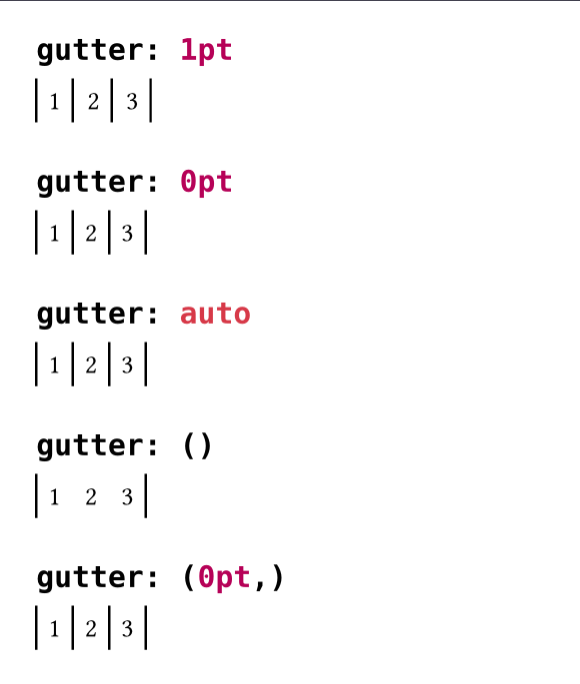
Interesting… I also find that gutter affects the result.

Code
#for gutter in (1pt, 0pt, auto, (), (0pt,)) {
  [= #raw("gutter: " + repr(gutter), lang: "typc")]

  table(
    columns: 3,
    column-gutter: gutter,
    stroke: (x, _) => (
      left: if x == 0 { 1pt } else { 0pt },
      right: 1pt,
    ),
    [1], [2], [3],
  )
}

Besides, bluss noticed the lack of documentation (Discord, 2025-11-23), but nobody replied.

2 Likes

Oh weird.

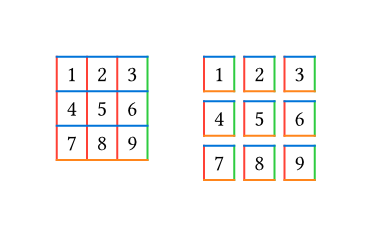
I expected the code shown in the documentation guide to be the most robust and recommended way, but maybe there is a better method to get outline borders like this. From the guide:

Strokes are applied to the boarders of each cell. If no gutter is set, the top boarder stroke takes precedence over the bottom boarder and left over right.

Code
#grid(
  columns: 2,
  gutter: 1cm,
)[
  #table(
    columns: 3,
    stroke: (
      left: red,
      right: green,
      top: blue,
      bottom: orange,
    ),
    [1],[2],[3],
    [4],[5],[6],
    [7],[8],[9],
  )
][
  #table(
    columns: 3,
    gutter: 5pt,
    stroke: (
      left: red,
      right: green,
      top: blue,
      bottom: orange,
    ),
    [1],[2],[3],
    [4],[5],[6],
    [7],[8],[9],
  )
]

I does, but because the left stroke of the next cell takes precedence and is set to 0pt it overwrites the stroke of right.

So 0pt has a special meaning, it indicates there is a stroke, but it isn’t displayed because it has a thickness of 0.

No else is always none or (:) (a empty dict).

YES, I think this should be better documented.

2 Likes

gutter: 1pt is expected, but the other should in my opinion behave like the default empty () gutter. I think this is simply an oversight/bug.

2 Likes
2 Likes