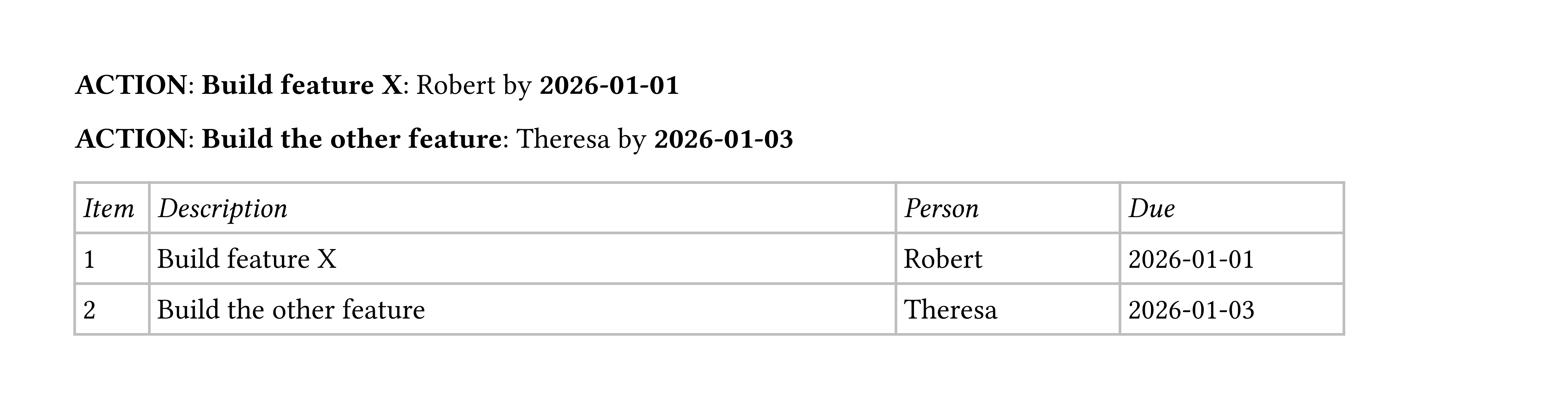
User Story
I am 90% through to a Typst template that would allow me to capture an engineering meeting summary. We use a specific format to highlight individual inline action items that seems to be making it harder to generate a summary table.
I would like Typst to create a summary table at the end of the document, without having to copy and paste the items from the body, and while adding an item number for reference. Each action seems too long for use in a dictionary.
We present each action inline as a three- element row:
- Description | Responsible | Due Date
We present the summary table as above and add an item number for the first column.
- Item | Description | Responsible | Due Date
Hypothesis: I am interpreting prior work wrong
Someone else has already figured out how to read an array of row arrays from context in a function. I have two ways I’m doing it and both don’t work.
Adrian’s solution for Beno has too much other stuff and only two items to keep track of.
Converting content into a table seems over my head.
Spreading content into a table doesn’t seem to fit into my approach, but is my next step.
Trials
-
I have been able to create a function to dress the inline actions up in the appropriate format. The format is a table without borders: Action Description, Responsible Person, Due Date. Once I had this, I first presented the table just copying the information into an array and formatting it as a table.
-
I was able to create a summary table when manually pasting the items into an input array for the function. The table looked great: Item Number, Action Description, Responsible Person, Due Date.
-
I can create a table and am having trouble getting the information from
contextback down into another function. Yet, the information I can get seems stuck in a narrow column width that doesn’t even match the table column widths.
My results using a function where the “data” is in the context outside the summary table function
- have the rows without item numbers
- have a table where all the information and item numbers show up in the first cell
Challenge
- The function that formats the action item also pushes it to an array to collect it for later.
- The function that assembles the summary table is where I add the item number for the action item.
- I am stumbling on how to take the information from the array through
contextand present it in the table with the item number showing up only once.
Code
Initializing the actions collection
// initialize the actions array
#let actions_array = state("actions_array", ())
// define actions, intend to use this across functions
#let actions = (("actor", "task", "time"),)


//testing
#actions.push(("once-this", "once-me", "once-then",))
//actions_array.update(arr => {
//    arr.push(actions)
//    arr
//  })
//end testing
Formatting the action and putting that action into the collection
// new single action
#let action(
  (who-in, what-in, when-in),
) = {
//  let actions = (("once-inside", "once-this", "once-then",))
  [*ACTION*: *#who-in*: #what-in by *#when-in*]
// ADD method to assign this item into the actions array
// actions.push((who-in,what-in,when-in),)  //nope
// actions.push(("once-me", "once-this", "once-then",)) //nope
// per https://github.com/typst/typst/discussions/3081
  actions_array.update(actions => {
    actions.push((what-in, who-in, when-in))
    actions
  })
} //end of action function (single action formatting)
Manual method assembling the function and inputting it into the summary table function
// this one works on an array input to the function
   #context {let action_counter = counter("action_counter")
   let cell = table.cell
   table(
     columns : (10mm, 100mm, 30mm, 30mm),
     inset: (x: 3pt, y: 6pt,),
     stroke: luma(190),
     table.header(
          [_Item_], [_Description_], [_Person_], [_Due_],
     ),
     ..for (i, elem) in actions.enumerate(start:1) {
        (cell[#action_counter.step() #i],
         cell[#elem.at(1)],
         cell[#elem.at(0)],
         cell[#elem.at(2)],
        )
     }
   )}
   ]
   body
}  //end of actionslog function
Problems
I can add numbers, but they go with every piece and fail to go into the cells, while also creating a table for each item.
#let dumptasks = {
  [\ Dump Tasks version \ ]
context for c in actions_array.get() [
  #let taskcount = counter("taskcount")
  #let celldt = table.cell
  #taskcount.step()
  #table(columns: (15mm, 80mm, 20mm, 20mm),
    stroke: luma(190),
    table.header([Itm], [Des], [Per], [Due],),
    for d in c [
      #celldt[#context taskcount.display()]
        #let taskpart(taskcount) = d

      #celldt[#taskpart(taskcount)]

    ]
  )
]
}
Closest to success
Item number shows up once, everything is in one cell and all is at some arbitrary width that is different than the cell widths.
#let tabledump = {
  let cell = table.cell
  let taskcountb = counter("taskcountb")
  [\ Table Dump Version \ ]
  table(
    columns:  (10mm, 100mm, 30mm, 30mm),
    inset: (x: 3pt, y: 6pt,),
    stroke: luma(190),
    table.header(
      [Item],[Description],[Person],[Due],
    ),
    context for c in actions_array.get() {
      taskcountb.step()
      cell[#context taskcountb.display()]
//      cell[#c.at(0)]
      for d in c [
//        #let taskpart(taskcountb) = d

//        #cell[#context taskcountb.display()]
        #cell[#d]

//        #taskpart(taskcountb)
      ]
    }
  )
}
Related aids – maybe
- Topic 3281: Adrian’s solution for Beno - use a dictionary (how can I also have the date for each item?)
- Topic 6587: Parsing content into a table
- Spreading content into a table
Next:
Look at Topic 1197 - how to spread a 2d array into a table