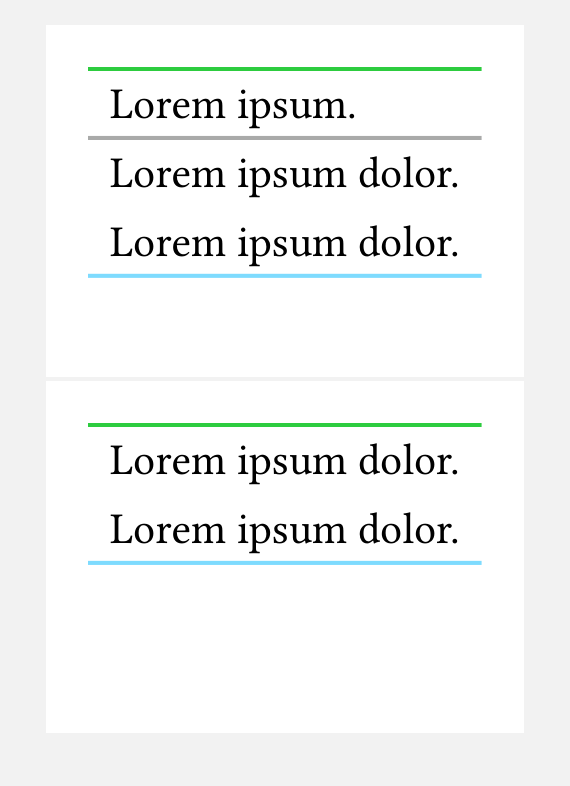
It looks likes top and bottom hlines are repeated after page breaks? Is it possible to disable this behaviour?
#set page(height: 8em, width: auto, margin: 1em)

#table(
  columns: 1,
  stroke: none,
  table.hline(stroke: green, y: 0),
  lorem(2),
  table.hline(stroke: gray),
  ..range(4).map(_ => lorem(3)),
  table.hline(stroke: aqua),
)
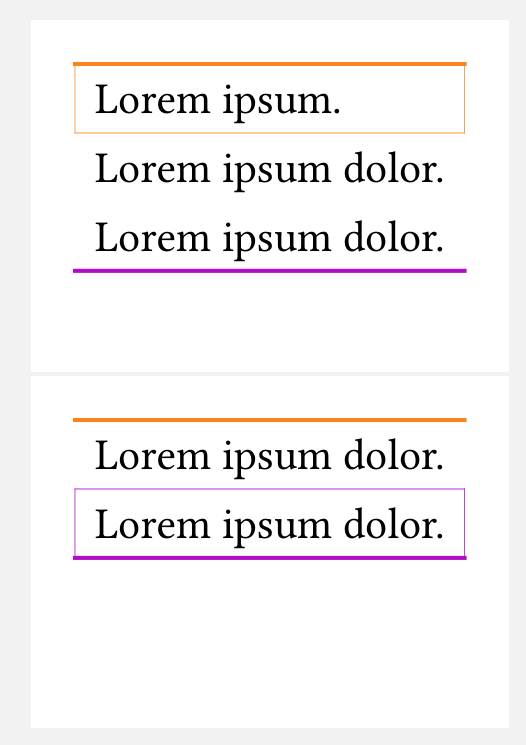
I’ve also tried stroke: (x, y) => …, but the result is mysterious.
#set page(height: 8em, width: auto, margin: 1em)

#table(
  columns: 1,
  stroke: (x, y) => if y == 0 {
    (top: orange, rest: orange + 0.2pt)
  } else if y == 4 {
    (bottom: purple, rest: purple + 0.2pt)
  },
  lorem(2),
  ..range(4).map(_ => lorem(3)),
)
I’ve even tried #set table.footer(repeat: false). Thankfully, that doesn’t control table.hline.