How to add horizontal line in between text lines

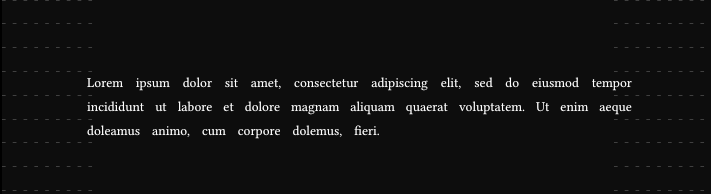
Hello, I’m trying to write a document which I will print out and cut each line of text into its own strip. For that I would like to add short lines at the beginning and end of the page in between each line to make it easy to line up to a paper cutter and cut it straight.

I’ve tried a few things and gotten it to work with underlines to have a thin line all the way across:

#set text(size: 2em, spacing: 1em)
#set par(leading: 1em, justify: true)
#show text: it => {
  underline(it, extent: 20pt, offset: 0.5em, stroke: 0.1pt)
}

words
and
more
different
words
and
more
and
more
exampie
words

However, I haven’t gotten far when trying to only have them at the start and end of each line. I thought par.line could be used, but that isn’t doing anything in the show rule I tried:

#set text(size: 2em, spacing: 1em)
#set par(leading: 1em, justify: true)
#show par.line: it => {
  it
  line(length: 100%)
}

words
and
more
different
words
and
more
and
more
exampie
words

I appreciate any help :)
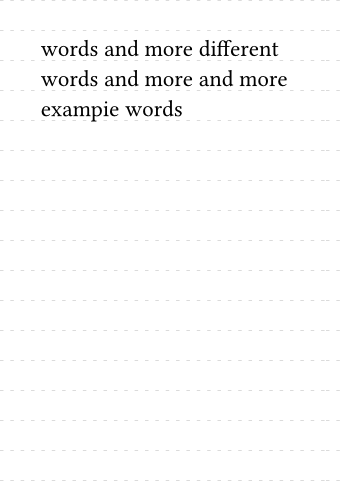
Without knowing more about your specific use-case, I’m not sure if this even helps you. It uses tiling, line, and stroke options.
An example, even if it’s hand-drawn, would be great.

It’s possible to add lines to the entire page like this:

Code
#set text(20pt) //Adjust to your desired text size

#let stroke = (paint: gray, thickness: .1mm, dash: "loosely-dashed")
#let size = 20pt * 1.3
#set page(
  paper: "a6",
  fill: tiling(
    size: (10cm, size),
    line(
      stroke: stroke,
      length: 100%
    )
  )
)

words
and
more
different
words
and
more
and
more
exampie
words

This was modified from the graph paper snippet.

4 Likes

Thank you for the help, especially with the tiling, I was able to get what I wanted with that as the starting point:

#let text-size = 0.4cm
#set text(top-edge: 0.2cm, bottom-edge: -0.2cm)
#let par-leading = 0.3cm
#set text(size: text-size, spacing: 10pt)
#set par(leading: par-leading, justify: true)
#let stroke = (paint: gray, thickness: .1mm, dash: "loosely-dashed")
#let size = 0.7cm
#set page(
  margin: (top: 2.38cm),
  fill: tiling(
    size: (18cm, size),
    line(
      stroke: stroke,
      length: 15%
    )
  )
)


words
and
more
different
words
and
more
and
more
example
words
words
and
more
different
words
and
more
and
more
example
words
words
and
more
different
words
and
more
and
more
example
words

There are lots of hard-coded values to line everything up, which I’m sure could be improved, but this is good enough for my use case.

Font size of 4 mm does not guarantee to be 4 mm, since it’s converted to pt, and each font provides its own scaling against pt, which is a common problem (especially among monospaced fonts). There are ways of fixing it, but it’s all hacks and values will have to be adjusted for each font.

#let new = true
// #let new = false

#let top-margin = if new { 2.3cm } else { 2.38cm }
#let text-size = 4mm
#let size = 7mm
#let par-leading = 3mm
#let stroke = (paint: gray, thickness: 0.1mm, dash: "loosely-dashed")
// #set text(text-size, spacing: 10pt, top-edge: 2mm, bottom-edge: -2mm)
// #set par(leading: par-leading, justify: true)
#set text(text-size, spacing: 10pt)
#set par(justify: true)
#set page(
  margin: (top: top-margin),
  fill: tiling(size: (18cm, size), line(stroke: stroke, length: 15%)),
)

#set text(top-edge: 2mm, bottom-edge: -2mm) if not new
#set par(leading: par-leading) if not new

#set par(leading: 1.1em) if new

#lorem(30)

#set text(4mm, spacing: 10pt)
#set par(leading: 1.1em, justify: true)
#set page(
  margin: (top: 2.3cm),
  fill: {
    let v-distance = 7mm
    let stroke = (paint: gray, thickness: 0.1mm, dash: "loosely-dashed")
    tiling(size: (18cm, v-distance), line(stroke: stroke, length: 15%))
  },
)

#lorem(30)

Also, using negative values for text edges seems like and awful idea. Just change the par.leading and page.margin.top instead.

When you enable justification, the word spacing is now kind of ignored?, because par.justification-limits.spacing is not set to (min: 100%, max: 100%), so it won’t always be exactly text.spacing. Though to justify you must stretch/shrink anyway, which is the whole point.

1 Like

I got the negative value for the bottom edge from the documentation on how to achieve consistent line spacing.

And yeah, jutification overwrites the spacing between the words, but that’s okay because I don’t need it to be exact just a minimum of 10pt apart.

Your solution is way better than what I had managed to do, thank you!

1 Like

Interesting. It still isn’t perfect just like my -0.75em hack for making par.leading work like baseline-to-baseline space, but I guess it does give a new alternative for that. Though Proposal: change `leading` option to `line-height` · Issue #4224 · typst/typst · GitHub is still a thing.

Turns out that this didn’t render correctly for me when I went to print it out, even though it looked perfect in the preview.
This is what I have landed on now after a lot of trial and error exporting the pdf:

#let top-margin = 2.3cm
#let line-depth = 2.5cm
#let side-margin = line-depth + .2cm
#let text-size = 4mm
#let size = 7mm
#let stroke = (paint: gray, thickness: 0.1mm)
#set text(text-size, spacing: 10pt)
#set par(leading: 4.4mm, justify: true)
#set page(
  margin: (top: top-margin, left: side-margin, right: side-margin),
  fill: tiling(size: (21cm - line-depth, size), line(stroke: stroke, length: line-depth)),
)

#lorem(500)

See Tracking issue for printer problems · Issue #2963 · typst/typst · GitHub.

I know that I have to tweak a few default options in PDF viewer to get a more accurate result. Mainly, remove the additional margins and print as-is.