Hello!
I’m writing some slides for a presentation, using touying, and want to present a diagram. To aid the cadence of my explanation, I want to reveal it piece by piece, adding some captions as I explain each component.
I read fletcher’s manual and found out about the layer parameters for both node and edge which, to my understanding, allow you to draw content “above” or “below” (or rather “in front” / “behind”). Content on the same layer will be drawn in the order it is passed to diagram.
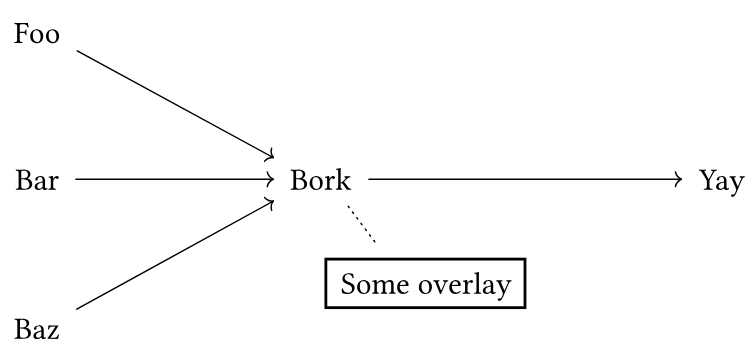
Trying this out in a simple case, it seems that is not the real behaviour; the “overlaid” content shifts the layout on the layers below. Here’s a minimal example:
#import "@preview/fletcher:0.5.8" as fletcher: diagram, node, edge

#diagram(
  node(name: <foo>)[Foo],
  node((rel: (0, 1)), name: <bar>)[Bar],
  node((rel: (0, 1)), name: <baz>)[Baz],
  node((rel: (2, 0), to: <bar>), name: <bork>)[Bork],
  node((rel: (2, 0)), name: <yay>)[Yay],
  edge(<foo>, <bork>, "->"),
  edge(<bar>, <bork>, "->"),
  edge(<baz>, <bork>, "->"),
  edge(<bork>, <yay>, "->"),
)
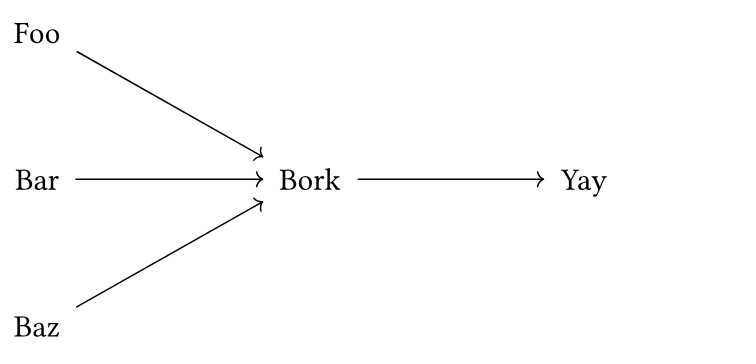
This produces the following document:
However, if we add this node and edge on layer 2 (the default is 0, except for encloses nodes, where it is -1):
node((rel: (.5, .7), to: <bork>), name: <over>, layer: 2, rect[Some overlay]),
edge(<bork>, <over>, layer: 2, "..")
The nodes get shifted like this:
Have I misunderstood this feature or is there a bug? In any case, how could I achieve my goal?
Thank you for your time in advance!
