I tried typesetting a document which has multiple numbered lists on the same page. But there is an issue with how the lists are aligned when the lists have different number of digits. Is there a way to deal with this? ideally I’d except all the separators (period, brackets, etc.) to be aligned across the document. Please see this page:
List numbering indentation depends on the longest item number width. If one list has item with 2000. , do you really want list with just 4 items to have numbering taking measure[2000.].width with a big space for no reason on the left side? I’m not sure if there are solutions for this, but sounds like this would need some hackery that might not work great.
You could use the package numbly – Typst Universe.
Or an easy way would be to use this solution by @ensko:
#set enum(numbering: num => context {
  let the-numbering = numbering.with("1.")
  let max = 99

  let width = measure(the-numbering(max)).width
  box(width: width, the-numbering(num))
})
You can adjust the max number of entries to your liking.
If you want to change the numbering pattern with the level:
#set enum(
  numbering: (..n) => context {
    let n = n.pos()
    let level = n.len()
    let n = n.last()
    let (max, the-numbering) = {
      if level == 1 {
        (99, numbering.with("(1)"))
      } else if level == 2 {
        (10, numbering.with("(a)"))
      } else {
        (10, numbering.with("(i)"))
      }
    }
    let widths = range(1, max).map(num => measure(the-numbering(num)).width)
    box(width: calc.max(..widths), the-numbering(n))
  },
  full: true,
)
Credit to @ensko (aka SillyFreak). This was posted a while ago on Reddit and seems like a good working solution. Read the post for more.
The itemize package supports this feature, so you could give it a try.
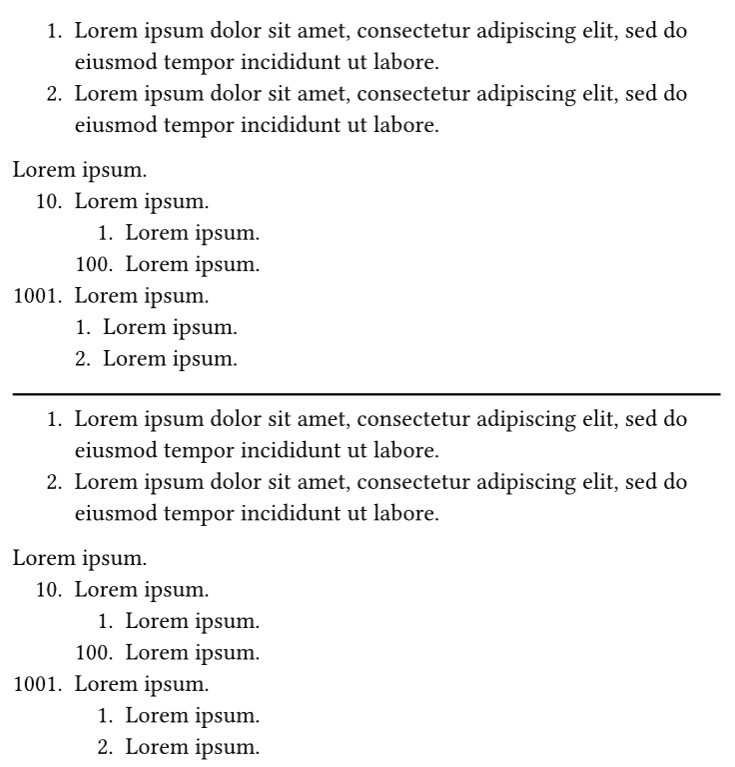
Here is an example:
#import "@preview/itemize:0.2.0" as el
#show: el.default-enum-list.with(auto-label-width: auto)

#let auto-label-width = el.auto-label-item.with(form: (auto, none)) // only for level-1

#auto-label-width[
  + #lorem(15)
  + #lorem(15)
  #lorem(2)
  10. #lorem(2)
    + #lorem(2)
    100. #lorem(2)
  1001. #lorem(2)
    + #lorem(2)
    + #lorem(2)
]

#line(length: 100%)

#let auto-label-width-all = el.auto-label-item.with(form: auto) // for each level

#auto-label-width-all[
  + #lorem(15)
  + #lorem(15)
  #lorem(2)
  10. #lorem(2)
    + #lorem(2)
    100. #lorem(2)
  1001. #lorem(2)
    + #lorem(2)
    + #lorem(2)
]
For more details, read the manual.
Thank you so much. @ensko 's solution worked just fine.