How to align the outline entries and fill. plus more

Hi,
I wanted to typeset the old LaTeX (which i rewrote myself as well) of my uni in Typst, I have managed to get everything except one thing. I can’t get the outline to look like the original TeX output.

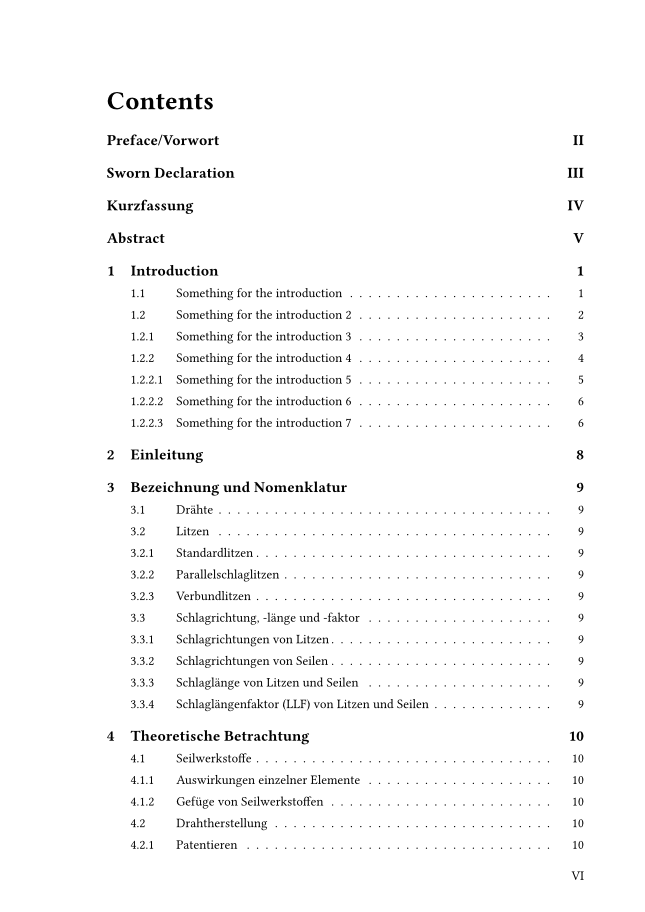
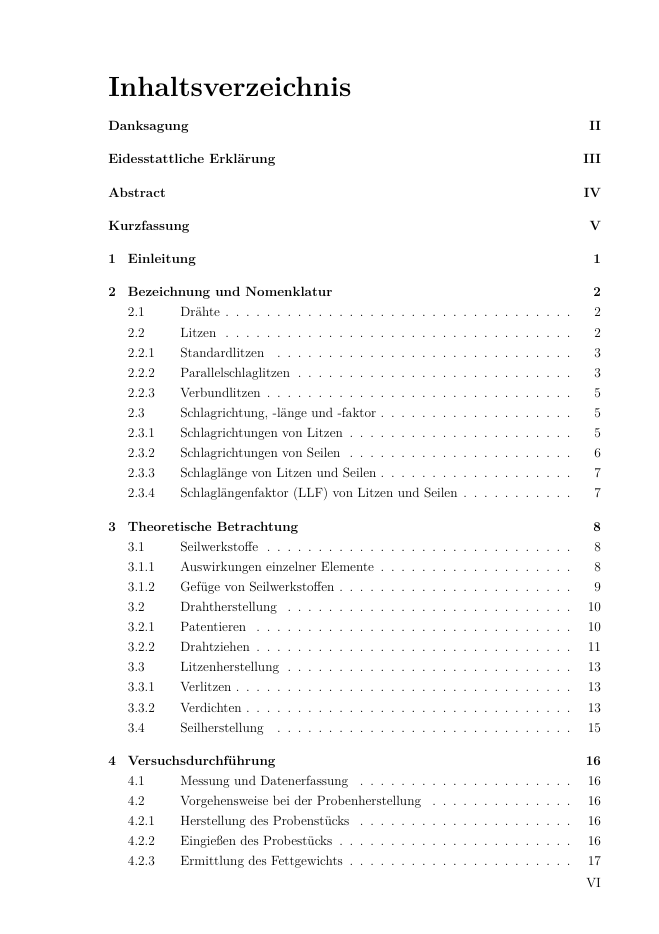
here is an example:
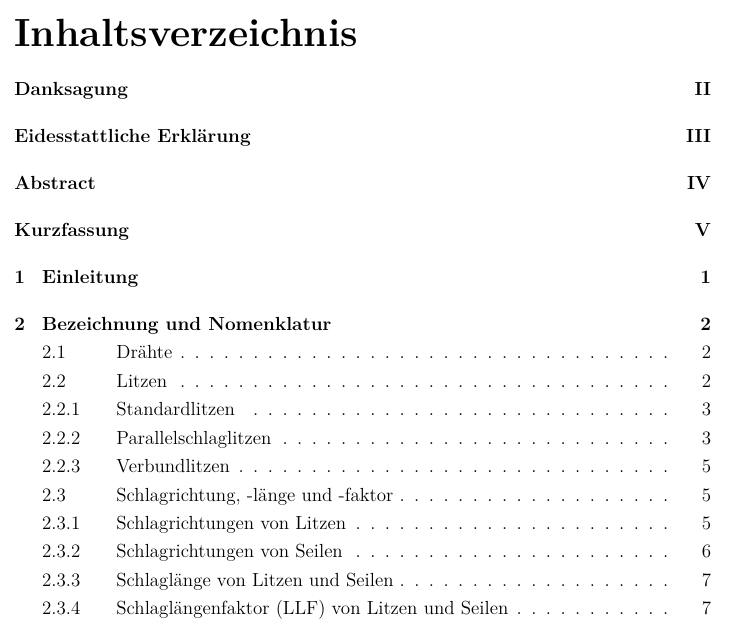
best I was able to produce is this:

// Outline setup
  #let docTableOfContents(body) = {
    set heading(numbering: "1.1")

    // set upper distance of level 1 heading
      show outline.entry.where( level: 1 ): set block(above: 24pt)
    
    // indents heading numbers level 2+
      set outline(indent: n => if n == 0 { 0em } else { 1em })
    // max depth
      set outline(depth: 4)
      
    outline()
    body
  }

// and call like this in main
#show: docTableOfContents 

which produces this:
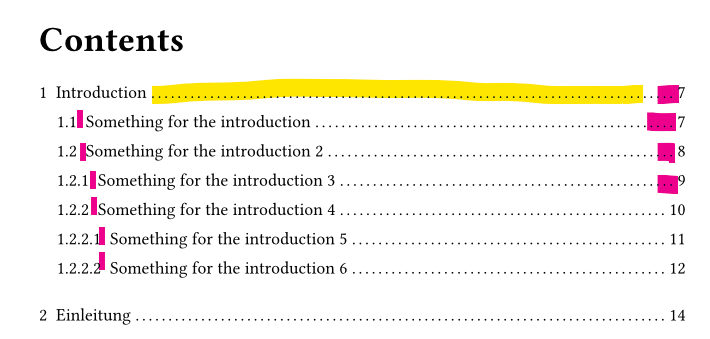
(ignore that the lack of unnumbered sections and roman numeral pages, have not touched that yet)

the missing features of the TeX template are marked to be obvious. they are:

  • Bold level 1
  • aligned text/body for level 2 an higher
  • right aligned fill, which does not react to number width
  • no fill for level 1 entry

From what I can tell, the outline.entry function is what I want but I honestly don’t get how it operates from the examples in the typst docs.
If someone could help me a bit, I would be rather grateful.
The alignment on the left would be the most important, the rest is “ok” if it does not quite equate to the original

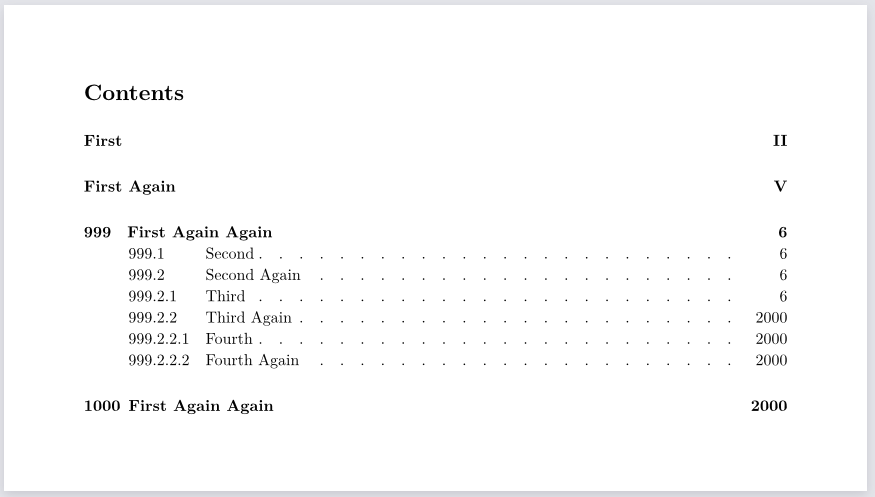
here is a link if you want to check out the whole thing:
FH-Wels-Thesis-Template

You may message me about things to improve, this is actually my first project in typst

I have a template that implements aligned fill, the code is here:

The actual fill and the right-alignment concern are neatly separated. the left alignment part of different level subsections is not handled, though…

Thanks, I will look at this tomorrow. I have also found the package outrageous, which can also align the fill on the right. I am checking if it can (hopefully) also align the body

yes, outrageuous and the code in my template actually are based on the same source. outrageuous is GPL licensed, so if that should worry you for your purposes, you can be sure that my code is based on the original source at typst-plugins/outex/src/outex.typ at b13b0e1bc30beba65ff19d029e2dad61239a2819 · EpicEricEE/typst-plugins · GitHub, which is MIT licensed. (I don’t attribute that source in my code because the actual code is heavily modified from that. Outrageous and outex offer an aligned “repeat” function while I separate the content and the alignment, so you then use plain Typst’s repeat to generate the actual fill.)

A simple way to do the right alignment could be to use rtl text:

#set outline.entry(fill: {
  set text(dir: rtl)
  box(width: 1fr, repeat(justify: false, gap: 1em)[.])
})

#show outline.entry: it => link(
  it.element.location(),
  it.indented(
    it.prefix(),
    it.body() + it.fill + box(width: 2em, align(right, it.page())),
  ),
)

(Edit: well a simple align(right, ...) works too…)

Something similar could likely be available in existing packages, especially those originating from a particular organisation. However considering that it’s your own, the chances of that are lower. Or so I understood.

About the code you have provided:

  • Seems like you’re using this as part of a template. Not that your use is wrong, but usually, you would have one template function which you would then show after importing, see Making a Template – Typst Documentation.

  • Something like set outline(...) can contain more than one argument. I suppose it’s reasonable that you separated them because you’re commenting what the purpose is.

  • Using em for spacing is more recommended I would say, but I decided not to change that.


From what I can tell, the outline.entry function is what I want, but I honestly don’t get how it operates from the examples in the Typst docs.

This is what you should follow: Outline Function – Typst Documentation.


I took the time to follow through your outline.

Notable features:

  • Outline entries from prelude pages using roman numerals and unnumbered headings are properly distinguished
  • Right-aligned dotted lines, which are simpler to achieve than aligned. Not to undermine @ensko’s suggestion, but I think it’s less relevant since you specified this. Mentioned also by @Eric in How to remake this outline in Typst? - #7 by Eric
  • Automated left and right tab-like spacing

These are the implemented horizontal spacings, each of which applies the same for all outline entries of the second level, mimicking Typst’s initial outline:

  • Helper spacings:
    • fill-gap controls the spacing between the repeat separators:
      • You can change the recommended 1em
    • fill-gap-pad ensures that the repeat separator on either end doesn’t interfere with the heading nor the page number:
      • Automatically based on fill-gap
  • Left indent: [1]
    • Automatically based on the widest-numbered level 1 outline entry
    • This could have simply been auto, see the code why it’s not
  • Left indented.gap: [1:1]
    • Automatically based on the widest-numbered level 2+ outline entry [2]
    • Comparable to what indented.gap represents would be widest-level-2 - curr-level-2 + 1em
    • You can change the recommended 1em
  • Right page number gap:
    • Automatically based on the last heading’s page number, even level 1’s, assuming that it’s the widest-numbered
    • The actual gap is last-page-number-width - curr-page-number-width + fill-gap-pad + 1em
    • You can change the recommended 1em

There’s also indented-gap which is indented.gap for the level 1 outline entries and can be changed. These also have a strong emphasis which can be changed through text-weight.

Code
// Outline rules from @hpcfzl on Typst forum
#{
  // Excludes headings level `excl`+
  let excl = 4
  set outline(depth: excl)

  /*
    This is unreliable for more than single-digit numbers, but
    would be in case `auto` was allowed in place of `1em`
  */
  // Indents only heading numbers level 2+, all the same
  // set outline(indent: n => if n == 0 { 0em } else { 1em })

  // Indentation is done in the `outline.entry` rule
  // set outline(indent: 0em)

  // Indentation is actually NOT needed for heading numbers level 2+
  // This would be equivalent to `set outline(indent: n => if n == 0 { auto } else { 0em })`
  show selector.or(..range(2, excl + 1).map(it => outline.entry.where(level: it))): set outline(indent: 0em)

  // Repeating separator
  let fill-gap = 1em
  let fill-gap-pad = fill-gap / 5
  set outline.entry(fill: repeat(gap: fill-gap, justify: false)[.])
  show repeat: set align(right)

  // Rule for outline entries
  show outline.entry: it => {
    let indented-gap = 0.5em
    let text-weight = "bold"
    set text(weight: text-weight) if it.level == 1
    set block(above: 24pt) if it.level == 1 // Could be made proportional to the `indented-gap`

    // Seizure warning
    let widest-heading = {
      let heading-locs = query(heading).map(h => h.location())
      (
        n: calc.max(
          ..heading-locs.map(loc => counter(heading).at(loc)).map(it => it.map(str).join(".")).map(it => measure(it).width)
        ),
        p: measure(
          text(weight: text-weight, str(counter(page).at(heading-locs.last()).first()))
        ).width
      )
    }

    link(
      it.element.location(),
      it.indented(
        if it.level == 1 { it.prefix() },
        
        {
          if it.level > 1 {
            hide(
              text(
                weight: text-weight,
                str(counter(heading).final().first()) + h(indented-gap), // Wrong to use `counter(heading).display()`
              )
            )
            box(width: widest-heading.n + 1em, it.prefix()) // Pointless to add `h(indented-gap)`
          }
          it.body()
          h(fill-gap-pad)
          box(width: 1fr, if it.level > 1 { it.fill })
          h(fill-gap-pad)
          box(width: widest-heading.p + 1em, align(right, it.page()))
        },
        
        gap: indented-gap,
      )
    )
  }

  outline()
}
Output

I believe my approach addresses the few conundrums, but feel free to allude to any further observations.


  1. Mind that these hyperlinked values aren’t the ones actually used. ↩︎ ↩︎

  2. This is something to be aware of, as there can be a level excl heading which is the widest but invisible to the outline. Filtering the query is all that’s needed, I just didn’t think this would be worth the additional hassle. ↩︎

3 Likes

Thanks a lot, I am still looking through your code and getting a bit more acquainted with the process of making and publishing a proper typst template. My current document is structured like the TeX template that I made, which is also derivative of the original TeX template of the uni. The original also handles other citation styles and a few other things, but mostly it is to make LaTeX behave. Those options would need to implemented too. For now, I want to write my thesis and create the rest of the docs and option for the template later (this is for typst familiarity as well).

template thing

The issue is that this is for very much non technical users, who may need to modify some details because some of our profs are just so “creative” and “unique” in their ideas for how a thesis should look. Despite the fact that the templates exist…
So (I think) the

#import thesis-template-from-from-typst-universe: *

approach would not work. From what I can see, the template and main docs would basically need to be separate projects, with the modified template potentially needing to be uploaded to universe. This seems to stupid for single user mods, which makes me think that I am wrong, and please correct me there.

This is “template” is currently meant to be cloned and then used alongside/within the main project/thesis.

I am also not sure on how to do something like the data.typ properly (meaning neatly), since I do not want most of the stuff in the main file. I have read through this, yes, I just need to implement it myself, and move the whole authors thing into the data.typ (for example).

em thing

I am more used to pt and mm, because they are strict, and for things like the title page that makes sense. But I will look to change most measurements to em, since it is better to be relative to font size.

indent.gap footnote

the filtering is less necessary, I would prefer to just disable the numbering on anything beyond lvl 4, I just need to find how that works.

EDIT:

Thanks:

I think i understand everything that your solution does, with the exception of the brainfaqk part under // seizure warning. I also left a link to this thread in the code for future reference.

What I need to figure out next is the limiting of the numbering to level 4. The other solutions I found mess with other heading settings, I may open a new topic when I feel stumped, but I will try to figure it out myself.

THANK YOU very much hpcfzl, I have no idea how I would have gotten that :)
can I buy you a coffee for the effort?

There’s a difference between a template and a “template package”. A template is just a function the user can call in their document:

// Apply the "my-template" function to everything below
#show: my-template

// Everything from here down will be subject to "my-template"

The template function can have parameters, which can be used to configure the template. Here’s a full example:

#let my-template(title-color: black, doc) = {
  show heading: set text(font: "DejaVu Sans", fill: title-color)
  doc
}

// Use uses the template like this:
#show: my-template

// or like this:
#show: my-template.with(title-color: red)

= Introduction
#lorem(20)

Now the definition of my-template can live in a separate file:

// Content of template.typ
#let my-template(title-color: black, doc) = {
  show heading: set text(font: "DejaVu Sans", fill: title-color)
  doc
}

Used like this in the main document:

#import "template.typ": *
#show: my-template

= Introduction
...

Here template.typ lives in the same directory as the main document. You can give this template file to all your profs, they can then customize it and give their own version to their students.

Or you can try to make a flexible template function that accepts parameters for all the necessary customizations, and publish it in the Universe as a “template package”. The advantage is that users don’t need to manually place a copy of template.typ in their project, but the disadvantage is they also cannot easily modify it. All in all I think this is rather similar to how it works in LaTeX?

If you need more help with your template, don’t hesitate to create a new thread on the forum! (This one was supposed to be about outline entries in particular.)

Thanks for the clarification. My document already uses normal templates a lot, you can see that in the link, if you want.

About modifications: the profs will not do that, it is for the students to do. The main issue is that I cannot predict which mods the users may need, and most changes are very small

I may make a new topic later, I know that this is off topic. Is it possible to move replies to a thread? or do i just link this thread

No worries, there’s definitely parts in my solution which by no means are something to be devised from a novice in my opinion.

Indeed, the heading-locs dictionary can be at least somewhat simplified, for example the .join(".") could probably be a counter.display containing the numbering argument "1.1".

No need, this was a fun challenge. One thing I think all volunteers here appreciate from posters is adding enough details to the initial post so that there’s a minimal amount of follow-ups needed. Also helps those finding the thread.


As for going in a different direction from here, I think you can simply reply as linked topic to continue in a different post. See this screenshot from Replying as a linked-topic - Site Feedback - Sustain Open Source Forum.

2 Likes

I made some light changes to the solution from hpcfzl. Mostly:

  • aligned the numbers of level 2+ to have the same alignment as level 1’s text/body. though in a hacky way by just adding an offset variable
  • added font size variable for level 1 heading
  • made it into a function
Code Put this into `functions.typ` for example:
#let docTableOfContents = {
  // Outline rules from @hpcfzl on Typst forum:
  // forum.typst.app/t/how-to-align-the-outline-entries-and-fill-plus-more/8753
  // Excludes headings level `excl`+
  let excl = 4
  set outline(depth: excl)
  
  /*
    This is unreliable for more than single-digit numbers, but
    would be in case `auto` was allowed in place of `1em`
  */
  // Indents only heading numbers level 2+, all the same
  // set outline(indent: n => if n == 0 { 0em } else { 1em })

  // Indentation is done in the `outline.entry` rule
  // set outline(indent: 0em)

  // Indentation is actually NOT needed for heading numbers level 2+
  // This would be equivalent to `set outline(indent: n => if n == 0 { auto } else { 0em })`
  show selector.or(..range(2, excl + 1).map(it => outline.entry.where(level: it))): set outline(indent: 0em)

  // Repeating separator
  let fill-gap = 0.5em
  let fill-gap-pad = fill-gap / 5
  set outline.entry(fill: repeat(gap: fill-gap, justify: false)[.])
  show repeat: set align(right)

  // Rule for outline entries
  show outline.entry: it => {
    let indented-gap = 1em
    let indented-gap-offset = 0.3em // to align numbers of level 2+ with body of level 1
    let text-weight = "bold"
    let text-size   = 14pt
    
    set text(weight: text-weight, size: text-size) if it.level == 1
    set block(above: 1.5em) if it.level == 1 // Could be made proportional to the `indented-gap`

    // Seizure warning
    let widest-heading = {
      let heading-locs = query(heading).map(h => h.location())
      (
        n: calc.max( 
          // could be simplified? : forum.typst.app/t/how-to-align-the-outline-entries-and-fill-plus-more/8753/11
          ..heading-locs.map(loc => counter(heading).at(loc)).map(it => it.map(str).join(".")).map(it => measure(it).width)
        ),
        p: measure(
          text(weight: text-weight, str(counter(page).at(heading-locs.last()).first()))
        ).width
      )
    }

    link(
      it.element.location(),
      it.indented(
        if it.level == 1 { it.prefix() },
        
        {
          if it.level > 1 {
            hide(
              text(
                weight: text-weight,
                // Wrong to use `counter(heading).display()`
                str(counter(heading).final().first()) + h(indented-gap + indented-gap-offset), 
              )
            )
            box(width: widest-heading.n + 1em, it.prefix()) // Pointless to add `h(indented-gap)`
          }
          it.body()
          h(fill-gap-pad)
          box(width: 1fr, if it.level > 1 { it.fill })
          h(fill-gap-pad)
          box(width: widest-heading.p + 2em, align(right, it.page()))
        },
        
        gap: indented-gap,
      )
    )
  }
  
  outline()
}

and call in main.typ like this:

#import "functions.typ": *
or: #import "functions.typ": docTableOfContents 
...
#docTableOfContents 
Output

vs my rewritten LaTeX template:

You can grab my rewritten LaTeX template here or look at the typst code here.
Same link as in the first reply, just adding it here again to have all in one place.


Is it ok to mark this as the solution? Technically it is correcter but @hpcfzl did 99% of the work. I do not want to overshadow that, even if their reply is marked in the code