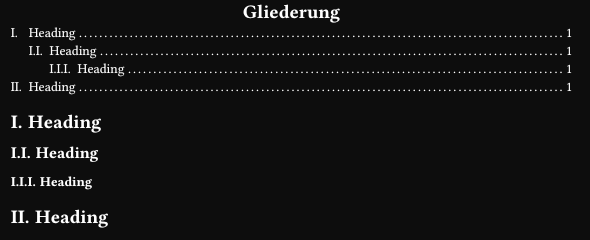
I am new to typst and I have been trying to help myself by reading the documentation but I just don’t seem to get past this issue. I would be very grateful if anyone could give me a hint on where to inform myself about this issue or anything.
You can use a show rule on heading (since the outline heading is in itself a heading), of course you have to scope it only to the outline call (unless you want all your headings centred).
You should prioritize show-set rules (you can undo them without scopes, they are more idiomatic), but there are no show-show-set rules, so you’d need to do:
#show outline: it => {
  show heading: set align(center)
  it
}
Though, it appears that for a simple example show outline: set align(center) is enough. Strange.
#set heading(numbering: "I.")
#set outline(title: "Gliederung")
// #show outline: set align(center)
#show outline: it => {
  show heading: set align(center)
  it
}

#outline()

= Heading
== Heading
=== Heading
= Heading