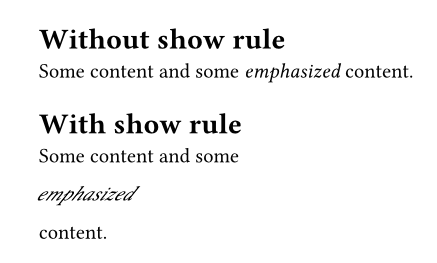
I am trying to “emulate” italic text using skew, but when I use the simple show rule as visible in the MWE, the result is not exactly what I expected.
Some context: the reason I’m trying to do this, is that for certain documents I am required to use provided font files which do not contain italic definitions unfortunately. Without any special rules in Typst, any text wrapped in _ is rendered as if it was regular text. In LaTeX, FakeSlant is used to mitigate this problem. For Typst, a show rule using skew seemed appropriate to me but I have difficulties getting it to work.
My MWE:
= Without show rule

Some content and some _emphasized_ content.

= With show rule

#show emph: skew.with(ax: -30deg, reflow: false)

Some content and some _emphasized_ content.
As can be seen in the image, the part using the emph show rule appears to behave like a block, which I don’t want. I’d like it to be in-line, just as normal emph text would be.
I’ve tried both reflow: false and reflow: true.
It’s probably an easy fix but I don’t have any more ideas currently so help is welcome!
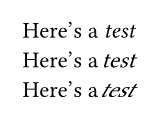
In case it’s important to your use case, the give answers (which are great) perform the skewing operation on text content that already has been emphasized. By using it.body instead of it, the “normal” text will be skewed.
/*
Normal italics
*/
Here's a _test_\
/*
Perform a skew on "normal" text
*/
#show emph: it => skew(ax: -17deg, it.body)
#show emph: box
Here's a _test_\
/*
Andrew's solution - performs skew on italicized text
*/
#show emph: skew.with(ax: -17deg)
#show emph: box
Here's a _test_
A font normally only supports either italic or oblique style. The documentation for the option you linked to explains this all much better. If the user needs to use skew, there is probably no oblique style available for the current font.