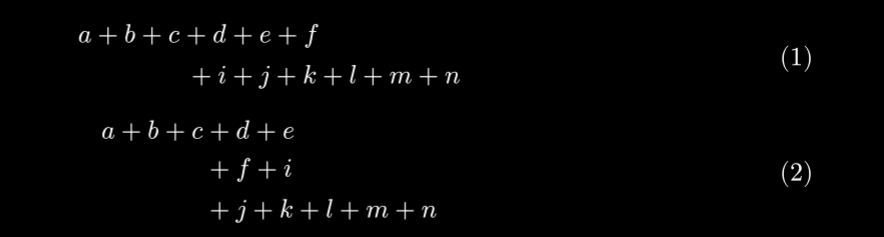
I want to have the option to have equations with multiple rows where each row is labeled separately. I have seen suggestions for equate and this seems to work for that purpose.
The problem is that I sometimes (very often) have long equations that I need to break up into multiple lines. These should not be numbered multiple times. Also, I would very much like the first row to be left aligned, all the middle lines centered, and the final line right aligned.
#set math.equation(numbering:"(1)")
$
  a + b + c + d + & e + f             \
        + med i + & j + k + l + m + n
$
$
  a + b + c + & d + e             \
        + med & f + i             \
        + med & j + k + l + m + n
$
Thank you for your answer, but unfortunately, this does not quite cut it. I checked out the other post and also tried all the solutions but none of them work in the context I want.
I basically want to recreate the AMS Math multline environment. At the same time, I also need the align environment from the same document (where I have multiple aligned equations in the same block, each with their own number).
I don’t directly understand how alignment points combine with general left/right alignment of a line and how both can be used at the same time. Is there an Latex example for this (for example on the tex stack exchange?)
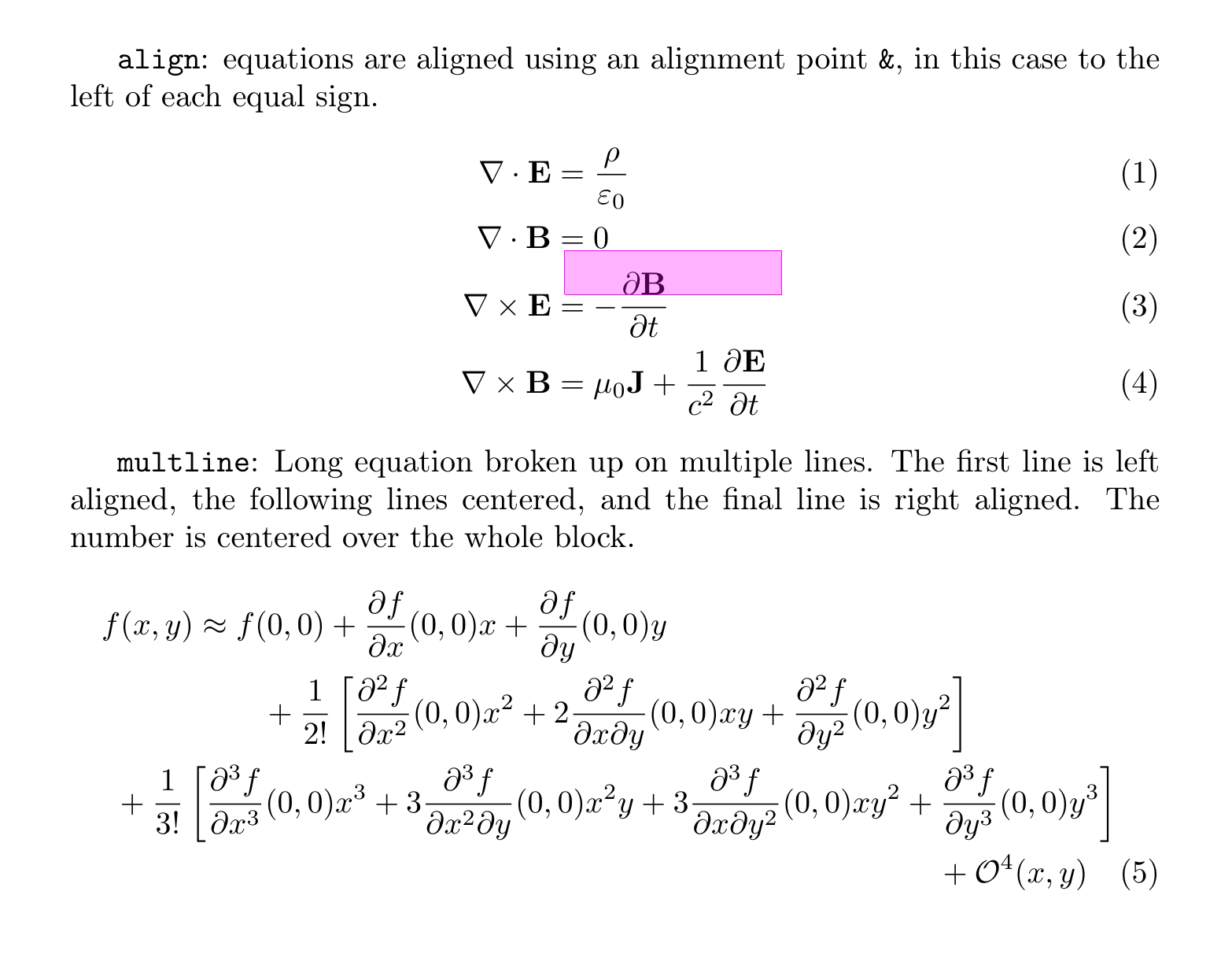
I am sorry for the unclear wording of my question. The left/right alignment is free of any alignment points. I just want to be able to choose between either having multiple aligned equations (see equations (1)–(4) below), and also have the multline equation (see equations (5)) in the same document. But perhaps this is trivial to solve once I know how to get both of them separately.
Here is an example on how align and multline works.
\documentclass[a4paper]{article}
\usepackage[utf8]{inputenc}
\usepackage[T1]{fontenc}
\usepackage[english]{babel}
\usepackage{amsmath}

\begin{document}

\texttt{align}: equations are aligned using an alignment point \texttt{\&}, in this case to the left of each equal sign.
\begin{align}
  \nabla \cdot \mathbf{E} &= \frac{\rho}{\varepsilon_{0}} \\
  \nabla \cdot \mathbf{B} &= 0 \\
  \nabla \times \mathbf{E} &=  - \frac{\partial \mathbf{B}}{\partial t} \\
  \nabla \times \mathbf{B} &= \mu_{0} \mathbf{J} + \frac{1}{c^2} \frac{\partial \mathbf{E}}{\partial t}
\end{align}

\texttt{multline}: Long equation broken up on multiple lines. The first line is left aligned, the following lines centered, and the final line is right aligned. The number is centered over the whole block.
\begin{multline}
  f(x, y) \approx
  f(0, 0)
  + \frac{\partial f}{\partial x} (0, 0) x
  + \frac{\partial f}{\partial y} (0, 0) y
  \\
  + \frac{1}{2!}
  \left[ \frac{\partial^2 f}{\partial x^2} (0,0) x^2
  + 2 \frac{\partial^2 f}{\partial x \partial y} (0,0) x y
  + \frac{\partial^2 f}{\partial y^2} (0,0) y^2
  \right]
  \\
  + \frac{1}{3!}
  \left[ \frac{\partial^3 f}{\partial x^3} (0,0) x^3
  + 3 \frac{\partial^3 f}{\partial x^2 \partial y} (0,0) x^2 y
  + 3 \frac{\partial^3 f}{\partial x \partial y^2} (0,0) x y^2
  + \frac{\partial^3 f}{\partial y^3} (0,0) y^3
  \right]
  \\
  + \mathcal{O}^4(x, y)
\end{multline}
\end{document}
Note that it is also crucial that these type of equations can exist with and without numbering in the same document.
I hope this indicates what I would like. Just a comment, I through together the example above quickly (don’t trust the equations . I also did not spend too much time on formatting the last equation in a very nice way. But hopefully this shows the idea anyway.
I suggest the following solution. I suggested an updated version of multiline in the other thread. And equate can be used to number each line of an equation - so that should have both necessary variants covered.
#import "@preview/equate:0.3.2"
#import "@preview/physica:0.9.7": pdv
#let number-every = equate.equate
#set math.equation(numbering: "(1)")

#show: block.with(width: 10cm, stroke: 1pt, outset: 0.25em)
#let vv = x => math.bold(math.upright(x))

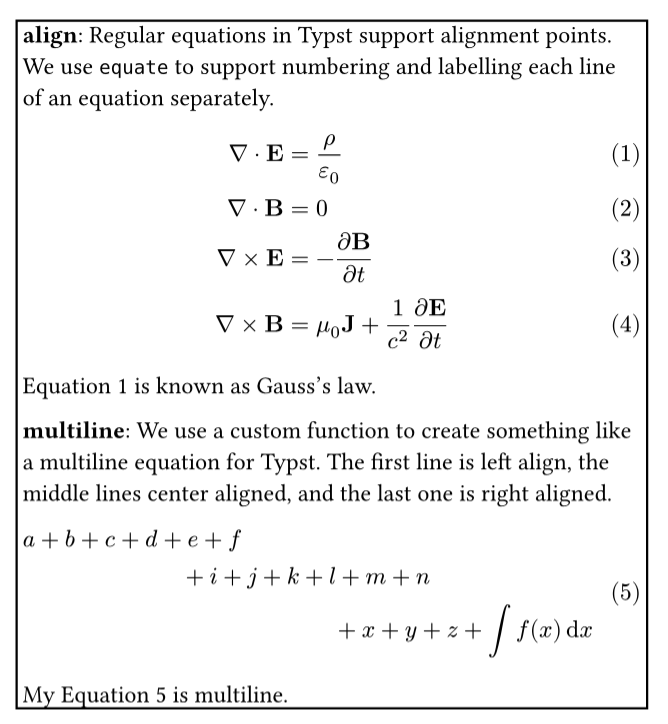
*align*: Regular equations in Typst support alignment points. We use `equate` to support numbering and labelling each line of an equation separately.
#number-every[$
  nabla dot vv(E) &= rho / epsilon_0 #<gauss> \
  nabla dot vv(B) &= 0 \
  nabla times vv(E) &= - pdv(vv(B), t) \
  nabla times vv(B) &= mu_0 vv(J) + 1/c^2 pdv(vv(E), t)
$]

@gauss is known as Gauss's law.

#let add-label(elt, label) = [#elt#label]
/// Create a multiline equation
/// Note: this function is semi-incompatible with equate!
/// (equate doesn't allow the equation to have numbering - you need to label it with equate:revoke to work around this, which removes the ability to put other labels on the equation.)
#let multiline(eq, numbering-pad: 2em, spacing: 0.65em) = {
  if eq.body.func() != [].func() { return eq }
  let label = eq.at("label", default: none)  // preserve the original label
  let parts = eq.body.children.split(linebreak())
  let inner(body, alignment) = {
    set block(spacing: spacing)
    show math.equation: set align(alignment)
    add-label(math.equation(body, block: true, numbering: none), <equate:revoke>)
  }
  if parts.len() <= 1 { return eq }
  let (a, ..middle, c) = parts.map(array.join)
  add-label($
    #block(width: 100%, inset: (right: numbering-pad), {
      inner(a, left)
      middle.map(eq => inner(eq, center)).join()
      inner(c, right)
    })
  $, label)
}


*multiline*: We use a custom function to create something like a multiline equation for Typst. The first line is left align, the middle lines center aligned, and the last one is right aligned.
#multiline[$
  a + b + c + d + e + f \
  + med i + j + k + l + m + n \
  + med x + y + z + integral f(x) dif x
$<my-eq>]

My @my-eq is multiline.
One small question: since accessibility is really important I am a university professor and write a lot of teaching materials.
A bit off topic:
I think I am getting more and more convinced to switch over to Typst for writing physics books. There are some remaining small “issues” that I hope will get handled in the future. One of them is the slightly better equation typesetting of Latex. One thing I noted is the positioning of sub- and superscripts. I think the Latex is much better at this. Hopefully better equation typesetting is in the pipeline…
I think the actual question is missing maybe.
I don’t know about accessibility for this, but I would guess those different ways of doing multiline are incompatible with accessibility. Yet another reason to ask for a Typst feature for this.
Whether equate is accessibility compatible I don’t know either but that could be asked to that package.
We should complete your initial question with the answer that equate can be used with line-by-line numbering and you can still omit numbering from specific lines by inserting #<equate:revoke> on every such line. That could have been an answer to the initial question in your thread title, too.
And the syntax for it can be shortened with a shorter name for the same thing:
#let omit = <equate:revoke>
For Typst’s benefit, write a feature request as a discussion here on the forum or an issue in Typst’s development repository.
 . I also did not spend too much time on formatting the last equation in a very nice way. But hopefully this shows the idea anyway.