How to control the spacing of symbols in math mode?

I would like to control the spacing of certain symbols in math mode. For instance, consider the following example.

$
 ?x + ?y
$

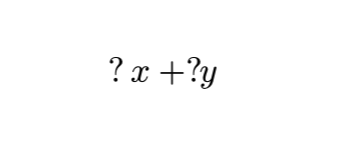
I would like for ?x to be parsed as a single element, however the ? and x are a bit too far away for my liking.

I have considered using "?x" instead, but this changes the font of x, which I would like to avoid. Is there an equivalent in Typst to the ; or ! found in LaTeX’s math mode?

I have found a way to achieve what I wanted using #h(-1pt). I thought I might be able to define a function which displays the glyph to my liking, however this makes it so my custom notation behaves weirdly with other math elements, like the + in my prior example
$
 ?x + ?#h(-1pt) y
$

See here

Hello @Ayhon,

A similar question was recently asked about this in What causes the difference between \triangle in LaTeX vs. $triangle.t$ in Typst? - #2 by hpcfzl

Changing math.class to unary for ? should do it:

#show "?": math.class.with("unary")
$ ?x + ?y $
2 Likes

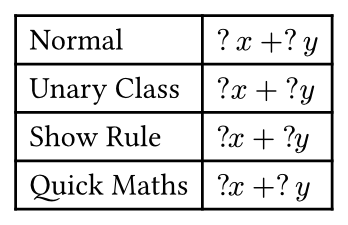
Here is a comparison of a few different methods including using the quick-maths package.

#let normal = {
  $?x + ?y$
}

#let unary-class = {
  show "?": math.class.with("unary")
  $?x + ?y$
}

#let show-rule = {
  show math.equation: it => {
    show "?": {"?"; h(-1pt)}
    it
  }
  $?x + ?y$
}
#let quick-maths = {
  import "@preview/quick-maths:0.2.1": shorthands
  
  show: shorthands.with(
    ($?x$, $?#h(-1pt)x$),
  )
  
  $?x + ?y$
}

#table(
  columns: 2,
  align: (auto, left),
  [Normal], normal,
  [Unary Class], unary-class,
  [Show Rule], show-rule,
  [Quick Maths], quick-maths
)
2 Likes