Dear all,
What are you ‘best practices’ to get the typst equivalent to a docx template like this - https://capsi2026.apsi.pt/templates/Modelo_Artigo_CAPSI2026.docx ?
I already tried to load the docx (errors happened…) then I tried to export the docx to other formats (odt) and read from there, but it never worked :-( - do you have some ‘specially adapted’ protocol for this situation?
Thanks in advance,
Pedro Pimenta
Hello @Pedro_Pimenta,
Welcome to the forum, and thank you for your question.
As you will notice, this seems like a duplicate of How to convert from Microsoft Word (.doc or .docx) to Typst? - #2 by quachpas where you will find a suggestion.
Could you please describe the process you are using that raises that error? Which tool are you using?
A potentially working solution (I have not tried it) would be to use Pandoc:
pandoc input.docx -t typst -o output.typ
and if the document contains images:
pandoc input.docx -t typst --extract-media=media -o output.typ
Dear @vmartel08 ,
Dear All,
Thank you very much for pointing out Pandoc.
I downloaded and installed it, then ran it on https://capsi2026.apsi.pt/templates/Modelo_Artigo_CAPSI2026.docx. The content was converted correctly, but the formatting (title centering, font, font size, etc.) was not  …
…
Since our goal is to convert the template itself, these formatting aspects are actually even more of a priority than the content 
Any other suggestions on how to proceed?
Thanks in advance,
Best regards,
Pedro Pimenta
I’m no DOCX expert, but in my experience with Microsoft Word, one difficulty is that documents often rely heavily on direct formatting, i.e. bold, underline, font size, alignment, etc. instead of consistently using styles.
In other words (no pun intended😉) , a document may look perfectly correct in Word without being semantically structured in a way that a converter such as Pandoc can reliably map to Typst.
For this particular case, I suspect that automatically converting the DOCX template may not be the best approach. It might be more reliable to inspect the Word template and manually apply styles before the conversion.
Again, I haven’t tried it myself.
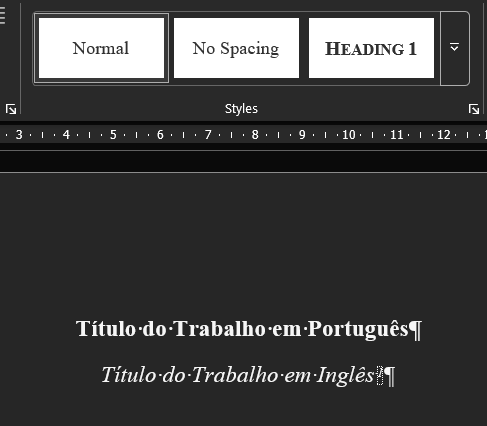
Edit: I have had a look at your document and I can see the Normal style is applied to the title, headings, figures, etc.
I would try and have a look at applying a proper Word styles to the various elements of you document, then attempt conversion again.
Edit: You may need to look at Pandoc Custom Styles as well as Custom Readers and Writers (in Lua). For debugging, you can try:
pandoc test.docx --from docx+styles --to native
This makes it easier to see which styles are being applied and to which part of the document.
Thank you for the direction!
However, thats exactly the ‘manual work’ that I was trying to avoid !