How to create a grid/table with the rendered image on the left side and the source code on the right side?

I am trying to create a grid with the rendered image in the left grid cell and the source code in the right grid cell simultaneously.

But the code fails to render as intended.

Instead, it returns the following error message: import cetz.draw: * …caused this problem: Unclosed delimiter .

Could someone analyse the code and provide an explanation and a solution?

#set page(width:60em, height:auto)
#set align(left)

#let cetz-code = raw([
import "@preview/cetz:0.4.2"
cetz.canvas({
  import cetz.draw: *
  circle((0,0),radius:1)
})
], lang:"typst")

#grid(columns:(1fr,2fr), rows:auto, 
align:(left:horizon+center,right:horizon+left), 
stroke:(paint:black,thickness:1pt,dash:"solid"),
{eval(cetz-code.text,mode:"code")},
{raw(cetz-code.text,lang:"typst",block:true)})
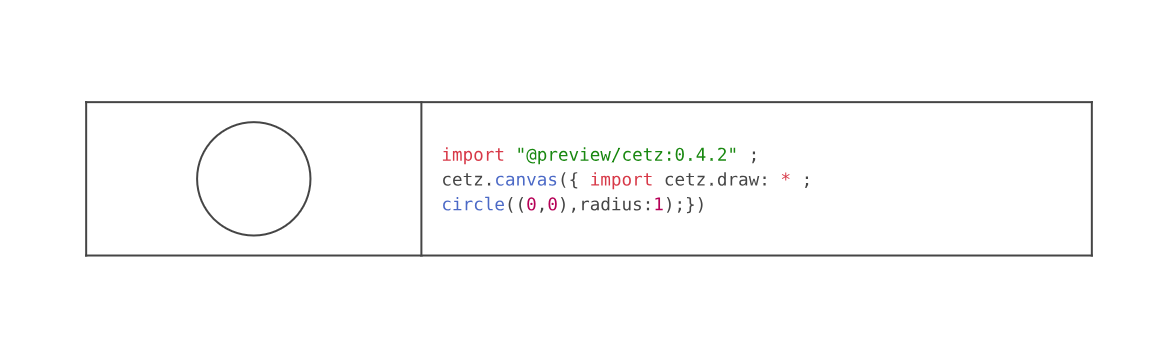
The [, ] syntax is for typst markup that is interpreted (to content), not for raw code. You can use this syntax instead and it will work well:

#let cetz-code = ```typst
import "@preview/cetz:0.4.2"
cetz.canvas({
  import cetz.draw: *
  circle((0,0),radius:1)
})
```

It’s correct. Thanks for your answer.

#set page(width:60em, height:auto)
#set align(left)

#let cetz-code= ```typst import "@preview/cetz:0.4.2" ; 
cetz.canvas({ import cetz.draw: * ; 
circle((0,0),radius:1);}) ``` ;

#grid(columns:(1fr,2fr), rows:auto, align:(horizon+center,horizon+left),
stroke:(paint:black,thickness:1pt,dash:"solid"),
inset:10pt,{eval(cetz-code.text,mode:"code")},
{raw(cetz-code.text,lang:"typc",block:true)})

1 Like