#import "@preview/theorion:0.4.0": *
#import cosmos.fancy: *
// #import cosmos.rainbow: *
// #import cosmos.clouds: *
#show: show-theorion

// 1. Define the main "preparation" environment.
#let (
  preparation-counter,
  preparation-box,
  preparation,
  show-preparation
) = make-frame(
  "preparation",
  "Preparation",
  numbering: "1",
  render: fancy-box.with(
    get-border-color: get-primary-border-color,
    get-body-color: get-primary-body-color,
    get-symbol: get-primary-symbol,
  ),
)
#show: show-preparation


// 2. Define the nested "sub-preparation" environment.
#let (
  subpreparation-counter,
  subpreparation-box,
  subpreparation,
  show-subpreparation
) = make-frame(
  "subpreparation",
  "Preparation", // Use "Preparation" as the text part
  inherited-from: preparation-counter,
  numbering: "1.1", // Use the standard "1.1" numbering pattern
  render: fancy-box.with(
    get-border-color: get-tertiary-border-color,
    get-body-color: get-tertiary-body-color,
    get-symbol: get-tertiary-symbol,
  ),
)
#show: show-subpreparation


// --- Your Example Usage ---
// This body should now work perfectly.

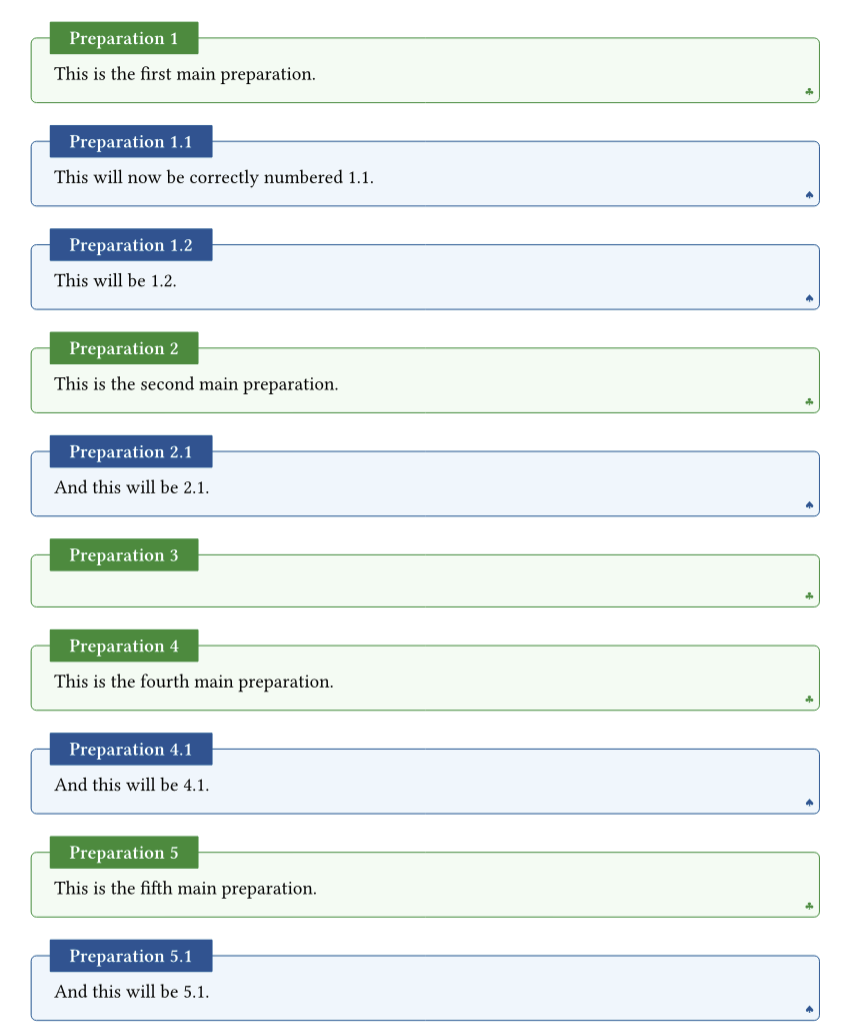
#preparation[
  This is the first main preparation.
]

#subpreparation[
  This will now be correctly numbered 1.1.
]

#subpreparation[
  This will be 1.2.
]

#preparation[
  This is the second main preparation.
]

#subpreparation[
  And this will be 2.1.
]

#preparation[]

#preparation[
  This is the fourth main preparation.
]

#subpreparation[
  And this will be 4.1.
]

#preparation[
  This is the fifth main preparation.
]

#subpreparation[
  And this will be 5.1.
]
Edit: With the use of rich counters you should be able to do something like nested preparation:
// 1. Define the main "preparation" environment.
#let (
  preparation-counter,
  preparation-box,
  preparation,
  show-preparation
) = make-frame(
  "preparation",
  "Preparation",
  numbering: "1.1",
  inherited-from: preparation, // Doesn't work
  render: fancy-box.with(
    get-border-color: get-primary-border-color,
    get-body-color: get-primary-body-color,
    get-symbol: get-primary-symbol,
  ),
)
#show: show-preparation

#preparation[
  This is the first main preparation.
  #preparation[This will now be correctly numbered 1.1.]
]
I am not sure how. Perhaps best to contact the package author? @OrangeX4
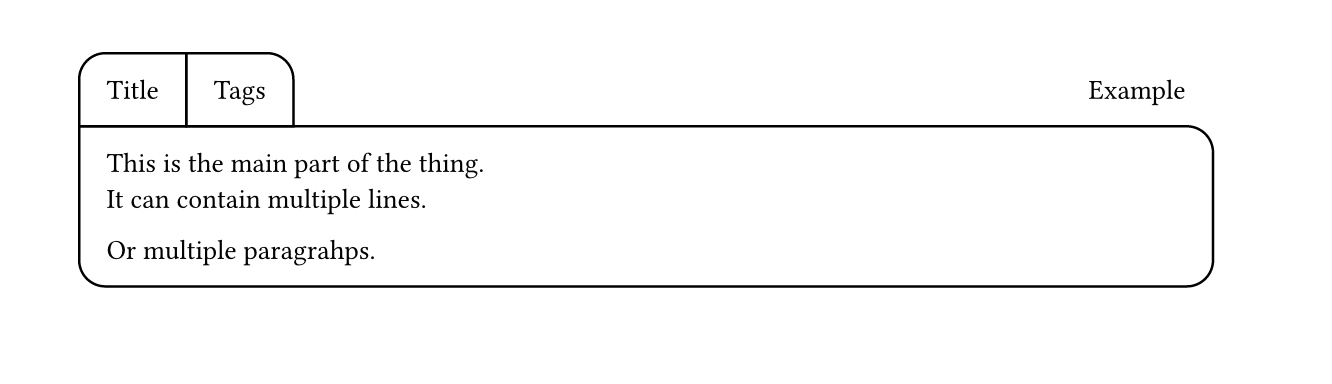
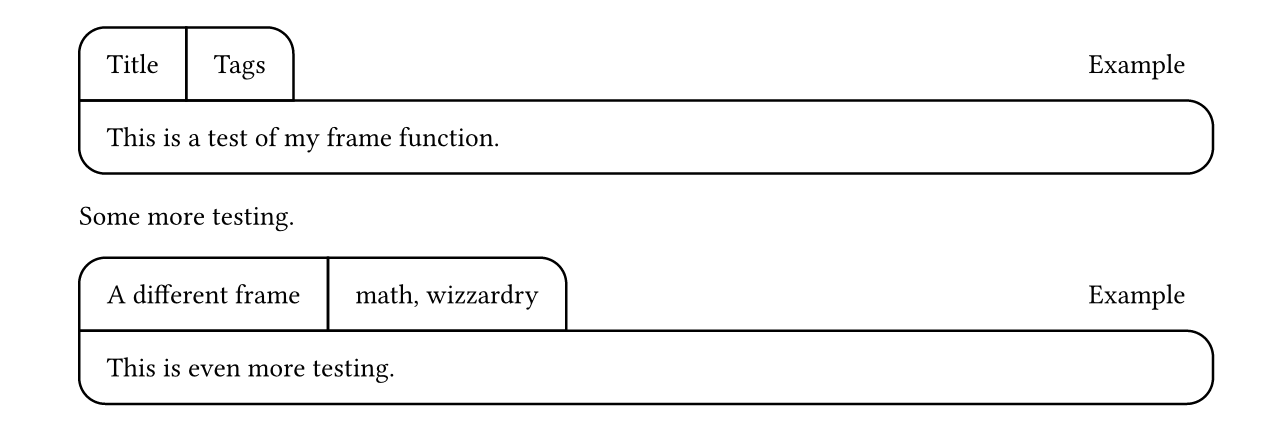
I think you would be better off recreating everything on your own. As an exercise, I started to recreate the frame-it layout (I’m a typst beginner). This is where I got:
#let my_radius = 1em
#let my_stroke = black

#block(width: 100%, below: 0pt)[
  #box(
    stroke: my_stroke,
    inset: my_radius,
    radius: (top-left:my_radius),
  )[Title]#box(
    stroke: my_stroke,
    inset: my_radius,
    radius: (top-right:my_radius),
    )[Tags]
  #h(1fr)
  #box(inset: my_radius)[Example]
]
#block(
  width: 100%,
  stroke: my_stroke,
  inset: my_radius,
  radius: (
    bottom-left: my_radius,
    bottom-right: my_radius,
    top-right: my_radius,
   ),
  )[
  This is the main part of the thing.\
  It can contain multiple lines.

  Or multiple paragrahps.
]
So, as I see it, the frame is actually two blocks (~lines). The first block does not have a border, the second one does. The first block consists of a ‘Title’, next are the ‘Tags’, then some infinite spacing #h(1fr) that pushes ‘Example’ to the right. I use boxes around ‘Title’ and ‘Tags’ to specify the border and the radii of the four corners. ‘Example’ needs the box around it to align it with the other boxes. See the documentation for rectangle.
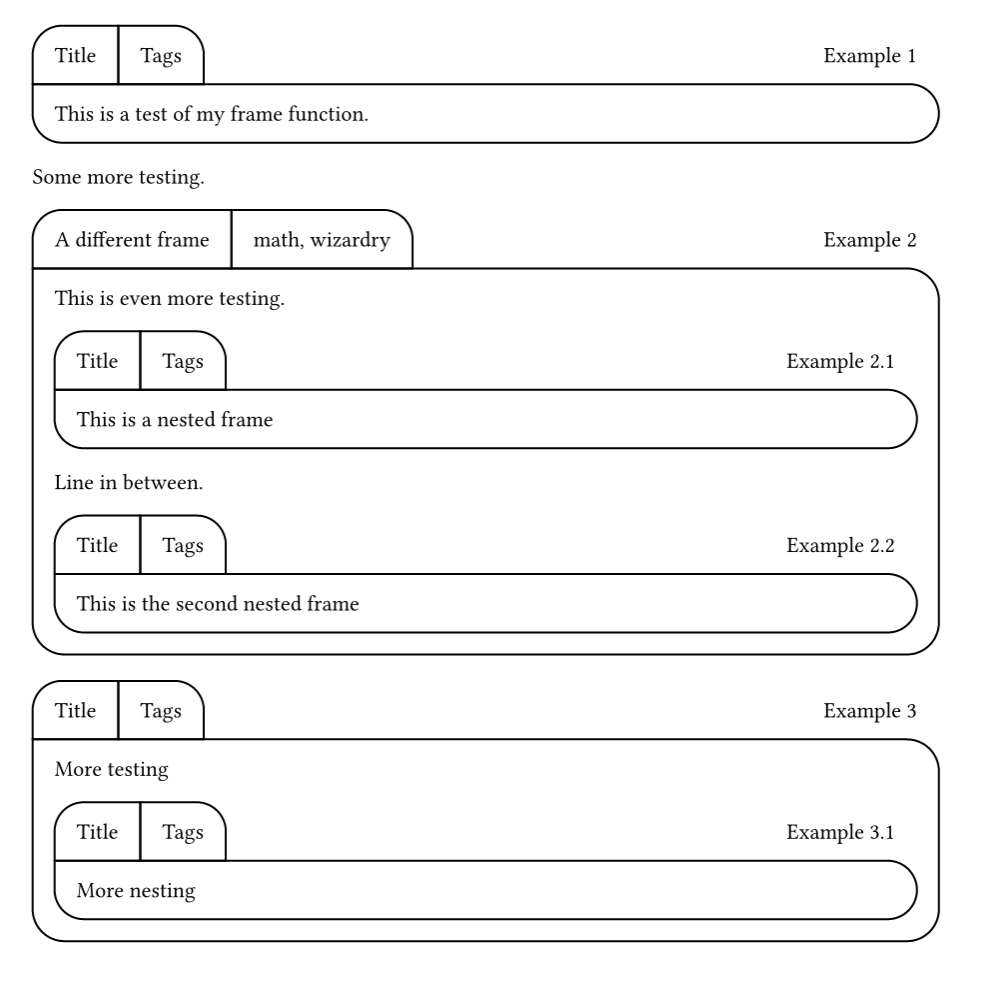
Next stop, make it a function, implement the counter and detect nested use.
#let frame_counter = counter("1.1")
#let frame_nesting_level = state("frame_nesting_level", 0)

#let frame(title: "Title", tags: "Tags", stroke: black, inset: 1em, content) = {
  let radius = (1em + inset * 2) / 2
  frame_nesting_level.update(c => c + 1)
  context(
    frame_counter.step(
      level: frame_nesting_level.get()
    )
  )
  block(width: 100%, below: 0pt, {
    box(title,
      stroke: stroke,
      inset: inset,
      radius: (top-left:radius),
    )
    box(tags,
      stroke: stroke,
      inset: inset,
      radius: (top-right:radius),
    )
    h(1fr)
    context(
      box(
        [Example #frame_counter.display()],
        inset: inset,
      )
    )
  })
  block(
    content,
    width: 100%,
    stroke: stroke,
    inset: inset,
    radius: (
      bottom-left: radius,
      bottom-right: radius,
      top-right: radius,
    ),
  )
  frame_nesting_level.update(c => c - 1)
  // I need to use the state to get the update to stick
  // but we don't want to show it.
  place(hide(context(frame_nesting_level.get())))
}

#frame[This is a test of my frame function.]

Some more testing.

#frame(title: [A different frame], tags: [math, wizardry])[
  This is even more testing.
  #frame[This is a nested frame]
  Line in between.
  #frame[This is the second nested frame]
]

#frame[
  More testing
  #frame[More nesting]
]
Hope this helps!
The documentation for counter and state will surely help you understand what I wrote.