Here’s a DFA diagram in one of the exercises for my Compilers course:
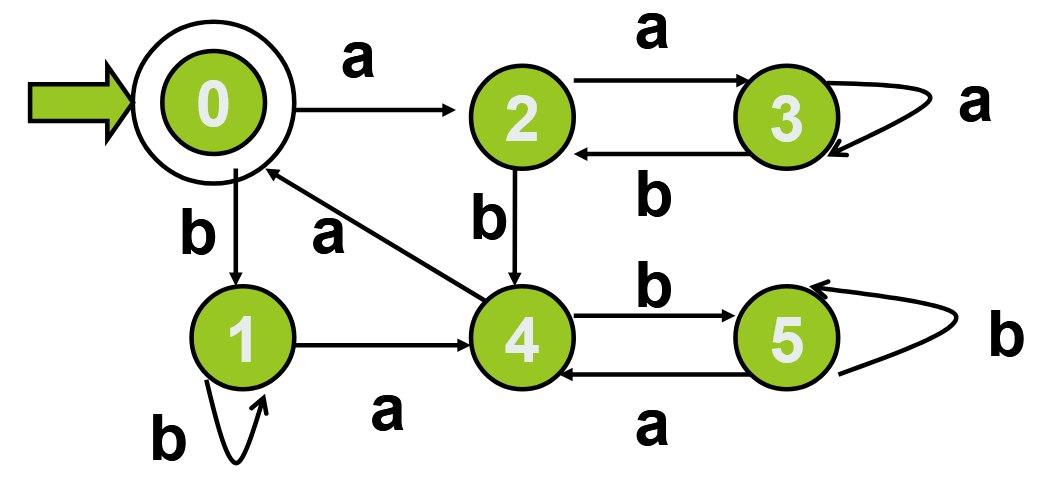
And here’s what I’ve got for now:
#figure(
  diagram(
    label-sep: 0.1em,
    node-fill: green,
    node-stroke: 0.1em + black,

    node((0, 0), $0$, name: <0>, extrude: (0, 0.2em), outset: 0.2em),
    edge(<0>, <1>, $b$, "->"),
    edge(<0>, <2>, $a$, "->"),
    node((0, 1), $1$, name: <1>),
    edge(<1>, <1>, $a$, "->", bend: -135deg),
    edge(<1>, <4>, $a$, "->"),
    node((1, 0), $2$, name: <2>),
    edge(<2>, <3>, $a$, "->", shift: 0.2em),
    edge(<2>, <4>, $b$, "->"),
    node((2, 0), $3$, name: <3>),
    edge(<3>, <2>, $b$, "->", label-sep: -1em, shift: 0.2em),
    edge(<3>, <3>, $a$, "->", bend: 135deg),
    node((1, 1), $4$, name: <4>),
    edge(<4>, <0>, $a$, "->"),
    edge(<4>, <5>, $b$, "->", shift: 0.2em),
    node((2, 1), $5$, name: <5>),
    edge(<5>, <4>, $a$, "->", label-sep: -1em, shift: 0.2em),
    edge(<5>, <5>, $b$, "->", bend: -135deg),
  ),
)
It looks like this in my editor:
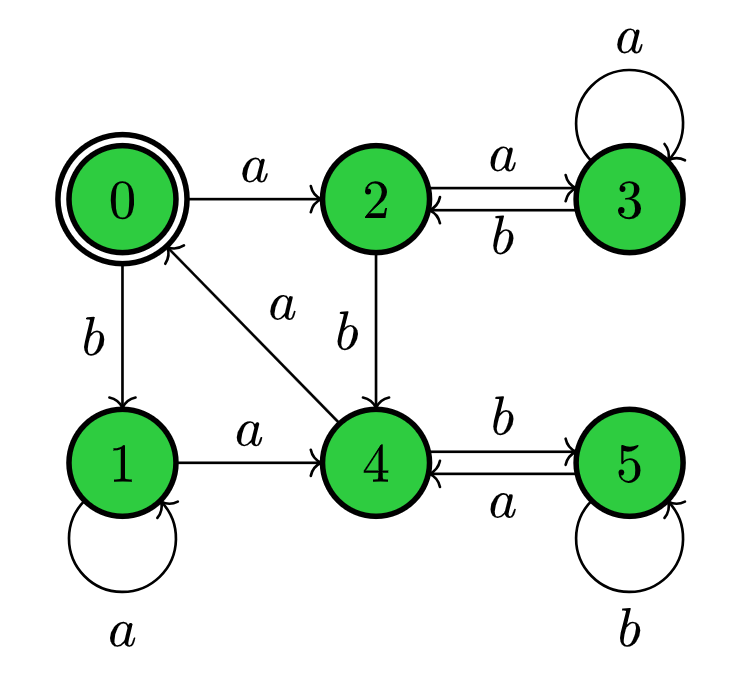
As you can see, it’s similar but not completely the same. I mainly have two questions:
-
I drew the back-and-forward edges with labels by setting a negative
label-sep, which I think is not quite fitting for what the value should mean. Is there any better way to do it? I tried setting thelabel-anchorattribute, but the resulting gap between the label and the edge was way smaller than I predicted. -
The self-edges on node 3 and 5 should be on the right of their nodes. I didn’t find out how to do this.
Thanks for your help.