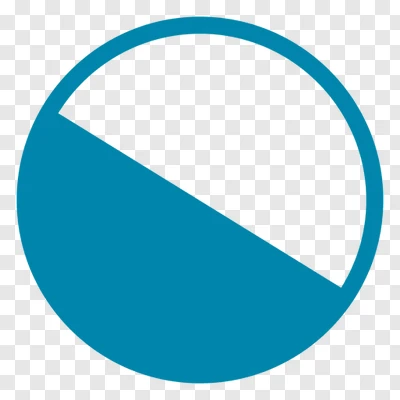
You can use a sharp gradient as the fill property of a circle.
#let c = blue
#circle(stroke: c, fill: gradient.linear(c, c.transparentize(100%), angle: -60deg).sharp(2))
Awesome, but it makes it jagged. I figured out what worked for me using this link
Could you post your specific solution, so that other users are able to see it.
Then you could mark your question as solved.
Thanks 
Something like this worked for me:
#let hybrid_circle(top_color, bot_color) = canvas({
  import draw: *

    merge-path(
      fill: top_color,
      stroke: none,
      {
      arc((0,0), start: 45deg, stop: 360deg, radius: 8pt, anchor: "origin")

    })

    merge-path(
      fill: bot_color,
      stroke: none,
      {
      arc((0,0), start: 45deg, stop: -135deg, radius: 8pt, anchor: "origin")
      }
    )

})
That’s not basic Typst. It’s using Typst with 3rd-party packages. CeTZ uses very advanced Typst under the hood.
Also, your example does not compile.
I hope someone knows how to do it without CeTZ
A non-CeTZ solution:
#let thisShape(dia, angle: 135deg, col: blue) = {
  let a = dia / 2
  let b = 0.55342925736 * a
  let c = 0.99873327689 * a

  let o(x, y) = {
    (a + x, a + y)
  }

  rotate(
    angle,
    curve(
      fill: col,
      stroke: col,

      curve.move(o(0mm, a)),
      curve.cubic(o(b, c), o(c, b), o(a, 0mm)),
      curve.cubic(o(c, -b), o(b, -c), o(0mm, -a)),
      curve.close(mode: "straight"),

      curve.cubic(o(-b, c), o(-c, b), o(-a, 0mm)),
      curve.cubic(o(-c, -b), o(-b, -c), o(0mm, -a)),

      curve.cubic(o(-b, -c), o(-c, -b), o(-a, 0mm)),
      curve.cubic(o(-c, b), o(-b, c), o(0mm, a)),
    )
  )
}

#thisShape(2cm)
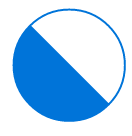
I actually didn’t know how to draw this shape. I had to learn how using the curve documentation and this site which explains how to approximate a circle using a bezier curve.
It was a fun challenge to try and solve. Maybe you wouldn’t find it so fun, but don’t doubt yourself. "Things are only impossible until they’re not"¹, and often times the difference is learning something new.
Another option would be to use a clipped box and turn it into a circle by setting the radius size to 50% and drawing a polygon inside:
#let this-shape(radius: 1cm) = {
  box(width: 2 * radius, height: 2 * radius, radius: 50%, stroke: blue, clip: true,
    polygon(
      fill: blue,
      stroke: blue,
      (0%, 0%),
      (100%, 100%),
      (0%,  100%),
    )
  )
}

#this-shape(radius: 1cm)
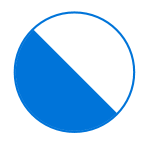
Or if you for whatever reason want to rotate the inner thingy:
#let this-shape(radius: 1cm, angle: -45deg) = {
  box(width: 2 * radius, height: 2 * radius, radius: 50%, stroke: blue, clip: true,
  rotate(
    angle,
    origin: right+horizon,
    polygon(
      fill: blue,
      stroke: blue,
      (0%, 0%),
      (50%, 0%),
      (50%, 100%),
      (0%,  100%),
    )
  )
  )
}

#for i in range(0, int(90deg/15deg)+1) {
  this-shape(radius: 5mm, angle: i * -15deg) + h(1mm)
}
