I want my Table of Contents (Outline) to skip the initial Level 1 headings (e.g., Introduction, Foreword) and start listing entries from Level 2.
Example
= Introduction // should NOT appear in TOC
= Foreword     // should NOT appear in TOC

#outline(title: "Table of Contents")

== Start Here  // first TOC entry
=== Details    // also appears
Desired TOC
*Table of Contents*
1. Start Here ................. 3
 1.1 Details .................. 4
Question:
What’s the best way to do this in Typst?
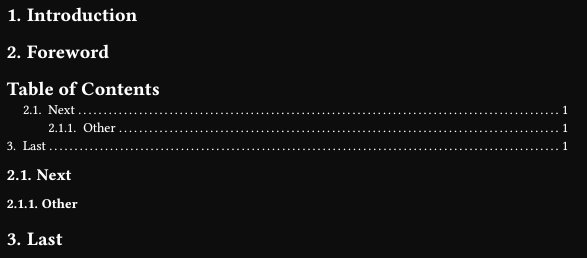
#set heading(numbering: "1.")
#set outline(title: "Table of Contents")

#set heading(outlined: false)
= Introduction
= Foreword
#set heading(outlined: true)
#outline()
== Next
=== Other
= Last
A more clean (kind of) but hacky way is to dynamically apply that styling:
#set heading(numbering: "1.")
#set outline(title: "Table of Contents")

// Exclude any headings that are before outline.
#show: doc => {
  let index = doc.children.position(x => x.func() == outline)
  set heading(outlined: false)
  doc.children.slice(0, index + 1).join()
  if doc.children.len() <= index + 2 { return }
  set heading(outlined: true)
  doc.children.slice(index + 2).join()
}

= Introduction
= Foreword
#outline()
== Next
=== Other
= Last
Or you can manually add label to the few headings, but you won’t be able to reference them.
#set heading(numbering: "1.")
#set outline(title: "Table of Contents")

#show <not-outlined>: set heading(outlined: false)

= Introduction <not-outlined>
= Foreword <not-outlined>
#outline()
== Next
=== Other
= Last
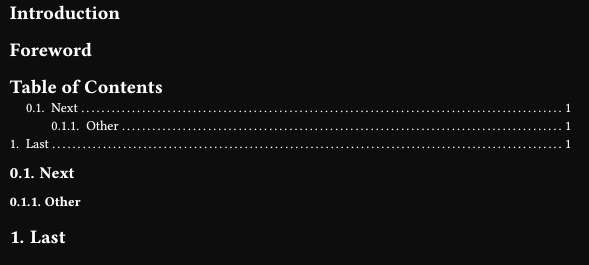
You can’t make 2nd level heading into 1st level, if there are more 1st level headings below. So the numbering will be different. The numbering can be removed to reset it:
// #set heading(numbering: "1.")
#set outline(
  title: "Table of Contents",
  target: selector(heading.where(outlined: true)).after(outline),
)

#set heading(numbering: none)
= Introduction
= Foreword
#set heading(numbering: "1.")
#outline()
== Next
=== Other
= Last