I’m preparing a question paper that is divided into several sections. Each section contains questions with different weightage, so I need to keep the sectional structure. However, Typst resets the numbering inside each section.
What I want instead is a single continuous question numbering sequence across all sections (e.g., Section A has Q1–Q10, Section B continues with Q11–Q20, etc.), without redefining every counter manually.
Is there a way to configure counters or labels so that questions continue numbering across sections while still keeping the sections themselves?
A ‘question’ is not a native typst element, so we need more information about how you have set this up. Are you using some specific package? Or are you referring to a specific level of headings as a question?
A regular typst counter is independent of sections and does not reset between sections already, so that would be an option here.
Maybe you want a part and chapters structure here, then I would recommend this existing solution, the quoted part is the only part you need, just update the numbering patterns to match your desired “A” and “Q1.1”:
Since the counting of the question numbering is not dependent on the sectioning numbers, a custom counter can be used in combination with metadata. The metadata is simply to be able to access different information of the questions when referencing them (for example for an outline!). So if you want to expand it with for example points, you can expand the function parameters and dictionary values.
I think it makes sense to use a custom counter, as other elements such as enums are not impacted by it!
// keep track of the questions
#let question-counter = counter("questions")

#let question(body, name: none) = {
  question-counter.step()

  // using context so .step() is applied directly
  context {
    let number = question-counter.get()
    [#strong(numbering("Q1",..number)) #body #metadata((counter: number, body: body))#label("question:" + if name != none { str(name) } else { str(number.first()) })]
  }
}


// defines how questions are display when referenced via `@...`.
#show ref: it => {
  if str(it.target).contains("question") {
    // customize the styling here!
    link(it.location(),[Question #numbering("1",..it.element.value.counter)])
  } else {
    it
  }
}

/*---------------------------------------------*/

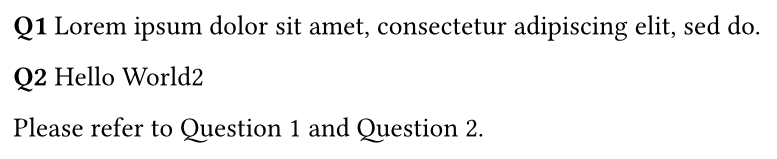
#question(name: "blabla")[#lorem(10)]

#question[Hello World2]

Please refer to @question:blabla and @question:2.
With the functions and variables from above applied to the following example
#question(name: "blabla")[#lorem(10)]

#question[Hello World2]

Please refer to @question:blabla and @question:2.