The behavior of line stroke styling has changed between CetZ 0.4.1 and CetZ 0.4.2, as shown below. In the latest version, the stroke styling of a line is also applied to its marks, which wasn’t the case in previous versions.
#import "@preview/cetz:0.4.1": canvas, draw

CetZ 0.4.1:
#canvas({
  import draw: *
  line((0, 0), (2, 0),
    stroke: (dash: "dashed"),
    mark: (end: ">", scale: 1.2)
  )
})

#import "@preview/cetz:0.4.2": canvas, draw

CetZ 0.4.2:
#canvas({
  import draw: *
  line((0, 0), (2, 0),
    stroke: (dash: "dashed"),
    mark: (end: ">", scale: 1.2)
  )
})
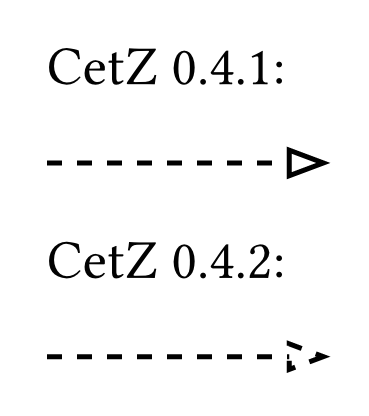
Is this a bug? How to reproduce the upper arrow in CetZ 0.4.2?