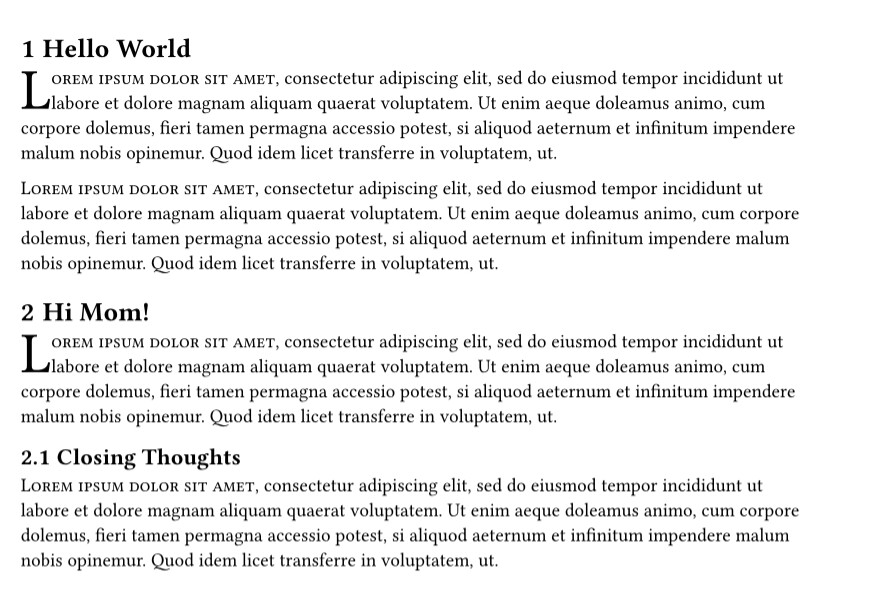
Yes, you can match the first n words with regex and apply any styling you want:
#import "@preview/t4t:0.4.3": get

#show par: it => {
  let b = get.text(it.body)
  let m = b.match(regex("^.((?:[^ ]* ){5})"))  // Change 5 to anything
  if m == none { return it }
  show m.captures.first(): smallcaps
  it
}
One downside with this approach is that it will also stylise other occurences of those same n words if they appear in the same order. I doubt this will be an issue in practice, but if it turns out to be then you can use states to prevent this.
The simplest would be to make heading update a state and conditionally apply dropcaps based on that state:
#import "@preview/droplet:0.3.1": dropcap

#let do-dropcap = state("do-dropcap", false)
#show heading.where(level: 1): it => it + do-dropcap.update(true)

#show par: it => context {
  if do-dropcap.get() {
    dropcap(/* custom params here */ it.body)
  }
  else {
    it
  }
} + do-dropcap.update(false)
Note that if you use both in combination with eachother, the rule applying smallcaps must come after the one applying dropcaps due to how typst applies show rules.
Full code
#import "@preview/t4t:0.4.3": get
#import "@preview/droplet:0.3.1": dropcap

#set heading(numbering: "1.1")

#let do-dropcap = state("do-dropcap", false)
#show heading.where(level: 1): it => it + do-dropcap.update(true)

#show par: it => context {
  if do-dropcap.get() {
    dropcap(/* custom params here */ it.body)
  }
  else {
    it
  }
} + do-dropcap.update(false)

#show par: it => {
  let b = get.text(it.body)
  let m = b.match(regex("^.((?:[^ ]* ){5})"))  // Change 5 to anything
  if m == none { return it }
  show m.captures.first(): smallcaps
  it
}


= Hello World

#lorem(50)

#lorem(50)

= Hi Mom!

#lorem(50)

== Closing Thoughts
#lorem(50)