How to globally modify the font of math formulas and code blocks?
Changing the global text style doesn’t seem to work.
 #set text(
    font: ("Noto Serif CJK SC"),
    lang: "zh",
    region: "CH",
    size: 12pt,
    weight: "regular"
  )
How to globally modify the font of math formulas and code blocks?
Changing the global text style doesn’t seem to work.
#set text(
font: ("Noto Serif CJK SC"),
lang: "zh",
region: "CH",
size: 12pt,
weight: "regular"
)
This should work
#show math.equation: set text(font: "Noto Serif CJK SC")

#show raw: set text(font: "Noto Serif CJK SC")
What is the default font of math formulas in Typst?
#show math.equation: context(panic(text.font))

$a$
This code shows that it’s New Computer Modern Math.
For math you need to select a math font, not just any font. Typst will warn about this, so that information will be clear in the process. Looking at various latex/CTAN resources can be a good way to find new math fonts.
For example in this post, there’s a long overview of various math fonts. Since these are OpenType fonts, then they should all be compatible with Typst and you can use them (as long as you install them): https://tex.stackexchange.com/questions/425098/which-opentype-math-fonts-are-available
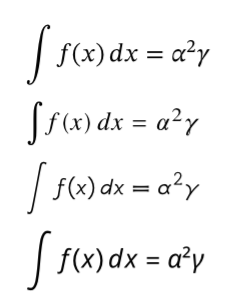
Here are some examples with math fonts that are available in the Typst webapp:
#let equation = box($ integral f(x) thin d x = alpha^2 gamma $)
#show math.equation: set text(font: "STIX Two Math")
#equation\
#show math.equation: set text(font: "TeX Gyre Termes Math")
#equation\
#show math.equation: set text(font: "GFS Neohellenic Math")
#equation\
#show math.equation: set text(font: "Noto Sans Math")
#equation\
See documentation: https://typst.app/docs/reference/math/#math-fonts.