How to horizontally align math symbols by their center when writing a multi-line block?

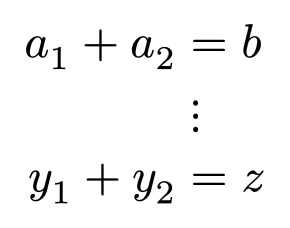
Let’s say I have a multi-line block of math: a_1 + a_2 = b on line 1, dots.v on line 2, and y_1 + y_2 = z on line 3. This is the initial code:

$
a_1 + a_2 = b \
dots.v \
y_1 + y_2 = z
$

By default, Typst renders this:

I would like to align dots.v on line 2 with the center of the equals signs on lines 1 and 3. I tried using alignment points:

$
a_1 + a_2 &= b \
&dots.v \
y_1 + y_2 &= z
$

But that renders like this:

Even if I wrap the equals signs and ellipses with two alignment points (e.g.: &=& and &dots.v&), it renders the same.

Is there a (preferably easy/quick) way to horizontally align math symbols by their centers, so that vertical ellipses is in line with the center of equals signs, etc.?

Hi, welcome to the forum!

Using Matrix Function – Typst Documentation is an option:

$
  mat(
    delim: #none,
    a_1 + a_2, =, b;
    , dots.v;
    y_1 + y_2, =, z;
  )
$

(If you formula already has ,, replace them with \, when passing to mat.)

2 Likes

Thank you! Would there be a potential downside of using this method with regards to accessibility, such as with screen readers, etc.?

1 Like

Is it possible to change the width of the bounding box for dots.v to match the width of the bounding box for =? That way, when using the alignment character &, dots.v and = would align horizontally by their centers.

I’ve found out how to do it: use the box function and set the width of the box using measure(math.eq).width.

Like so:

#show math.dots.v: context{
  box(
    width: measure(math.eq).width, 
    math.dots.v
  )
}

This changes the width of dots.v to that of =, but does so for all instances of dots.v which may be undesirable (such as in matrices, because the column width may change).

So as a middle ground, I went with measure($..$) instead; this expands the width of dots.v enough that it is aligned over the = in a system, but only barely increases the width of dots.v in other places like matrices, etc.

Edit: Another method is to use a variable instead of a show rule. That way, you can use it only in the contexts you want. Like this:

#let dveq = context{
  box(
    width: measure(math.eq).width,
    math.dots.v
  )
}

Do either of the above methods compromise accessibility of math equations for screen readers? (I would suspect not in this specific use case)

3 Likes