How to include standalone CeTZ in a figure?

I want to have my CeTZ in a standalone file.
Just like Pacioli’s construction of the icosahedron.
Then I want to include/import the file into a figure.

#figure(
  include "img/cetz.typ"
)

However this gives the error that I am not allowed to have a page configuration inside a container.

error: page configuration is not allowed inside of containers
  ┌─ cetz.typ:4:1
  │
4 │ #set page(width: auto, height: auto, margin: .5cm)
  │  ^^^^^^^^^^^^^^^^^^^^^^^^^^^^^^^^^^^^^^^^^^^^^^^^^

Is there a way to include a standalone CeTZ file without having to compile it to an SVG first?

You can define the drawing inside a function in the diagram file, then in the main file only include import only that function.
This way the diagram document will still produce an output but there is no page configuration seen by the main document.

cetz.typ

#set page(
  width: auto,
  height: auto,
  margin: 1mm,
)

#let draw-shape() = {
  import "@preview/cetz:0.4.2"
  cetz.canvas({
    import cetz.draw: *
    circle((0, 0))
    line((0, 0), (2, 1))
  })
}

#draw-shape()

main.typ

#figure(
  {
    import "cetz.typ": draw-shape
    draw-shape()
  },
  caption: [This figure was imported]
)
3 Likes

There’s no need to set page for such a figure in the first place.

Since CeTZ itself provides a padding argument, this is also completely sufficient:

cetz.typ:

// Example by @samuelireson
#import "@preview/cetz:0.4.2": canvas, draw, tree

#canvas(
  padding: 0.5cm,
  ...
)

main.typ:

#show figure: rect
#figure(include "cetz.typ")
Output

Used rect to prove the same padding is added.


Assuming you will end up having multiple drawings, I would advise for this approach:

cetz.typ:

// Example by @samuelireson
#import "@preview/cetz:0.4.2": canvas, draw, tree

#let planes = canvas(
  padding: 0.5cm,
  ...
)

#let more = ...

main.typ:

#import "cetz.typ" as drawings

#figure(drawings.planes)
#figure(drawings.more)

Depends what you want to achieve with the diagram data in a separate file. Setting up the page and drawing a single diagram means that the diagram Typst file can be compiled to a single PDF with the diagram exactly as you want it to appear.

You’re right, of course, that setting the page is not needed by the main document. I’m not sure now what the ultimate goal is. Maybe you can give us the extra context @WiredMic.

My thought was that it would be smart to have a standalone figure that describes everything.
This figure could then be shared or stored in a seperate place.
Then i would just import the figure into Typst where i need it.
I am going to try @gezepi solution tomorrow and see how that looks.
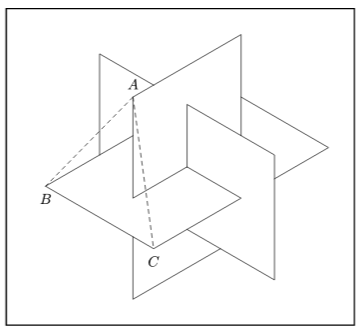
I found out that if I use a combination of @gezepi and @hpcfzl solutions, then it works like a charm.

First set

#set page(width: auto, height: auto, margin: 0cm)

Then control the padding with

#let draw-shape() = {
  import "@preview/cetz:0.4.2": *
  canvas(padding: 2cm, {
  ...
  })
}
#draw-shape()

Then in the main document

#figure(
  {    
    import "cetz.typ": draw-shape
    draw-shape()
  }
)

This gives identical figures, when compiling as a standalone document and as part of a bigger document.

2 Likes