How to indent only List Level 1

Please consider the following code:

List:

- List_1, Level 1, Item 1
- List_1, Level 1, Item 2
  - List_1, Level 2, Item 1
  - List_1, Level 2, Item 2
- List_1, Level 1, Item 2
  - List_1, Level 2, Item 1
  - List_1, Level 2, Item 2
  - List_1, Level 2, Item 3
    - List_1, Level 3, Item 1
    - List_1, Level 3, Item 2
  - List_1, Level 2, Item 4
- List_1, Level 1, Item 3

Other List:

- List_2, Level 1, Item 1
- List_2, Level 1, Item 2
  - List_2, Level 2, Item 1
  - List_2, Level 2, Item 2
- List_2, Level 1, Item 3
  - List_2, Level 2, Item 1
  - List_2, Level 2, Item 2

I want the entire list to be indented by 1 cm. My approach is:

  #show list: it => {
      context {
        let depth = counter(list).get().len()
        
        if depth == 1 {
          pad(left: 1cm)[#it]
        } else {
          set list(indent: 0pt)
          [#it]
        }
      }
    }

But unfortunately, I get the following result.
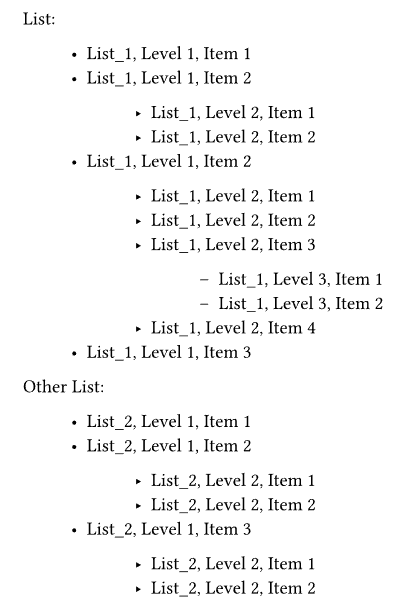
The second and all other list levels should have the default indention.
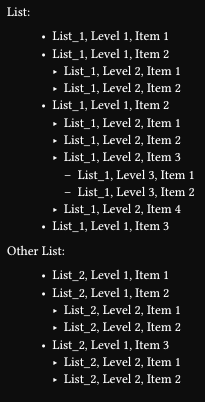
Hi. Use show + set rules like in How can I get diffrent indents for different levels of enums? - #4 by cAtte or How to control spacing between an outer enum and inner bullet list - #3 by Andrew :

#set list(indent: 1cm)
#show list: it => {
  set list(indent: 0pt)
  it
}

It’s incredible how simple it is. Thank you very much!

But with enum-lists it does not work as expected:

  set enum(indent: doc-list-first-level-indent)
  
  show enum: it => {
    set enum(indent: 0pt)
    it
  }

The list level 2 is not aligned with the first list level.

1 Like

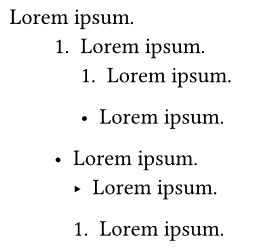
If we want to treat list and enum as a whole and achieve the following effect:


the levels of list and enum cannot be discussed separately. The itemize package provides a solution (in fact, it allows each parameter to be set according to levels (and even items), so it can also be considered as a temporary solution for Add level field to bullet list items for easier format and style minipulation · Issue #4520 · typst/typst · GitHub).

The code to achieve the above effect can be written as follows:

#import "@preview/itemize:0.2.0" as el
#show: el.default-enum-list.with(indent: (2em, auto))
#lorem(2)
+ #lorem(2)
  + #lorem(2)
  - #lorem(2)
- #lorem(2)
  - #lorem(2)
  + #lorem(2)

Or (not using itemize),

  #set enum(indent: 2em)
  #set list(indent: 2em)
  #show list: it => {
    set list(indent: 0pt)
    set enum(indent: 0pt)
    it
  }

  #show enum: it => {
    set list(indent: 0pt)
    set enum(indent: 0pt)
    it
  }
  #lorem(2)
  + #lorem(2)
    + #lorem(2)
    - #lorem(2)
  - #lorem(2)
    - #lorem(2)
    + #lorem(2)

The more I learn about Typst and the more I read here, the more I realize how simple things are compared to Latex.

Thank you very much for your detailed answer!