How to insert a drop cap in each paragraph?

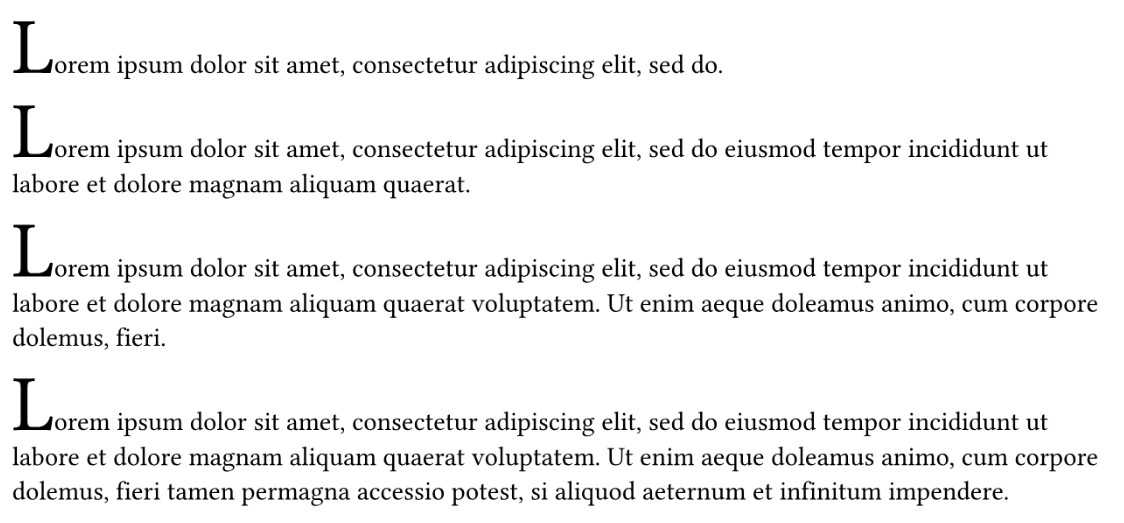
As the header says I would like to start each paragraph with a drop cap (OR just a differently styled character)?

I have a very long text planned, and I dont want to use #dropcap (from droplet) around each paragraph (or #text for the first character). Is one of this even possible?
Any suggestion will be appreciated.

Hi, welcome to the Typst forum! Here’s a proof of concept that works in very simple cases:

#show par: it => {
  if it.at("label", default: none) == <processed> {
    return it
  }
  let (first, ..rest) = it.body.text.clusters()
  [#par(text(3em, first) + rest.join())<processed>]
}

#lorem(10)

#lorem(20)

#lorem(30)

#lorem(40)

Not sure it will be helpful in a real application… It’s difficult to make show rules on par that don’t go haywire at some point!

2 Likes

If you’d rather use dropcap, you can also do something like this:

#import "@preview/droplet:0.3.1": dropcap

#show par: it => {
  dropcap(it.body)
}

#lorem(40)
3 Likes

Thank you both. Will try it and hope for the best :slight_smile:

1 Like