I have the following math block:
$
	a &= b \
	&= min("very long text", \
	&"very long, wait even longer text") \
	&= "something way, way longer than the previous ones"

$
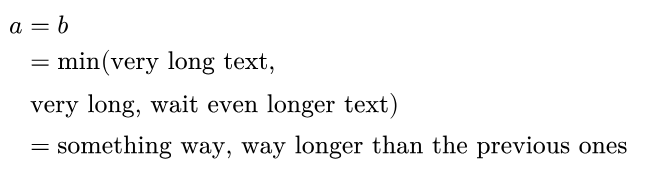
which is displayed as such:
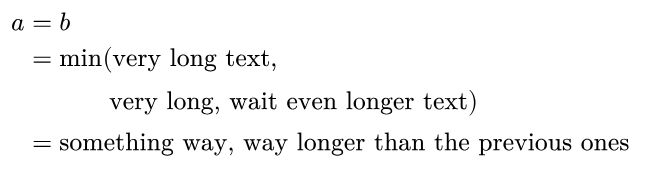
However, I would like to have it look rather like this, with each argument of min aligned with each other:
I tried several ways to use alignment points and using the stack function, but not to avail. Does someone know how this is achieved ?
Last I heard, there is not yet convenient syntax to solve problems like this. As you might have already seen, the following doesn’t work because alignment characters apply to all rows, where rows without alignment characters have them appended at the end:
$
  a &= b \
    &= min(&& "very long text", \
    &      && "very long, wait even longer text") \
    &= "something way, way longer than the previous ones"
$
Here are the best workarounds I’m familiar with, which you might have used already:
$
  a &= b \
    &= min("very long text", \
    &#hide($= min\($)"very long, wait even longer text") \ // use `hide`
    &= "something way, way longer than the previous ones"
$
or
$
  a &= b \
    &= min("very long text", \
    &#h(35pt)"very long, wait even longer text") \ // estimate width
    &= "something way, way longer than the previous ones"
$
First, posts in the questions category must be posed as a question (according to the guidelines How to post in the Questions category - #2)
I’m not at the computer right now, but what you could do is isolate these two lines in a #box to reduce the size of the scope! Don’t forget to use the display math syntax in the box.
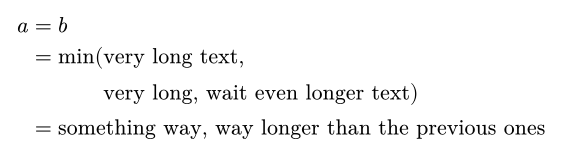
I am now at my computer. So it works with the #box.
$
	a &= b \
	&#box($ = min(&"very long text", \
	&"very long, wait even longer text") $)\
	&= "something way, way longer than the previous ones"
$
2 Likes