How to make an angle bracket macro work with multiple parameters?

I’m new to Typst and would like to use angle brackets for vectors, however, I want to minimize the syntax.

In LaTeX, I use the following:

\newcommand{\anglebr}[1]{\left\langle{#1}\right\rangle}

I tried to do something similar in Typst:

#let anglebr(body) = $lr(chevron.l #body chevron.r)$`

This seems to work for a single parameter, e.g., $anglebr(x)$, but it does not work for multiple: $anglebr(x, y)$. Am I doing anything wrong, and is there an easy way to fix this?
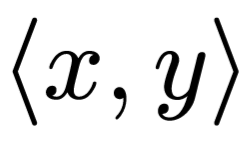
What’s happening is that the arguments aren’t being treated as a single one like they are in LaTeX.

Here’s one possible solution using an argument sink:

#let anglebr(..body) = $lr(chevron.l #body.pos().join($, $) chevron.r)$

$anglebr(x, y)$
Output

Funnily enough, when I was searching for anything simpler, I found exactly the same approach in a past GitHub issue. The more significant difference is in the comma font that’s being used.

4 Likes