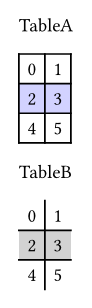
You can create a function for each table style you want to use, then call that function instead of the default table(). One thing this code uses that is not obvious (or wasn’t to me at the beginning) was the use of .with(). For instance, table.with(...) will return a new function that calls table() with the parameters you defined in .with(...). I’m not sure how good of an explanation this is.
#let tableA = table.with(
  fill: (x, y) => if (calc.even(y+1)) {rgb(0, 0, 255, 45)}
)

#let tableB = table.with(
  fill: (x, y) => if (calc.odd(y)) {rgb(0, 0, 0, 45)},
  stroke: (x,y) => (
    top: if (y > 0) {rgb(0,0,0)},
    right: if (x == 0) {rgb(0,0,0)}
  )
)

TableA
#tableA(
  columns: 2,
  ..range(6).map(value => str(value))
)

TableB
#tableB(
  columns: 2,
  ..range(6).map(value => str(value))
)
Also, I see that you used single back-ticks (`) around your example code. This does change the font of the text to better show that it is code, but does not apply any further formatting. In your case because the text was long enough it spilled into a new line making it appear quite messy.
A better way would be to use triple back-ticks (```) as mentioned in this how-to: