$
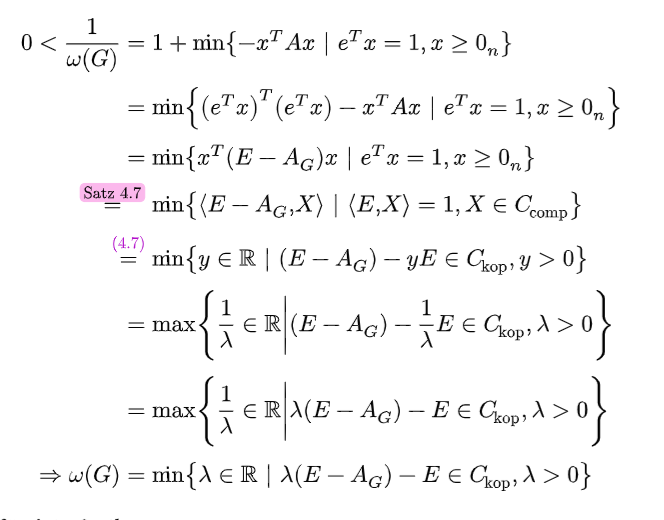
    0 < 1/omega(G) = &1 + min {-x^T A x | e^T x = 1, x >= 0_n} \
    = &min {(e^T x)^T (e^T x) - x^T A x | e^T x = 1, x >= 0_n} \
    = &min {x^T (E - A_G) x | e^T x = 1, x >= 0_n} \
    =^#text[@4.7_satz] &min {angled(E - A_G, X) | angled(E, X) = 1, X in C_comp} \
    =^#text[@-4.7-] &min {y in RR | (E - A_G) - y E in C_kop, y > 0} \
    = &max {lr(1/lambda in RR |) (E - A_G) - 1/lambda E in C_kop, lambda > 0} \
    = &max {lr(1/lambda in RR |)lambda(E - A_G) - E in C_kop, lambda > 0} \
    => omega(G) = &min {lambda in RR | lambda(E - A_G) - E in C_kop, lambda > 0}
  $
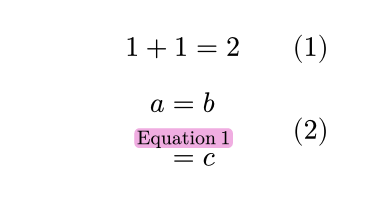
The width of the oversetted relator is the max of itself and the overset text. So just force the overset to have no width: replace #text[@4.7_satz] with #box(width: 0pt)[@4.7_satz]
(note that text doesn’t do anything, #[@4.7_satz] would have been enough. so adding box is what you need; it’s not critical that I got rid of text at the same time)
You can further add baseline: -3pt or something in that direction to your box, to not make the collision with the min so egregious.
Wow, that is simple. I was just going to post a solution where the oversetting is ignored using place, and, because aligning that easily breaks, the equal sign is inside the place, but there is also hidden equal sign outside to make space.
&#box[#hide($=$)#place(bottom + center, $=^#[@4.7_satz]$)]
Why doesn’t & for alignment work inside a function argument? I think that the simplest way would be attach(limits(&=), t: #[@4.7_satz]), but it does not work. More simply, it would be (&=)^#[@4.7_satz], but, for that, parentheses would need to be ignored for displaying.
The problem which I meant is that the parentheses are displayed, and they are just to syntactically group the &=. Without them, the & applies also to the oversetting, not just the = By that they need to be ignored, I meant that they need to be hidden. In LATEX, {, } are only to syntactically group, never displayed. Typst needs something similar in math.