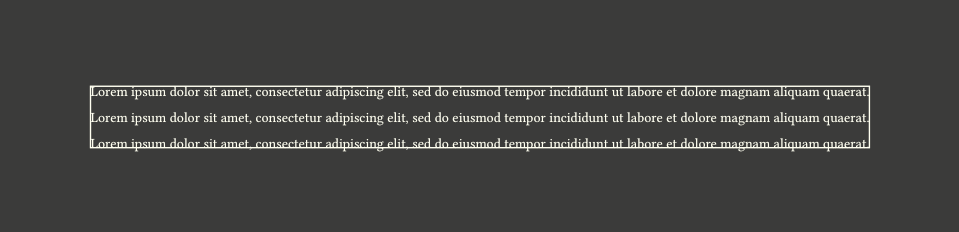
How to measure the effective dimensions of a page set to (width: auto, height: auto)?
measure()yieldsauto;layout(size => size)yieldsfloat.inf * 1pt.
How to measure the effective dimensions of a page set to (width: auto, height: auto)?
measure() yields auto;layout(size => size) yields float.inf * 1pt.Not sure why bottom-right placement ignores margins, but after adjusting for that, it looks like it works:
#import "@preview/scaffolder:0.2.1": get-page-margins

#set page(width: auto, height: auto)

#let get-page-dimentions() = {
  let bottom-right = query(<bottom-right>).first().location().position()
  (
    width: bottom-right.x - get-page-margins().left,
    height: bottom-right.y - get-page-margins().top,
  )
}

#lorem(20)

#lorem(20)

#lorem(20)

#context place(top + left, rect(..get-page-dimentions()))

#place(bottom + right)[#metadata(none)<bottom-right>]
Or, if page.background is not used:
#import "@preview/scaffolder:0.2.1": get-page-margins

#set page(
  width: auto,
  height: auto,
  background: place(bottom + right)[#metadata(none)<bottom-right>],
)

#let get-page-dimentions() = {
  let bottom-right = query(<bottom-right>).first().location().position()
  let margins = get-page-margins()
  (
    width: bottom-right.x - margins.left - margins.right,
    height: bottom-right.y - margins.top - margins.bottom,
  )
}

#lorem(20)

#lorem(20)

#lorem(20)

#context place(top + left, rect(..get-page-dimentions()))
This gets the size of page content, to get page size, just add the margins back.
Right. The top/left subtraction is because bottom-right location is in absolute coordinates, so it includes “addressable rectangle” + top/left margins. And with background the bottom-right location is not bounded by margins, so it’s literally at the bottom-right of the page, hence the subtraction of all 4 margins.