Hi, I’m trying to highlight some formatted text that contains math in my document with some fun colours. I did the following:
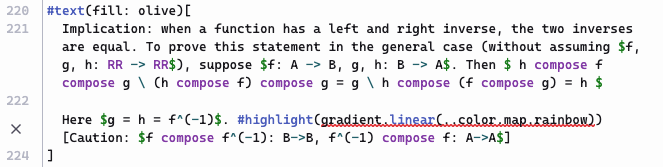
#text(fill: olive)[
  Implication: when a function has a left and right inverse, the two inverses are equal. To prove this statement in the general case (without assuming $f, g, h: RR -> RR$), suppose $f: A -> B, g, h: B -> A$. Then $ h compose f compose g \ (h compose f) compose g = g \ h compose (f compose g) = h $

  Here $g = h = f^(-1)$. #highlight(gradient.linear(..color.map.rainbow))[Caution: $f compose f^(-1): B->B, f^(-1) compose f: A->A$]
]
The compiler is giving me an error:
Error: Expected content, found gradient How to fix this?
Replace the gradient.linear(…color.map.rainbow) with content.
Did you store content in a variable? Insert the variable’s name.
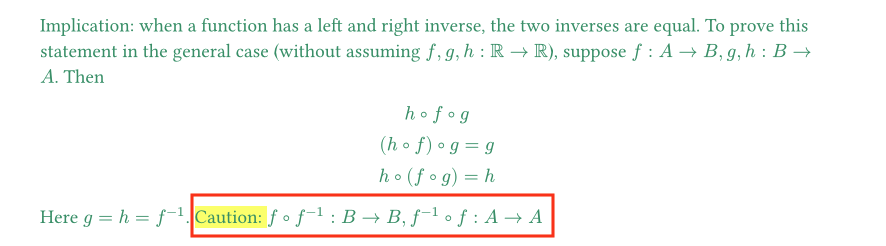
When you call highlight(gradient.linear(...)), the argument is interpreted as the body because it is the only positional argument of the highlight function. This what the error is trying to tell you. Use the named argument highlight(fill: gradient.linear(...)) instead to apply the gradient as the fill of the highlight element.
One additional comment regarding highlight and equations. As you can already see in your second image, the highlight only covers the text. If you want the gradient to extend to the end of the equation, you can wrap everything in a box and set the fill with the linear gradient. You need to play around with the vertical size a bit to make sure that the box has the same extent as the highlight.
Another option would be to use the package mannot – Typst Universe which uses a manually placed Rectangle - Typst Documentation to realize the function markhl(). Note that the function can only be used from within an equation, which requires nested equations if you want the highlight to cover both text and math.
#import "@preview/mannot:0.4.0": markhl

Here $g = h = f^(-1)$. $#markhl(fill: gradient.linear(..color.map.rainbow))[Caution: $f compose f^(-1): B->B, f^(-1) compose f: A->A$]$