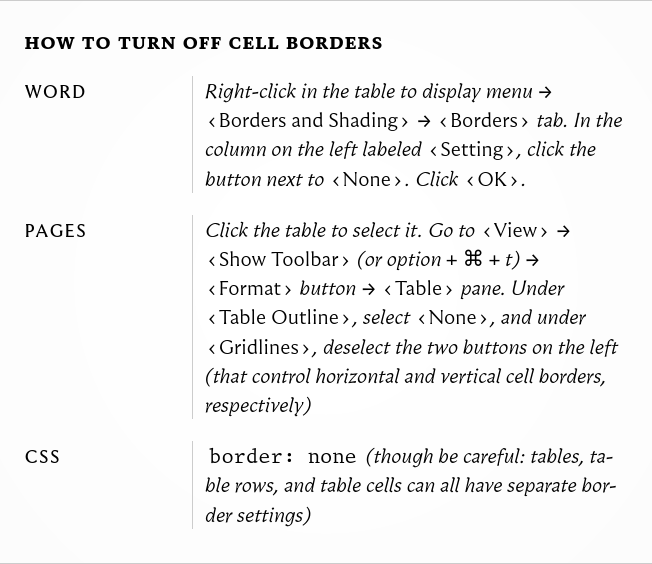
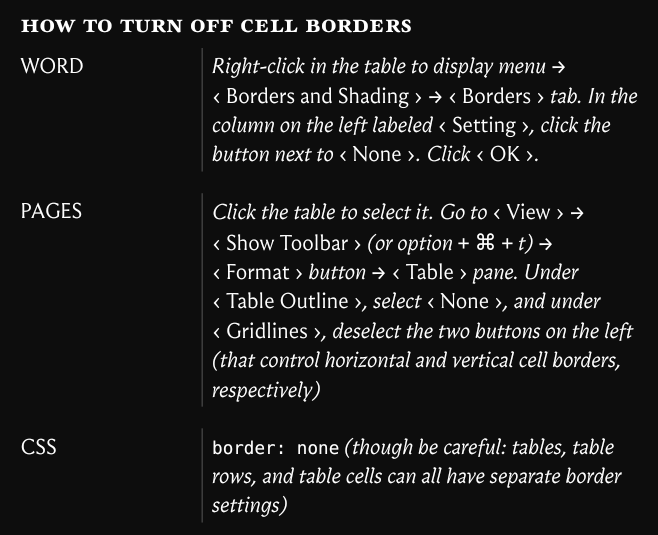
In particular, I want to recreate the border between the two columns, which doesn’t fully span from the top to bottom of each cell, but rather only ~90% of the cell, leaving a gap between the outline of the next cell.
Looking at the css of the book, this is done using margins. However, the table function doesn’t appear to have any margin property. There is the grid function, which has a gutter property, but this would require me to rewrite a big chunk of my document to use grids instead of tables, which isn’t ideal.
Does anyone know how I could recreate a table like the one shown? Thank you in advance.
#set page(width: 146mm, height: auto)
// https://github.com/typst/typst/issues/1920
#set smartquote(quotes: ("‹" + sym.space.nobreak, sym.space.nobreak + "›"))
#show heading: smallcaps
== how to turn off cell borders
#show regex("\"[^\"]+\""): it => emph["#it.text.slice(1, -1)"]
#table(
  columns: (32mm, auto),
  stroke: (x, _) => if x == 1 { (left: 0.1pt) },
  inset: (x, _) => if x == 0 { (left: 0pt, rest: 5pt) } else { 5pt },
  row-gutter: 1em,
  upper[Word],
  emph[Right-click in the table to display menu → "Borders and Shading" →
    "Borders" tab. In the column on the left labeled "Setting", click the button
    next to "None". Click "OK".],

  upper[Pages],
  emph[Click the table to select it. Go to "View" → "Show Toolbar" (or option +
    ⌘ + t) → "Format" button → "Table" pane. Under "Table Outline", select
    "None", and under "Gridlines", deselect the two buttons on the left (that
    control horizontal and vertical cell borders, respectively)],

  upper[CSS],
  [`border: none` _(though be careful: tables, table rows, and table cells can
    all have separate border settings)_],
)