I was messing about with typst styling rules while I was trying to get a specific style. What I had in mind was to apply a certain style to all the text before the first header and a different style to all the text after the first header. Here is an example I set up with my own crude implementation.
#let color-state = state("color", false)

#show heading: it => {
  set text(fill: primary-red)
}
#show par: it => {
  context {
    let is-action = color-state.get()
    let txt-color = if is-action { black } else { red }
    set text(fill: txt-color)


    block(
      text(it.body)
    )
  }
}

#show heading.where(level: 4): it => block[
  #text(it.body, size: 1.3em, fill: red, weight: "light")
  #v(-0.5em)
  #line(length: 100%, stroke: 1pt + red)

  #color-state.update(true)
]

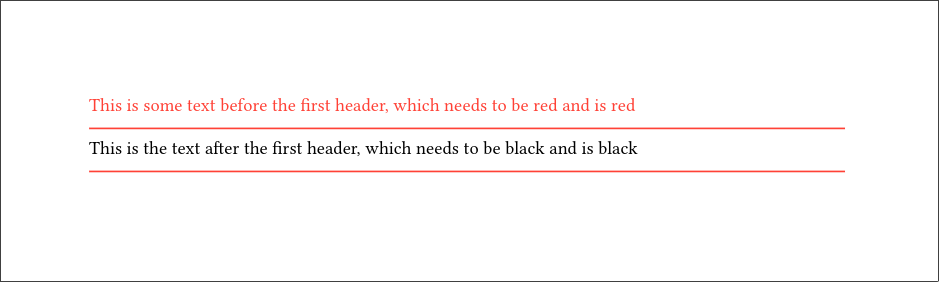
This is some text before the first header, which needs to be red and is red

==== This is the first header that needs to be red and is red

This is the text after the first header, which needs to be black and is black

==== This is the second header that also needs to be red but is black
It all works good and well, maybe even too good. I want the headings themselves to be a different style (in this case just red) but I couldn’t get the show rule for headings to override the show rule for paragraphs. I tried putting it before, after and inside to no avail.
The problem arises because you are stripping away the heading element when you use #text(it.body, ...). This makes the show rule return a par element, which matches with the other show rule. Simply keeping the entire heading, i.e. #text(it, ...) fixes the issue.
Changing it.body to just it causes the whole text to disappear for some reason. So having:
#let color-state = state("color", false)

#show heading: it => {
  set text(fill: red)
}

#show par: it => {
  context {
    let is-action = color-state.get()
    let txt-color = if is-action { black } else { red }
    set text(fill: txt-color)


    block(
      text(it.body)
    )
  }
}

#show heading.where(level: 4): it => block[
  #text(it, size: 1.3em, fill: red, weight: "light")
  #v(-0.5em)
  #line(length: 100%, stroke: 1pt + red)

  #color-state.update(true)
]

This is some text before the first header, which needs to be red and is red

==== This is the first header that needs to be red and is red

This is the text after the first header, which needs to be black and is black

==== This is the second header that also needs to be red but is black
There is a discussion going on about resetting/revoking styles (which then can be used to override existing styles), but seems to be a rather complicated topic, as the goal is to get a general solution.
I did some more screwing around and with a combination of your suggestions I managed to get the test to work, but when I apply it to my real use case I have another issue. I have another show rule at the top level of the document which looks like this:
I want only a section of the document to be effected by the rules I made (which is determined by cmarker and html tags). So I have something like this:
#let stat-block = (attrs, body) => {
  let beige = rgb("#BDB1B1")
  let gray = rgb("#555555")

  block(
    stroke: 2pt + beige,
    radius: 10pt,
    inset: 0.5em,
    breakable: false
  )[
    #let color-state = state("color", false)

    #show par: it => {
      context {
        let is-action = color-state.at(it.location())
        let txt-color = if is-action { black } else { red }

        set text(fill: txt-color)

        it
      }
    }

    #show heading.where(level: 3): it => block[
      #color-state.update(false)

      #set text(size: 1.9em, fill: red)
      #it.body
      #v(-0.8em)
      #line(length: 100%, stroke: 1pt + red)
    ]


    #show heading.where(level: 4): it => block[
      #text(it, size: 1.3em, fill: red, weight: "light")
      #v(-0.5em)
      #line(length: 100%, stroke: 1pt + red)

      #color-state.update(true)
    ]

    #body
  ]
}

#import "@preview/cmarker:0.1.10"

#let html-dict = (
  statblock: ("normal", (attrs, body) => stat-block(attrs, body))
)

#let text = read("input.md")

#cmarker.render(
  text,
  html: html-dict,
)
I have two options now, when I put it.body in the #text, the black rule is applied and when I put it the top rule is applied and I can’t change the size or weight (interestingly I can change the color still). I have no idea in what order the rules are applied or how I can change it, any help would be appreciated.
If I understood correctly, the problem is caused exactly by what I was describing with prioritising show-set rules over “raw” show rules, precisely because of this thing with more customisation later on. So re-writing the first show rule to be
#show heading.where(level: 4): set block(inset: (
  top: 0.5em,
  bottom: 0.3em
))
#show heading.where(level: 4): set text(size: 1.4em, weight: "bold")
#show heading.where(level: 4): set block(inset: (
  top: 0.5em,
  bottom: 0.3em
))
#show heading.where(level: 4): set text(size: 1.4em, weight: "bold")


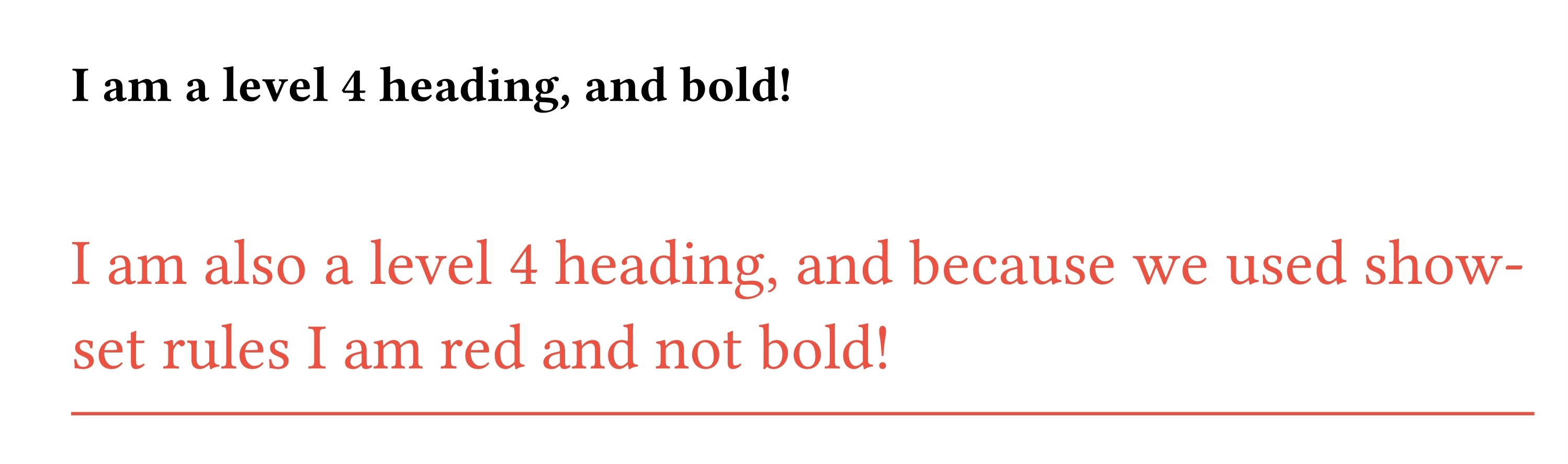
==== I am a level 4 heading, and bold!

#let color-state = state("color", false)

#show heading.where(level: 4): set text(size: 1.3em, fill: red, weight: "light")
#show heading.where(level: 4): set block(below: 0.7em)
#show heading.where(level: 4): it => {
  show divider: set line(length: 100%, stroke: 1pt + red)
  show divider: box.with(inset: (top: -1em))
  it + divider() + color-state.update(true)
}

==== I am also a level 4 heading, and because we used show-set rules I am red and not bold!