How to place content fixed on a page and the rest of the content below?

I want to place some content fixed on a page (in my case center+horizon) and then just continue with the rest of the content below it.

If I use

#set align(center + horizon)

Content 1

Content 2

The combination of Content 1 and 2 will be placed in the middle of the page. But I want Content 1 to be centered vertically (horizon) and then continue with the rest below it.

Do you mean that the alignment should only apply to Content 1? You can apply the function to the piece on content directly, like so

#align(center + horizon)[
  Content 1
]

Content 2

I tried that but it doesn’t work. Content 1 gets “pushed up” by the rest.

#set align(center)

#align(horizon, box(fill:green, width:80%, height:3cm)[Content 1])

#lorem(50)

I see, I didn’t realise that it interacted in this way. I don’t think this is “natively” supported by typst but you could pad the content manually:

#let force-center(content) = layout(container => [
  #let content-height = measure(content, width: container.width).height
  #let top-margin = if page.margin == auto {
    2.5 / 21 * calc.min(page.width, page.height)
  } else if type(page.margin) == relative {
    page.margin
  } else if page.margin.top == auto {
    2.5 / 21 * calc.min(page.width, page.height)
  } else {
    page.margin.top
  }
  // margin calculation inspired by:
  // https://forum.typst.app/t/how-to-draw-at-the-margin-of-a-page/1708/2
  #let offset = here().position().y - top-margin
  // the offset ensures that content is in the center even if the page is not empty
  
  #pad(
    top: (container.height - content-height) / 2 - offset,
    content
  )
])
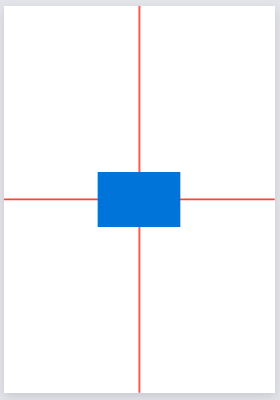
#force-center(box(fill:green, width:80%, height: 3cm)[Content 1])
I am below the box!
1 Like

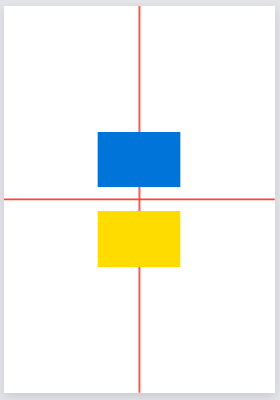
For anyone still confused, here’s a comparison:

Comparison output


Code
#set page(paper: "a8", margin: 0mm)

#context place(line(stroke: red, start: (page.width / 2, 0mm), end: (page.width / 2, page.height)))
#context place(line(stroke: red, start: (0mm, page.height / 2), end: (page.width, page.height / 2)))

// This is your code
#set align(center)
#align(horizon, rect(fill: blue))
#rect(fill: yellow)

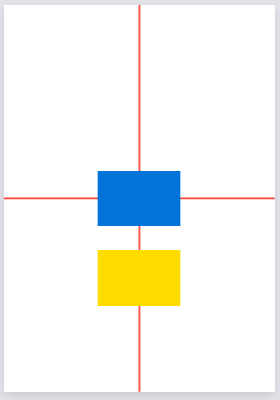
To recap what this is about, you’re is asking for a fixed blue rectangle that affects layout. So here’s possible code for that, using v instead of align(horizon):

Corrected output

Code
#set page(paper: "a8", margin: 0mm)

#context place(line(stroke: red, start: (page.width / 2, 0mm), end: (page.width / 2, page.height)))
#context place(line(stroke: red, start: (0mm, page.height / 2), end: (page.width, page.height / 2)))

#set align(center)
#context v(page.height / 2 - measure(rect(fill: blue)).height / 2)
#rect(fill: blue)
#rect(fill: yellow)

I only considered your specific use and assumed this would only be used on whole pages. A better approach to remedy both of these could probably be pad.

Even then, your margin is most likely not 0mm. I believe whatever margin you have would need to be added in all these approaches. By this stage, clearly a simpler solution exists? I seem to have been too late to reply!

1 Like

Technically only correct if the top and bottom margins are equal, but a simple solution is also a 3 row grid where the first is empty

#grid(
    rows: (1fr, auto, 1fr), 
    [],
    [Content 1],
    [Content 2]
)

This is very elegant, but note that if Content 2 is long it won’t break onto the next page, even if grid.cell.breakable is set to true (which seems like a bug?).

You are right that my solution errors out if the page margins are a dictionary, i’ve edited my answer accordingly. Whereas for behaviour, if Content 1 should be placed in the center of the margined area, my previous answer behaves as expected. If it should be placed in the center regardless of margins, we can get rid of the margin calculations altogether:

#let force-center(content) = layout(container => [
  #let content-height = measure(content, width: container.width).height
  #let offset = here().position().y
  // the offset ensures that content is in the center even if the page is not empty
  
  #pad(
    top: (page.height - content-height) / 2 - offset,
    content
  )
])