RaNiK
July 14, 2026, 3:24pm
1
Hi,
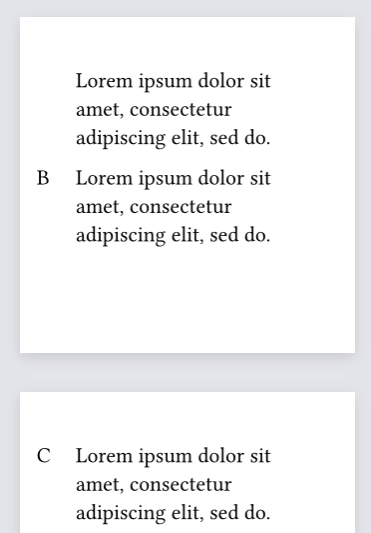
I use something like this :
#set page(width: 6cm, height: 6cm, margin: 1cm)

#let side(c) = place(dx: -0.7cm)[#c]

#lorem(10)

#side[B] #lorem(10)

#side[C] #lorem(10)
It goes right until an automatic pagebreak happen (if I add manual #pagebreak(), it’s ok, but not really satisfying…)
I took a look at How does one place content relative to the page margin? but it’s not really my use case.
Any ideas ?
You could wrap the current side function in a sticky block (and set the spacing appropriately):
#let side(c) = block(
  place(dx: -0.7cm, c),
  sticky: true,
  below: 0pt
)
RaNiK
July 24, 2026, 7:56am
3
That works great with paragraph, but not with heading.
#set page(width: 6cm, height: 6cm, margin: 1cm)

#let side(c) = block(
  place(dx: -0.7cm, c),
  sticky: true,
  below: 0pt
)

#side[B]
= Hello

#side[C] #lorem(10)
Any ideas of how to solve this ?
Headings are block level elements, and will naturally add a paragraph break after most elements. You can manually force it to be inlined by wrapping it in a box:
#box[= Hello]
And if you want every heading to be inlined, you can of course use a show rule:
#show heading: box