I am currently researching how to produce complex tables that take multiple pages. I am nearly there, but during a basic test I have noticed some problems with headers and footers. Please consider the following code and the result:
#set text(size: 4cm)
#set page(
  paper: "a4",
  margin: (top: 1.5cm,
           bottom: 1.5cm,
           left: 1.8cm,
           right: 1.5cm)
)

#v(178mm)

#table(
  columns: (0mm, 1fr),
  table.header(
    repeat: true,
    [],
    [Header],
  ),
  [],
  [Row],
  table.footer(
    repeat: false,
    [],
    [Footer],
  ),
)
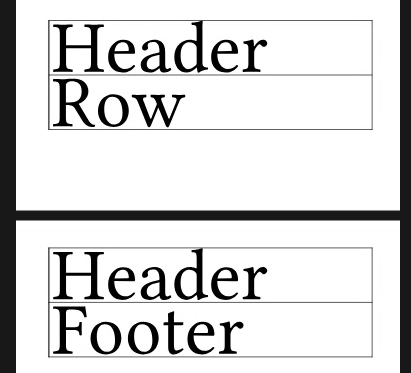
This outcome does not make any sense for my use case. I don’t want a footer or a header to appear on a page without a normal table row. That is, in this case I would like the three elements (header, row, footer) to a be a unbreakable block.
First question: How do I achieve that?
A few notes regarding the problem:
- This is typst 0.15.1
- I really need
repeat: truefor the header andrepeat: falsefor the footer - The column with width 0 has been inserted by intention; explanation below.
The problem seems to be related to the specific combination of the repeat properties. If I use repeat: true for both the header and the footer, the three rows (according to my research) are always part of an unbreakable block. Naturally, this is not a solution to my problem because I don’t want the footer to repeat on every page.
If I use repeat: false for both the header and the footer, the result in my case doesn’t make sense, too, because the footer is the first table element on the second page:
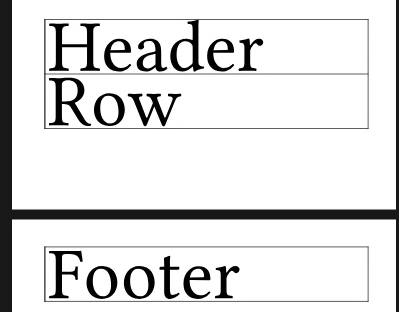
This raises the second question (which is more a side question): Why do the repeat properties change the outcome in that way? The three combinations of the header’s and the footer’s repeat property have lead to three different outputs. IMHO, the outputs should have been the same in this test case.
Then I tried to apply a common method to keep the footer together with the row. On this forum and elsewhere, people often have asked how to keep certain table rows together on the same page. The answer was the same every time:
Use an invisible column (e.g., a column with a width of 0mm), and row-span that column across the rows the should be kept together. I often do that, and it works like a charm with normal table rows. But in conjunction with headers and footers, it not only doesn’t work, but makes the situation worse (for brevity, the following code shows only the actual table and leaves away the rest):
// ... preamble left away

#table(
  columns: (0mm, 1fr),
  table.header(
    repeat: true,
    [],
    [Header],
  ),
  table.cell(rowspan: 2)[],
  [Row],
  table.footer(
    repeat: false,
    // [],
    [Footer],
  ),
)
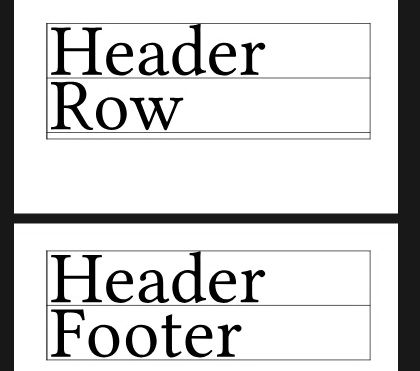
Now there is an additional row below the actual row. This additional row is nowhere in the source code. This may be a bug. If yes, please let me know so that I can file a bug report.
I now probably will replace the footer by a normal table row, thereby losing structural information that might be important for certain groups of people or for automated processing of the resulting PDF file.
This is acceptable to me because when I set repeat: true for the header, this seems to ensure that the first row is always in an unbreakable block with the header, which is what I want. When I then force (in addition) the last table row (that then takes the role of the footer) to be in an unbreakable block with the row before it (using the rowspan method), this should solve my problem.
However, I’d still like to know whether I have missed something and whether there is a better solution.