I ran into an issue in Typst when trying to use custom bold and italic styles for Chinese text at the same time. My template currently looks like this:
#show emph: it => {
    show regex("\p{script=Han}"): it => {
      text(font: "Kaiti SC", it)
  }
     text(style: "italic", it.body)
}

#show strong: it => {
    show regex("\p{Han}"): it => {
      text(font: "PingFang SC", it)
  }
     text(weight: "bold", it.body)
}
The problem is that these two styles overwrite each other, depending on which one is the outermost.
For example:
But when nesting them, only the outermost style survives.
I’ve searched online but couldn’t find a case that specifically deals with combining emph and strong for Chinese text. I also tried asking AI tools, but didn’t get a working solution.
My question is:
Is there a good way to make these styles combine rather than override each other?
For example, can I make strong override emph, or even better, allow both so that I can render bold italic for Chinese text?
Any help would be greatly appreciated—thanks a lot!
Thanks for your help! However, since the fonts I’m using are not OpenType, I need to assign different fonts to #emph and #strong. My original style setup was almost the same as yours except for the skew part.
#show emph: it => {
    show regex("\p{Han}"): set text(font: "TW-Kai")
    it
  }

#show strong: it => {
   show regex("\p{Han}"): set text(font: "PingFang SC")
    it
  }
The problem is that with non-OpenType fonts this leads to conflicting overrides.
This is not exactly the same, but maybe it could be used?
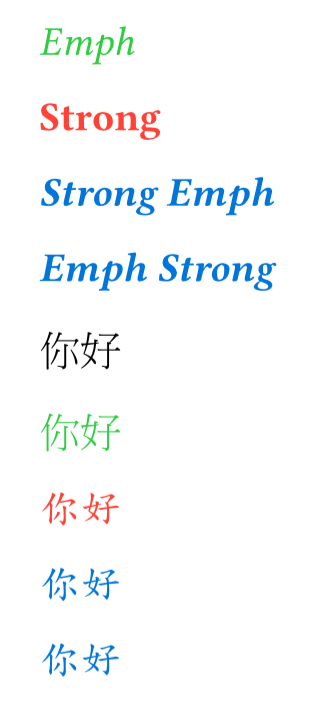
It shows that using set text() rules we can separate the four cases: emph, strong, strong(emph) and emph(strong). I don’t know if it’s sufficient, but if you can use the font’s covers options to set the font (instead of a regex rule), then you already have the separation of styles that you need.
Will not handle nested strong and nested emph
A style needs to be chosen for the combination of emphasis and strong. Pick a separate font for this case or other style tweak. We can’t of course apply two fonts at the same time, it has to be one or the other.
#let zhfont(x) = ((name: "Libertinus Serif", covers: "latin-in-cjk"), x)
#show strong: set text(red, font: zhfont("TW-MOE-Std-Kai"))
#show emph: set text(green, font: zhfont("MOESongUN"))

// Rules for both emph and strong
#show emph: it => {
  show strong: set text(blue, font: zhfont("TW-MOE-Std-Kai"))
  it
}
#show strong: it => {
  show emph: set text(blue, font: zhfont("TW-MOE-Std-Kai"))
  it
}

_Emph_

*Strong*

*_Strong Emph_*

_*Emph Strong*_

你好

_你好_

*你好*

*_你好_*

_*你好*_
(Note: my font selection was entirely random, just something that seemed to exist in the webapp. Happy to hear better suggestions.)
Thank you! Can I understand this solution as essentially defining a bolditalic style?
For the Chinese typesetting part, it indeed solves the problem I originally raised. But in my usual workflow I often mix Chinese and English text, and this solution changes the appearance of English text as well. That’s why I think using the regex rule is still necessary:
#let font = (
  main: "Times New Roman",
  sans: "Helvetia Neue",
  cjk: "Noto Serif CJK SC",
  cjk-sans: "Noto Sans CJK SC",
  emph-cjk: "TW-Kai",
)

#set text(font: ((name: font.main, covers: "latin-in-cjk"), font.cjk))
---

_你好 Hello_

*你好 Hello*

_*你好 Hello*_

*_你好 Hello_*

---
#show strong: set text(red, font: font.cjk-sans)
#show emph: set text(green, font: font.emph-cjk)

#show emph: it => {
  show strong: set text(fill: blue, font: font.cjk-sans)
  it
}

#show strong: it => {
  show emph: set text(fill: blue, font: font.cjk-sans)
  it
}

_你好 Hello_

*你好 Hello*

_*你好 Hello*_
That’s because your example does not use the two font options where one of them uses covers, like my example does. That explains the difference. In the code in my example - just an example - the function zhfont helps set two font options for each style, with one for latin text and one for cjk.
Note that the font covers option either uses the option “latin-in-cjk” or a limited regex rule. You could move your specific regex logic there and see if it works exactly for you.
Thank you for your patience, again. What I mean is that I only need to specify the emph / strong / emph + strong font styles for CJK text, without explicitly setting the corresponding styles for English text.
In your example, English text is explicitly assigned to Libertinus Serif. But suppose I use another English font like Helvetica in a different paragraph—then all the strong/emph in that paragraph would still be forced into Libertinus Serif, which is not the result I want.
What I’m looking for is something similar to my familiar LaTeX config:
\setmainfont{Times New Roman}
\setsansfont{Helvetica}
\setCJKmainfont[ItalicFont=TW-Kai, BoldFont=Noto Sans CJK SC, BoldItalicFont=Noto Sans CJK SC]{Noto Serif CJK SC}
That way, only the CJK fonts are customized, while English fonts follow the main/sans font settings.
That’s fine. I think I’ve just focused on the first technical hurdle - making it possible, so we demonstrated it’s possible to configure the “four styles” separately. We can close that part now, that’s done.
Your next question is then, how to make the configuration interface nicer, maybe inspired by how this latex package works.