How to prevent top and bottom borders in a table from extending in horizontal direction when increasing their thickness?

I have a table where the vertical borders of each cell are 1pt thick (..., stroke: (left: 1pt, right: 1pt), ...). For the header cells, I’d like have have a top and a bottom border that is 4pt thick (..., stroke: (top: 4pt, bottom: 4pt), ...).

This is easy to achieve, but the result is not satisfying:
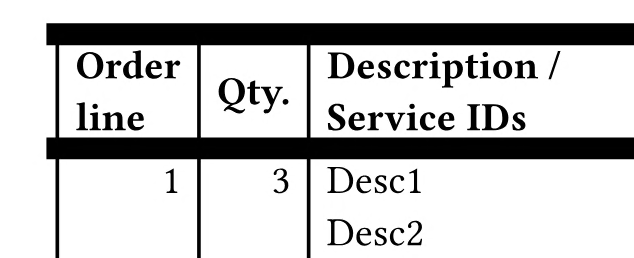


As we can see, the horizontal borders in the header are too wide. It seems that their vertical thickness is added to their horizontal extent at the left and the right side (the picture only shows the left side).

Is there a way to prevent this?

What I already have tried (without success):

I have looked into the cap property of stroke and have used the value "square" instead of the default value "butt" for it. This made the situation worse; the horizontal lines became even wider.

I also have tried to use table.vline and table.hline instead of styling the cells. However, I had exactly the same problem with them.

Possibly using gutter could help here, but I didn’t try. If possible, I’d like to avoid it.

I also could imagine a possible solution that works by putting each cell’s content into a box, placing the box in the respective cell, and applying horizontal borders (top, bottom) to the box and vertical borders to the table cell. I didn’t try that, though, because it would be quite ugly.
To my understanding, this is covered by Table border ends (caps) wrongly positioned · Issue #8671 · typst/typst · GitHub, see the second image there for "butt". This is the default cap which, as mentioned, you used. The change proposed there seems to eliminate that horizontal extent you noticed.

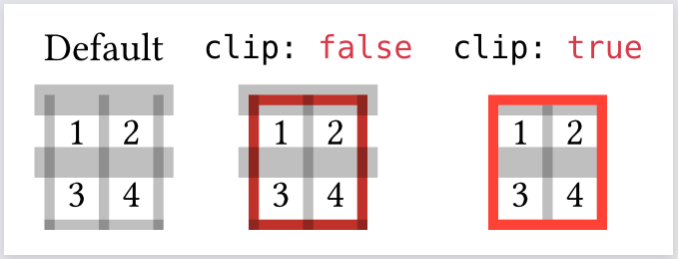
A workaround I can think of uses block.clip, however now the top and bottom edges are clipped:

Code
#set table(stroke: (thickness: 1mm, paint: luma(0%, 25%)))
#set table.hline(stroke: 3mm)

#let sample-table = table(
  columns: 2,
  rows: 2,
  align: center + horizon,
  table.hline(),
  [1], [2],
  table.hline(),
  [3], [4],
)

#grid(
  columns: 3,
  inset: 0.5em,
  align: center,
  [Default],
  raw(lang: "typc", "clip: false"),
  raw(lang: "typc", "clip: true"),
  sample-table,
  block(
    stroke: 1mm + red,
    clip: false,
    sample-table,
  ),
  block(
    stroke: 1mm + red,
    clip: true,
    sample-table,
  ),
)
2 Likes

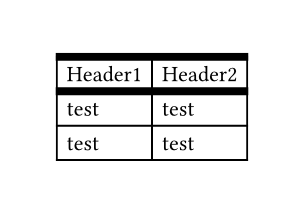
The issue #4416 has a bit more discussion and a similar workaround as suggested by @hpcfzl but with outset to keep the full width of the strokes on the outer stroke lines.

Unfortunately a general and automated workaround is a bit complicated, but doing it manually is quite simple:

#show table: set block(clip: true, outset: (top: 4pt/2, rest: 1pt/2))
#table(
  columns: 2,
  stroke: (left: 1pt, right: 1pt),
  table.hline(stroke: 4pt),
  table.header([Header1],[Header2]),
  table.hline(stroke: 4pt),
  [test], [test],
  [test], [test],
)

3 Likes

@hpcfzl

Thank you very much! I had forgotten about block.clip in the meantime.

@flokl

Thank you very much for providing a working solution. I guess it will be some work to adapt it to my situation, because the table contains a lot of non-trivial code already and in addition must automatically be generated by a backend. But the approach is great. If I fail, I’ll write a new question.