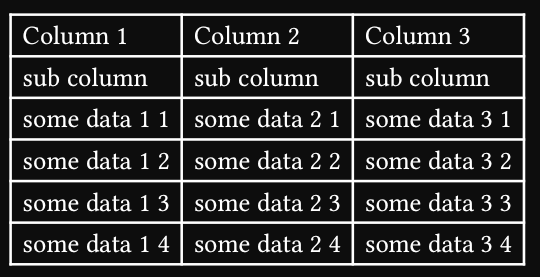
Hi, I have a large table (in .xlsx format) that I am importing into typst using pandoc.
I would like to set some of the rows as subheaders. I tried the following (for the third row) but none of them work:
#show table.cell:it=>{
if it.y==2{
table.header(level:1, it)
}else{
it
}
} // doesn't work
#show table.cell.where(y: 2): it => table.header(level:1, it) //doesn't work
#show table.cell.where(y: 2): set table.header(level:2) //doesn't work
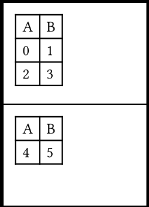
I think a show rule on table.cell is run too late to change the structure of the table. You could do something like this with a #show table: it => ..., to transform the table into a new one. Here’s an example that converts the first row to a header:
#show table: it => {
  let (children, ..rest) = it.fields()
  if it.at("label", default: none) == <processed> {
    // Already processed, avoid recursion
    return it
  }
  let n = rest.columns
  if type(n) == array {
    n = n.len()
  }
  let tbl = table(
    ..rest,
    table.header(..children.slice(0, n)),
    ..children.slice(n),
  )
  [#tbl<processed>]
}

#set page("a10", flipped: true)

#table(
  columns: 2,
  [A], [B],
  ..range(6).map(str),
)
Hi. You can use rexllent – Typst Universe or spreet – Typst Universe for parsing and then just process the cell matrix with conditional table.header insertion/wrapping. You are overcomplicating this.
#let data = {
  data
    .enumerate(start: 1)
    .map(((n, row)) => if n <= 2 { table.header(row) } else { row })
}

#table(
  columns: data.first().len(),
  ..data.flatten(),
)
does work, but adjacent header row groups are repeated separately, instead of all at once. The documentation doesn’t make it clear that you can have non-header rows in between.
This is the same logic that you’ve used in the OP. You have to be able to identify the header rows in order to mark them as such. The identification process wasn’t provided, other than “3rd row is header level 1 or 2.”