How to properly create an outlined heading with an external link for HTML?

Is it possible to create a heading that meets all three requirements below?

  1. Clicking the heading in #outline should jump to the section.
  2. Clicking the heading in the section should go to https://example.com.
  3. The generated HTML is valid.

For example, the following is acceptable.

<nav>
  <h2>Contents</h2>
  <ol>
    <li><a href="#heading">Heading</a></li>
  </ol>
</nav>
<h2 id="heading"><a href="https://example.com">Heading</a></h2>

My Failed Attempts

Link in Heading

#outline()

= #link("https://example.com")[Link in Heading] <heading>

This is the most intuitive approach, but unfortunately it does not meet 1. There’re two nested <a> in #outline, and clicking it will go to the inner one.

<nav role="doc-toc">
  <h2>Contents</h2>
  <ol style="list-style-type: none">
    <li><a href="#heading"><a href="https://example.com">Link in Heading</a></a></li>
  </ol>
</nav>
<h2 id="heading"><a href="https://example.com">Link in Heading</a></h2>

Heading in Link

#outline()

#link("https://example.com")[#[= Heading in Link] <heading>]

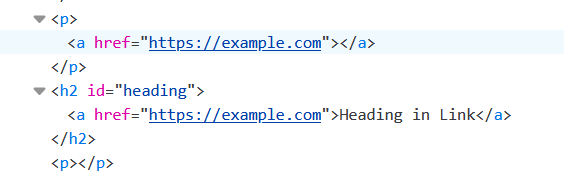
This satisfies 1 and 2, but not 3, because <h2> is wrapped in a <p>.

<nav role="doc-toc">
  <h2>Contents</h2>
  <ol style="list-style-type: none">
    <li><a href="#heading">Heading in Link</a></li>
  </ol>
</nav>
<p><a href="https://example.com"><h2 id="heading">Heading in Link</h2></a></p>

In my browser (Firefox 147), the invalid HTML results in an empty <a> and two additional <p>s.


So is it possible in Typst 0.14.2? Should it be considered as a bug?
Partial answers are also welcomed. Thanks in advance.

It’s possible, but it’s not as native as the first approach. I have no idea which API would be best and unambiguous.

#outline()

#show <heading>: it => {
  show text: link.with("https://example.com")
  it
}

= Heading <heading>
Output
<!DOCTYPE html>
<html>
  <head>
    <meta charset="utf-8">
    <meta name="viewport" content="width=device-width, initial-scale=1">
  </head>
  <body>
    <nav role="doc-toc">
      <h2>Contents</h2>
      <ol style="list-style-type: none">
        <li><a href="#heading">Heading</a></li>
      </ol>
    </nav>
    <h2 id="heading"><a href="https://example.com">Heading</a></h2>
  </body>
</html>

A general way with a nice wrapper:

#outline()

#let apply-heading-links(heading-links, doc) = {
  for (label, url) in heading-links {
    doc = {
      show label: it => {
        show text: link.with(url)
        it
      }
      doc
    }
  }
  doc
}

#show: apply-heading-links.with((
  (<a>, "https://example.org"),
  (<duck>, "https://duckduckgo.com"),
))

= Example <a>
= DuckDuckGo <duck>
Output
<!DOCTYPE html>
<html>
  <head>
    <meta charset="utf-8">
    <meta name="viewport" content="width=device-width, initial-scale=1">
  </head>
  <body>
    <nav role="doc-toc">
      <h2>Contents</h2>
      <ol style="list-style-type: none">
        <li><a href="#a">Example</a></li>
        <li><a href="#duck">DuckDuckGo</a></li>
      </ol>
    </nav>
    <h2 id="a"><a href="https://example.org">Example</a></h2>
    <h2 id="duck"><a href="https://duckduckgo.com">DuckDuckGo</a></h2>
  </body>
</html>

P.S. Cool that show text does in fact work like a catch-all string/regex.

1 Like

I would probably do something like this: Short figure caption for outline · Issue #1295 · typst/typst · GitHub and create a function that abstracts over the link/no link options.

1 Like

Thank you both!

In my case, I find that hacking links in #outline is more practical.

#show outline: body => {
  show link: it => if type(it.dest) == str {
    // Remove external links
    it.body
  } else {
    it
  }
  body
}
#outline()

= #link("https://example.com")[Link in Heading] <heading>
<nav role="doc-toc">
  <h2>Contents</h2>
  <ol style="list-style-type: none">
    <li><a href="#heading">Heading in Link</a></li>
  </ol>
</nav>
<h2 id="heading"><a href="https://example.com">Link in Heading</a></h2>

Then do you think an issue needs to be created?

1 Like

I think the 2 current native ways pretty much do what you tell it, therefore this external link use case needs something else. So a feature request to support this kind of setup natively, because you can’t do that without hacking.

1 Like

Doesn’t seem that hacky to me. It expresses what you want: No external links in the outline. Semantically it’s not perfect, but with a replacing selector it would be fine.

Regarding opening an issue: The current behavior seems correct to me. And I don’t really see what to add to the language here. The show rule you wrote uses existing composable mechanism to do precisely what you want.

I think it’s hacky because it’s a show-function rule. I won’t be able to revert it without introducing extra complexity. For example, the outline might link to an appendix that lives in another html page.

Well, to some extent, I agree as well.
In the example below, link (Antigravity) is only a part of the heading. Perhaps the link should be kept in outline. If so, then it will be quite confusing that deleting The Essense of would cause the link to disappear…

= The Essence of #link("https://example.com")[Antigravity]