How to recreate embellished implication arrows?

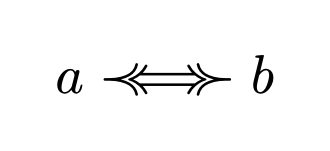
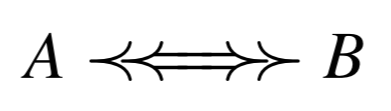
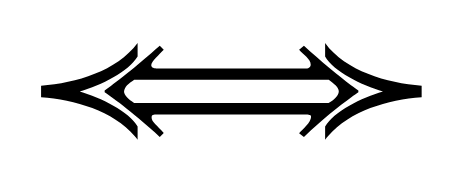
Hi, I’m trying to recreate these embellished implication/equivalence arrows,


my current approach is this:

#let equiv = math.class(
  "relation",
  $prec #h(-1.2mm) arrow.r.l.double.long #h(-1.2mm) succ$
)

which leaves a lot to be desired:


Any help would be greatly appreciated!

Which font are you using? Mine looks better than your example.

#let equiv = math.class(
  "relation",
  $prec #h(-1.2mm) arrow.r.l.double.long #h(-1.2mm) succ$
)

$ a equiv b $

Though I would still say this is not as good as the example you gave.

I forgot I was using XITS Math, it does indeed look a lot better with the default font, thanks!

1 Like

Out of curiosity, are you able to link to the reference where you got your example? Since this symbol isn’t defined in the unicode standard (at least not in the arrows range 2190–21FF nor any of the supplemental arrows ranges 27F0–27FF, 2900–297F, 1F800–1F8FF), it might be useful to look more closely how the reference implements this

The reference image is a screenshot from the book Gödel’s Theorems and Zermelo’s Axioms in case that’s of any help, but I don’t have any details on how it was accomplished there. During a very brief search I also didn’t find any latex package providing arrows like this.
In case it’s of any help, selecting and copying the arrow in the pdf yields Î===Ï.

Thanks! It seems that the way this is implemented inside the PDF is with the symbols ⪻===⪼ (the arrow heads are prec.double and succ.double respectively), and Î===Ï is due to an encoding bug.

The font seems to be TeX mathb, but sadly the font’s format is antiquated and incompatible with typst. I tried some online converters, but they did not work for me. Maybe you’ll be luckier. With the default font, it looks kind of ugly:

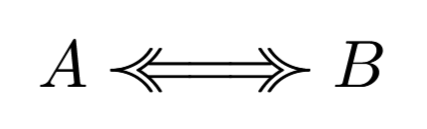
In LaTeX however, we get identical results to your reference:

\documentclass{article}
\usepackage[mathb]{mathabx}

\newcommand{\curlyiff}{%
  \mathrel{\llcurly\mkern-6mu=\mkern-3mu=\mkern-3mu=\mkern-6mu\ggcurly}%
}

\begin{document}
\( A \curlyiff B \)
\end{document}

So, if you figure out a way to get the font to work you should be able to implement the arrow in typst.

3 Likes

Thanks, that was incredibly helpful, I managed to convert enough of the font to otf by going off the type 1 version and using fontforge.

In case anyone else ever needs this for some reason, I’ve uploaded the results of this conversion here, and here’s a minimal example for the arrow in typst:

#let llcurly = text(font: "TeX mathb10")[\u{00CE}]
#let rrcurly = text(font: "TeX mathb10")[\u{00CF}]

#let equiv = math.class(
  "relation",
  $llcurly #h(-1.2mm) = #h(-1.2mm) = #h(-1.2mm) = #h(-1.2mm) rrcurly$
)

$ a equiv b $

Making sure typst can find the font files

typst compile --font-path /path/to/mathabx_files test.typ

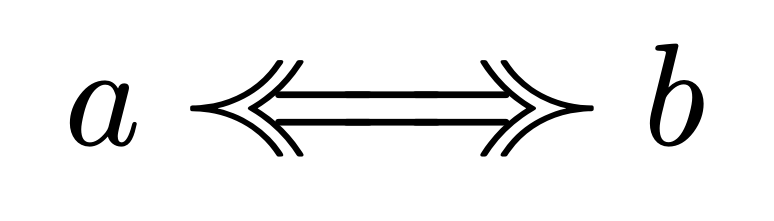
gives this result:


which looks spot on.

Thanks again for your help!

2 Likes

Well done. You may want to change a bit the definition of equiv to use relative sizes (em units) so it still works in different font sizes.

1 Like