How to reference another equation in math mode?

How do I include a reference inside an equation?

Say I have

#set math.equation(numbering: "1.")
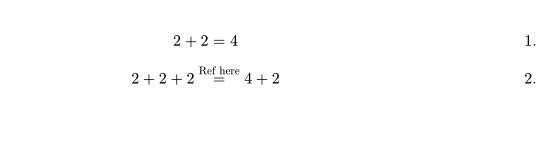
$ 2 + 2 = 4 $ <lemma> 

$ 2 + 2 + 2 =^"Ref here" 4 + 2 $

How do I replace "Ref here" with a reference to the lemma? The @lemma syntax doesn’t appear to work in math mode and when I try ref("lemma") I get error: unknown variable: ref. Same with link.

In Math mode, you can use #[] instead, for example

#set math.equation(numbering: "1.")

$ 2 + 2 = 4 $ <lemma>

$ 2 + 2 + 2 =^(#[@lemma]) 4 + 2 $

Adding to what @Chern already brought up.

The parentheses aren’t mandatory:

$ 2 + 2 + 2 =^#[@lemma] 4 + 2 $

Consider also changing the supplement argument to take up less space:

$ 2 + 2 + 2 =^#ref(supplement: "Eq", <lemma>) 4 + 2 $

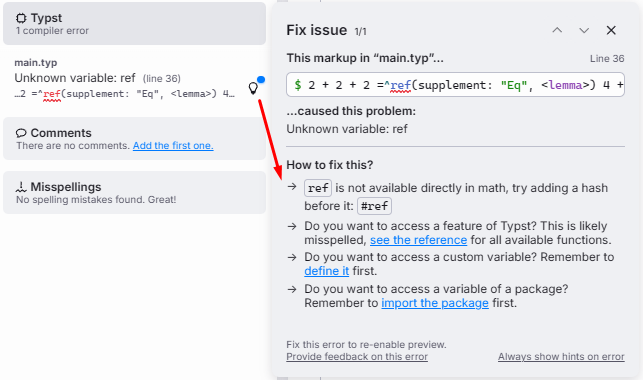
Depending on how you’re using Typst, a How to fix this? message should appear which would resolve this issue:

2 Likes

This works, thank you both!

I went with =^#[(#ref(supplement: none, <eq:monotonicity>))] and set math.equation(numbering: "(1)") to get references like “(1).”

I am using the built-in compiler and indeed upon further inspection of the output:

= hint: `ref` is not available directly in math, try adding a hash before it: #ref

Is there any logic to when # should be used? I have always thought of math mode as being similar to the {} environments i.e. # is redundant and wrong.

For functions, symbols, etc. in the math module (see Math – Typst Documentation), you can typically write them directly without the # prefix unless specifically required. For example:

$ lim_x = op("lim", limits: #true)_x $

Here, true requires the # prefix, but lim, op do not.


If you don’t need a supplement , you can write it more concisely as @some-label[] (but in math mode, use #[@some-label[]] instead); To change the supplement for all equations, you can use like:

#set math.equation(numbering: "(1)", supplement: "Eq")

Edit:

If you use

#set math.equation(numbering: "(1)")

then @some-label[] will only output the equation number (e.g., “1”) without the parentheses. You can use the following intead

#set math.equation(
  numbering: (..nums) => (numbering("(1)", ..nums))
)

If you want the equation.number to depend on other counters, such as heading, you can write code similar to the following:

#set math.equation(numbering: (..nums) => {
  let counter = counter(heading).at(here())
  numbering("(1.1)", counter.at(0), ..nums)
})
3 Likes

Don’t forget to add summary to the details tag, or use a native details block with summary string.