I have defined a frame environment and want to reference the counter in the title of the frame but it gives me an error as the counter is context. Is there a way to get around this?
My current version is below. Basically everything works but if I enter a label my frame it tells me it cant reference context.
#let frame(content, counter: none, title: none, fill-body: none, fill-header: none, radius: 0.2em, color: default-color,type : none,label:none) = {

  // Automatically increment frame counter
let displayed-counter = none

if type == "Lemma" {
  lemma-counter.step()
  displayed-counter = if counter == none {
    context lemma-counter.display()
    color = gray
  } else {
    counter
  }

} else if type == "Definition" {
  definition-frame-counter.step()
  displayed-counter = if counter == none {
    context definition-frame-counter.display()

    color= green
  } else {
    counter
  }

} else if type == none {
  displayed-counter = if counter == none {
    context definition-frame-counter.display()
  } else {
    counter
  }
}

  let header = none

  if fill-header == none and fill-body == none {
    fill-header = color.lighten(75%)
    fill-body = color.lighten(85%)
  }
  else if fill-header == none {
    fill-header = fill-body.darken(10%)
  }
  else if fill-body == none {
    fill-body = fill-header.lighten(50%)
  }

  if radius == none {
    radius = 0pt
  }


  if title == none {
    header = [*#type #displayed-counter#label*]
  } else {
    header = [*#type #displayed-counter#label
    * #title]
  }

  show stack: set block(breakable: false, above: 0.8em, below: 0.5em)

  stack(
    block(
      width: 100%,
      inset: (x: 0.4em, top: 0.35em, bottom: 0.45em),
      fill: fill-header,
      radius: (top: radius, bottom: 0cm),
      header,
    ),
    block(
      width: 100%,
      inset: (x: 0.4em, top: 0.35em, bottom: 1em),
      fill: fill-body,
      radius: (top: 0cm, bottom: radius),
      content,

    ),
    v(0.21cm)
  )
}
Write a custom show-rule to be able to reference metadata.
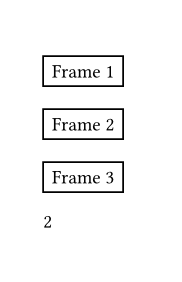
It is never possible to reference context, but it is possible to reference metadata if you have a custom show ref: rule. You can store the rendered counter inside metadata, and attach the label to the metadata. This will then give the error that you “cant reference metadata”, but that is not completely true. You can write a custom show ref: rule which handles this case and it will be fine.
#let my-counter = counter("my-counter")

#let frame(label: none) = {
  my-counter.step()
  context {
    let displayed-counter = my-counter.display()

    // here, it is important that the `metadata` is inside the `context` block
    [#metadata((frame-counter: displayed-counter))#label]

    rect([Frame #displayed-counter])
  }
}

#show ref: it => {
  if it.element != none and it.element.func() == metadata and "frame-counter" in it.element.value {
    it.element.value.frame-counter
  } else {
    it
  }
}

#frame()

#frame(label: <foo>)

#frame()

@foo
Both of these code examples produce the following output:
My apologies, as this was my first time posting, I was unaware - I will be doing better next time. As my question has been solved be the other comment I will just let it be as is for now.